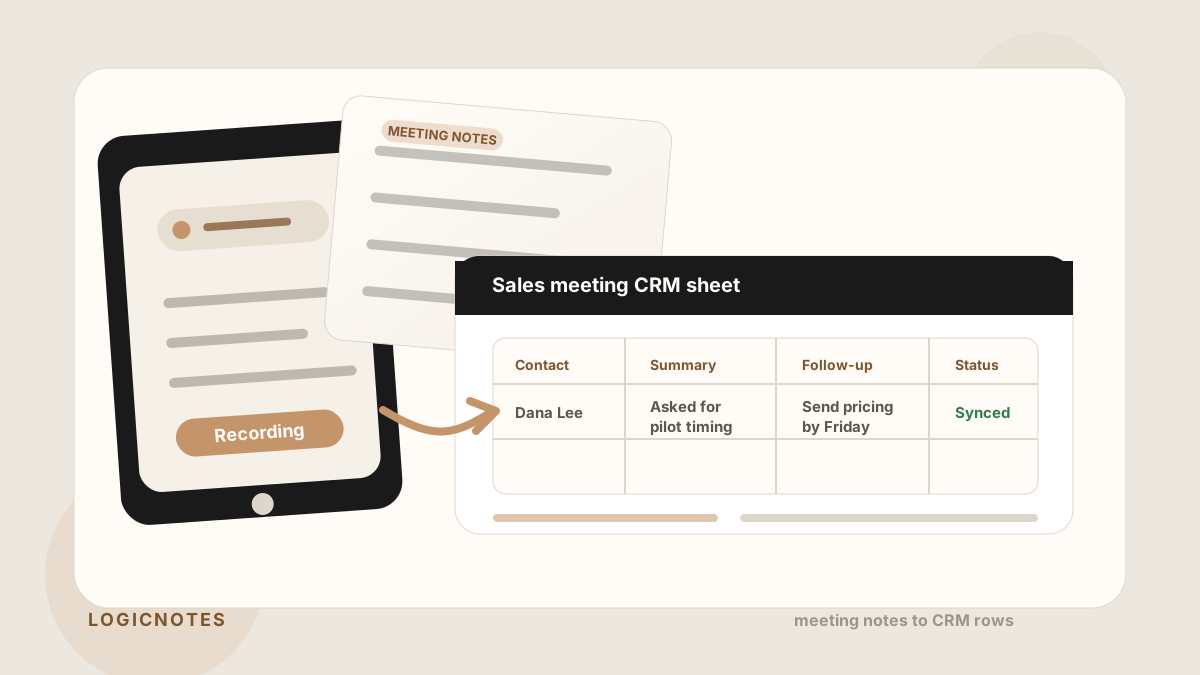
A Google Sheet can work as a CRM when the sales process is still simple. The problem is that most sales spreadsheets slowly become a dumping ground: contact names in one tab, meeting notes in another, follow-ups in someone's head, and no clear next step.
For sales people, the sheet only becomes useful when every meeting turns into a clean row: who you met, what they cared about, what was promised, who owns the next step, and whether the CRM or pipeline has been updated.
If Google Sheets sits inside a field sales app, outside sales app, or workflow, it needs more than a blank tab. The sheet has to connect route planning, visit tracking, meeting notes, CRM field maps, after-sync hygienes, follow-up tasks, Salesforce, HubSpot, and CRM sync without becoming a second messy system of record.
The difference between a useful Google Sheets CRM and a messy spreadsheet is the handoff from meeting notes to structured follow-up.
Quick Answer: What Google Sheets CRM Template Do Sales Teams Need?
The best Google Sheets CRM template for sales meeting notes captures each meeting as a structured row with account or contact, meeting date, meeting type, short summary, objection, promised follow-up, owner, due date, priority, sync status, CRM field map, sync status, and the source meeting that created the row.
- If rows are too vague: prioritize buyer context, meeting outcome, objection, next step, promised follow-up, and the customer reason behind the task.
- If follow-up falls through: prioritize task owner, due date, priority, last updated date, sync status, and whether the action was completed or still needs CRM handoff.
- If Sheets becomes a second messy CRM: prioritize CRM destination, Salesforce or HubSpot record match, sync status, blocked updates, and missing fields.
Why Sales People Use Google Sheets as a Lightweight CRM
Google Sheets is fast, familiar, and easy to share. A small sales team can start tracking accounts without waiting for a CRM rollout, a custom pipeline setup, or a sales operations project.
That flexibility is the appeal. A sheet can hold early prospects, conference leads, field meeting notes, partner conversations, and follow-up status in one place. Everyone can see the same pipeline, sort it, filter it, and make quick updates. CRM vendors also publish spreadsheet templates because a simple sheet can be a practical bridge before a team needs heavier CRM workflows.
If Sheets is part of a rep's broader phone workflow, it should still fit the field sales app stack: plan the day, capture the meeting, review the useful details, sync the safe fields, and make the next action visible.
The risk is that flexibility turns into inconsistency. If every sales person writes notes differently, the sheet stops being a CRM and becomes a shared scratchpad.
Where Most Google Sheets CRMs Break Down
Most spreadsheet CRMs do not fail because the columns are wrong. They fail because the post-meeting workflow is weak.
A sales person leaves an in-person meeting with useful context: budget concern, buyer name, timing, next step, promised follow-up, and maybe a competitor mention. If that context is typed in later from memory, the row becomes vague. The sheet says "follow up" but does not say why, with whom, or by when.
- Too many free-text notes. Useful details disappear inside long cells nobody reads.
- No owner field. The next step exists, but nobody clearly owns it.
- No due date. Follow-up becomes a good intention instead of a sales task.
- No CRM or sync status. Nobody knows whether the meeting made it into the actual system of record or still needs review.
- No meeting origin. The sheet shows a row, but not what happened in the customer conversation.
- No mobile habit. Field reps plan to update the sheet later, then lose the details between customer visits.
Best Google Sheets CRM Layout by Sales Use Case
The best spreadsheet CRM layout depends on the work the sheet is supposed to support. A field rep visit tracker, conference lead sheet, and manager pipeline review should not all use the same row design.
| Use case | Best sheet layout | Fields that matter most |
|---|---|---|
| Field sales visits | One row per customer visit, linked to the route stop and account. | Visit date, contact, meeting summary, follow-up promised, owner, due date, CRM status. |
| Conference or event leads | One row per conversation with lead source, booth/event name, and promised follow-up. | Lead source, company, role, interest level, promised asset, owner, follow-up date. |
| Manager pipeline review | A filtered active-pipeline view that hides long notes and shows next actions. | Stage, next step, owner, due date, blocker, last meeting date, last updated date. |
| Sales call reports | One row per call report with outcome, action items, and CRM-ready update status. | Outcome, objection, buying signal, follow-up task, owner, due date, CRM status. |
| CRM handoff queue | A temporary after-sync hygiene for notes that still need to be synced, cleaned, or assigned. | Record match, task owner, due date, sync status, missing field, review owner. |
For the task side of the handoff, use the same structure from the sales meeting notes to CRM tasks workflow: owner, verb, deliverable, due date, related record, and a short note about why the follow-up exists.
The Columns Every Sales Meeting Notes Sheet Needs
Keep the sheet simple enough that sales people will actually use it. The goal is not to recreate Salesforce in a spreadsheet. The goal is to capture the fields that make follow-up and pipeline review easier.
| Column | What to capture | Why it matters |
|---|---|---|
| Contact / Company | Who the meeting was with. | The row needs to map back to a real account or person. |
| Meeting Date | When the conversation happened. | Fresh meetings should drive the next action first. |
| Meeting Type | Field visit, discovery, conference lead, renewal, partner meeting, or support follow-up. | Different meeting types create different follow-up tasks and review expectations. |
| Summary | Two to four lines on what mattered. | Managers need context without reading a transcript. |
| Objections | Pricing, timing, competitor, security, budget, or fit concerns. | Objections explain why a deal is moving or stuck. |
| Follow-up Promised | The exact promise made in the meeting. | Specific promises are easier to fulfill than vague reminders. |
| Owner | Who needs to act next. | A row without an owner is not a task. |
| Due Date | When the next action should happen. | Follow-up speed changes how professional the sales process feels. |
| CRM / Sync Status | Not synced, synced, queued, needs review, missing field, or no action. | The sheet should not drift away from the CRM or hide rows that still need attention. |
| Priority | High, medium, low, or blocked. | Reps and managers can sort urgent customer promises before low-value cleanup. |
| Next Step | The actual sales motion from here. | Pipeline reviews need the move, not just the memory. |
| Last Updated | When the row was last touched after a meeting or follow-up. | Stale rows are easy to spot before pipeline review. |
Google Sheets CRM Field Map for Sales Notes
A Google Sheets CRM needs just enough structure to make sales notes searchable and follow-up visible. The best CRM field map keeps free-text notes short while giving reps and managers sortable columns for ownership, timing, sync status, and CRM handoff.
| Sheet field | Why it matters | CRM handoff use |
|---|---|---|
| Account and contact | Ties the row to the customer, stakeholder, company, and active opportunity. | Maps to Salesforce account or opportunity, HubSpot company or deal, or a contact row. |
| Meeting or visit type | Separates discovery calls, field visits, route check-ins, event leads, renewals, and follow-up meetings. | Maps to activity type, lead source, visit report, or manager dashboard category. |
| Summary and buyer signal | Preserves what changed in the conversation without burying the row in transcript-length text. | Maps to CRM note, opportunity note, company timeline, or account history. |
| Follow-up promised | Turns the meeting into a clear customer commitment instead of a vague reminder. | Maps to CRM task, next step, follow-up queue, or customer recap draft. |
| Owner and due date | Shows who owns the next step and when it needs to happen. | Maps to task owner, due date, reminder, or manager review filter. |
| CRM status | Shows whether the row is a temporary tracker, already synced, or still needs review. | Maps to synced, queued, needs review, missing field, no-action status, or manager after-sync hygiene. |
Google Sheets Hygiene After Auto-Sync
Modern AI note tools, including LogicNotes, sync meeting note rows to the CRM automatically. There is no approval screen between the meeting and the record, and that is the point: the rep stays out of data entry. The trust layer moves into the CRM itself, as a quick after-sync habit instead of a pre-sync gate.
After a synced note lands, a two-minute pass covers what matters: confirm the note attached to the right account or contact, make sure the next step exists as a real task with a date, and fix anything that looks off by editing the note or task directly in Salesforce, HubSpot, Zoho CRM, Dynamics 365, or Google Sheets. Edits made in the CRM are visible to managers and teammates right away, so the record stays trustworthy without slowing down the field day.
A Simple Google Sheets CRM Template
If you are starting from scratch, keep one tab for active sales meetings and one tab for archived or closed conversations. Too many tabs create the same problem as too many tools.
Recommended sheet structure
Tab 1: Active meetings. All open prospects, recent meetings, promised follow-ups, owners, due dates, and CRM status.
Tab 2: Open follow-ups. A filtered view of rows where the owner, due date, or CRM status still needs action.
Tab 3: After-sync hygiene. Rows with missing account matches, vague follow-up tasks, pipeline field changes, or sync exceptions.
Tab 4: Closed or archived. Conversations that no longer need active follow-up.
Tab 5: Reference fields. Dropdown values for stage, CRM status, sync status, meeting type, lead source, and priority.
How to Keep the Sheet Updated After Every Meeting
The workflow matters more than the template. A clean sheet that nobody updates is still a stale CRM.
- Capture the meeting while it is fresh. Do not wait until the end of the day to reconstruct the details.
- Turn the conversation into fields. Summary, objections, owner, due date, and next step should be separate.
- Create one task row for each promise. If a meeting creates three follow-ups, use three visible task lines or a filtered follow-up tab.
- Flag rows that need attention. Put missing account matches, risky pipeline updates, or vague follow-up tasks in bold lines or a filtered follow-up tab so they get fixed in the CRM after sync.
- Sync or copy once. If you use a full CRM too, decide whether Sheets is a lightweight CRM, after-sync hygiene, or reporting layer.
- Review open follow-ups daily. Sort by due date and owner before checking email.
- Archive old rows. Keep the active view focused on conversations that can still move.
Use the same post-meeting discipline you would use for a sales call report: outcome, customer ask, rep promise, owner, due date, and CRM-ready update. The spreadsheet is only useful when those pieces stay separate enough to review quickly.
Google Sheets CRM Setup for Field Sales Reps
Field reps often use Sheets differently from desk-based sellers. They need a fast way to turn a customer visit, route stop, trade show conversation, or partner meeting into a row that can survive the rest of the day.
Start with the route planning workflow so reps know which accounts they are visiting. Then connect each stop to a meeting-capture habit, a follow-up template after-sync hygiene, and a Sheet row with owner, due date, and sync status. If the team is comparing tools, the mobile CRM guide can help decide when Sheets is no longer enough.
For a more dedicated field workflow, pair the sheet with a sales rep visit tracker, field sales follow-up app, or outside sales CRM app so reps can capture the meeting, review exceptions, and assign the next step before the next appointment starts.
Field sales sheet view
Today's visits: Account, contact, location, meeting type, route stop, and planned objective.
Post-visit update: Meeting summary, objection, promised follow-up, owner, due date, CRM status, and sync status.
Open follow-ups: Filter to rows where the due date is today, overdue, or missing an owner.
Google Sheets to Salesforce or HubSpot Handoff
Many teams use Sheets as a bridge, not a replacement. A rep may capture route-day notes in a spreadsheet, review open follow-ups with a manager, then move only the useful rows into Salesforce, HubSpot, or another CRM.
| Sheet row state | What the rep should check | Where it goes next |
|---|---|---|
| New meeting note | Account, contact, summary, buyer signal, follow-up promised, and next step. | CRM note, contact timeline, company history, or opportunity note. |
| Open follow-up | Owner, due date, customer promise, priority, and whether the task already exists in CRM. | Salesforce task, HubSpot task, reminder, or shared follow-up queue. |
| Needs review | Missing account match, ambiguous contact, unclear owner, or judgment-heavy CRM field. | Manager review, CRM cleanup queue, or row correction before sync. |
| Synced | CRM link, last updated date, next step, and whether the sheet can be archived. | Archived tab, CRM system of record, or weekly pipeline review. |
For system-specific examples, compare the Salesforce meeting-notes sync after-sync hygiene and the HubSpot meeting-notes sync after-sync hygiene. If the spreadsheet is creating duplicate typing, use the CRM admin reduction CRM field map to decide which fields should move automatically and which should stay human-managed.
When to Move From Sheets to a Real CRM
Google Sheets is useful when the team is small, the process is still changing, or the goal is lightweight visibility. It starts to break when you need permissions, automation, reporting, contact history, deal stages, or multiple people touching the same account.
A good rule: if the sheet is helping you remember follow-ups, keep it simple. If the sheet is trying to run your entire revenue process, it is time to connect or move into a real CRM. That is the same upgrade path Salesforce, HubSpot, Pipedrive, and other CRM-template guides tend to point toward: spreadsheets are useful starters, but they are not a complete revenue system.
The middle ground is common. Many sales teams use HubSpot, Salesforce, Zoho, or Dynamics as the system of record, then use Google Sheets for lightweight exports, pipeline reviews, conference lead lists, after-sync hygienes, or sales-friendly reporting. If the spreadsheet becomes a second system of record, use a CRM hygiene checklist to keep ownership, dates, task status, and CRM field maps aligned.
Where LogicNotes Fits
LogicNotes is built for the moment before the spreadsheet gets updated. Record an in-person sales meeting on your iPhone with consent, get a clean AI summary and action items, map the useful fields, review sync exceptions, then sync the clean parts to your CRM or Google Sheets automatically.
That means the Google Sheet gets structured meeting context without asking the sales person to rewrite everything later. The row starts with the actual conversation, not a tired memory of it. Pair this workflow with action-item capture so every customer promise becomes a visible follow-up task.
Google Sheets CRM FAQ
Can Google Sheets be used as a CRM for sales meeting notes?
Yes. Google Sheets can work as a lightweight CRM when the sales process is simple and the team uses consistent fields for contacts, meeting summaries, owners, due dates, next steps, sync status, and CRM sync.
What columns should a Google Sheets CRM template include?
A practical Google Sheets CRM template should include contact or company, meeting date, meeting type, summary, objection, follow-up promised, owner, due date, CRM field map status, sync status, next step, priority, and last updated date.
What is the best Google Sheets CRM layout for field sales reps?
Field sales reps should use one active pipeline tab, one open follow-up tab, one after-sync hygiene tab, one archived tab, and one reference-fields tab for dropdown values such as stage, priority, CRM status, and meeting type.
How do you turn sales meeting notes into Google Sheets CRM rows?
Summarize the meeting, extract promised follow-ups, assign an owner and due date, choose the related company or contact, set sync status and CRM sync status, and keep the full note linked separately if the row needs extra detail.
How do you track follow-up tasks in a spreadsheet CRM?
Use separate columns for follow-up promised, owner, due date, priority, status, and next step. Then filter by owner and due date so overdue work is visible before the next sales meeting.
How do you keep a spreadsheet CRM from getting messy?
Keep the active sheet small, use dropdowns for stage and sync status, separate summaries from tasks, require owners and due dates, archive stale rows, and review open follow-ups or sync exceptions on a regular cadence.
Should Google Sheets replace Salesforce or HubSpot?
Usually no. Google Sheets is useful for lightweight tracking, exports, conference leads, after-sync hygienes, and early pipeline visibility. Salesforce or HubSpot is better when the team needs permissions, automation, reporting, account history, and dependable sync.
Can a Google Sheets CRM hand off notes to Salesforce or HubSpot?
Yes. A Google Sheets CRM can hand off notes to Salesforce or HubSpot when each row has account, contact, meeting date, summary, follow-up task, owner, due date, related deal or opportunity, sync status, and sync status fields.
How should field sales reps use a Google Sheets CRM?
Field sales reps should use a Google Sheets CRM as a lightweight route-day tracker: one row per customer visit, with account, contact, visit type, outcome, summary, follow-up promised, owner, due date, sync status, and CRM sync status.
How does a Google Sheets CRM reduce CRM admin?
A Google Sheets CRM reduces CRM admin when meeting notes become structured rows with owners, due dates, next steps, sync status, and sync status, so reps can move useful fields into CRM without rewriting the conversation.
When should a team move from Google Sheets to a real CRM?
Move beyond Sheets when the team needs permissions, automation, forecasting, account history, deal-stage reporting, multiple reps touching the same account, or dependable CRM-connected workflows.
Turn sales meetings into Sheets-ready follow-up.
If your sales notes start in the field but need to end up in Sheets or your CRM, LogicNotes was built for that.
Download LogicNotes for iOS