Bad CRM data rarely starts as a big operational failure. It usually starts with one good meeting and one vague update. That is especially true for field sales teams, where the rep may leave one customer visit and drive straight to the next one.
For a modern field sales app, sales rep app, outside sales app, or outside sales CRM, the hygiene problem is not just note-taking. The app has to connect visit tracking, meeting notes, follow-up tasks, CRM field maps, after-sync hygienes, and CRM sync before the details get stale.
The sales person walks out with a real next step. The buyer asked for pricing. A technical reviewer needs to be introduced. The deal stage changed. Someone mentioned a date. Then the day keeps moving, and the CRM gets a quick note that says, "Good meeting. Follow up next week."
CRM hygiene is not about making the database pretty. It is about making the next sales action obvious.
Quick Answer: What CRM Hygiene Checklist Do Sales Teams Need?
The best CRM hygiene checklist for sales teams checks whether every recent meeting has the right account or contact, a useful note, a clear next step, task owner, due date, deal stage or pipeline field, close-date reason, sync status, CRM field map, and sync status before the record becomes trusted pipeline data.
- If CRM notes are vague: prioritize meeting summary, buyer context, objection, buying signal, promised follow-up, and the source meeting behind the update.
- If pipeline fields are stale: prioritize deal stage, close date, next step, owner, last meeting date, reason for change, and manager-sync status.
- If cleanup keeps repeating: prioritize capture timing, required fields, CRM field map, after-sync hygiene, sync errors, blocked updates, and approved-sync status.
Why CRM Hygiene Breaks After Sales Meetings
Most sales teams do not have a CRM hygiene problem because sales people are careless. They have a CRM hygiene problem because the system asks for clean data after the messiest part of the job.
In-person meetings create context quickly. Buying signals, objections, names, next steps, and deadlines can appear in side comments or hallway conversations. If that context is not captured close to the meeting, the CRM update becomes a reconstruction.
That is where pipeline quality starts to decay. The contact is missing. The note is too broad. The task has no due date. The opportunity stage stays stale. The next person who opens the record has to guess what happened. For the broader workflow around field reps, routes, and CRM handoff, see the field sales app guide.
What CRM Hygiene Actually Means
CRM hygiene should be narrower than most teams make it. You do not need a thirty-field inspection after every meeting. You need the few fields that decide whether the account can move forward.
For field teams, that means CRM hygiene is part of the mobile workflow, not a separate desk job. Reps need account context before the visit, a fast capture method after the visit, and a reliable way to sync the result from the field. For that layer, see mobile CRM for field sales reps and the outside sales CRM app workflow.
A good CRM hygiene workflow should make the next action reviewable before it becomes permanent CRM data. That usually means a clear CRM field map, a lightweight after-sync hygiene, and sync rules that distinguish safe notes from manager-reviewed pipeline changes.
| CRM area | What good looks like | What bad looks like |
|---|---|---|
| Contact record | The right people are attached with useful names, roles, and emails when available. | Notes mention a buyer, but the contact record is missing or duplicated. |
| Meeting note | The note captures the problem, objection, promise, decision, and next step. | "Good meeting" with no useful context. |
| Task | Clear owner, verb, object, due date, and meeting origin. | "Follow up" with no date or context. |
| Deal stage | The stage matches what the buyer actually agreed to. | The opportunity sits in discovery even after a proposal was requested. |
| Close date | The date reflects the buyer's timeline or the next decision point. | The date rolls forward every week without a reason. |
How to Prevent CRM Hygiene Problems at the Source
Most CRM hygiene advice starts after the mess exists: dedupe records, standardize fields, merge stale contacts, and audit old pipeline stages. Those tasks matter. But sales teams get more leverage by preventing bad records while the meeting context is still fresh.
For LogicNotes, the useful wedge is the handoff from customer conversation to CRM. If the meeting note, task, due date, and record match are clean from the start, the weekly cleanup job gets smaller.
| Workflow moment | Hygiene risk | Prevent it with |
|---|---|---|
| Before a field visit | Rep meets the customer without knowing the active contact, deal, or last promise. | A mobile account review using the mobile CRM workflow. |
| Right after the meeting | The note says the meeting happened but not what changed. | An in-person sales meeting notes workflow focused on outcome, buyer problem, and follow-up. |
| Manager review | Managers see activity volume but not qualified outcomes or blockers. | A sales call report template that turns visits into manager-readable context. |
| Task creation | Tasks say only follow up, with no owner, due date, or buyer reason. | A meeting-notes-to-CRM-tasks workflow with owner, due date, and sync status. |
| Spreadsheet fallback | Google Sheets becomes a second messy CRM with missing owners and stale rows. | A lightweight Google Sheets CRM structure that mirrors the CRM fields that matter. |
CRM Hygiene Checklist After Every Sales Meeting
Use this checklist immediately after the meeting, or have your meeting notes tool handle most of it automatically. The goal is not perfection. The goal is to make sure the record is useful before the next sales action.
If the meeting happened during a field route, the checklist should happen before the next stop whenever possible. The sales route planning workflow should leave room for post-visit capture, not just drive time.
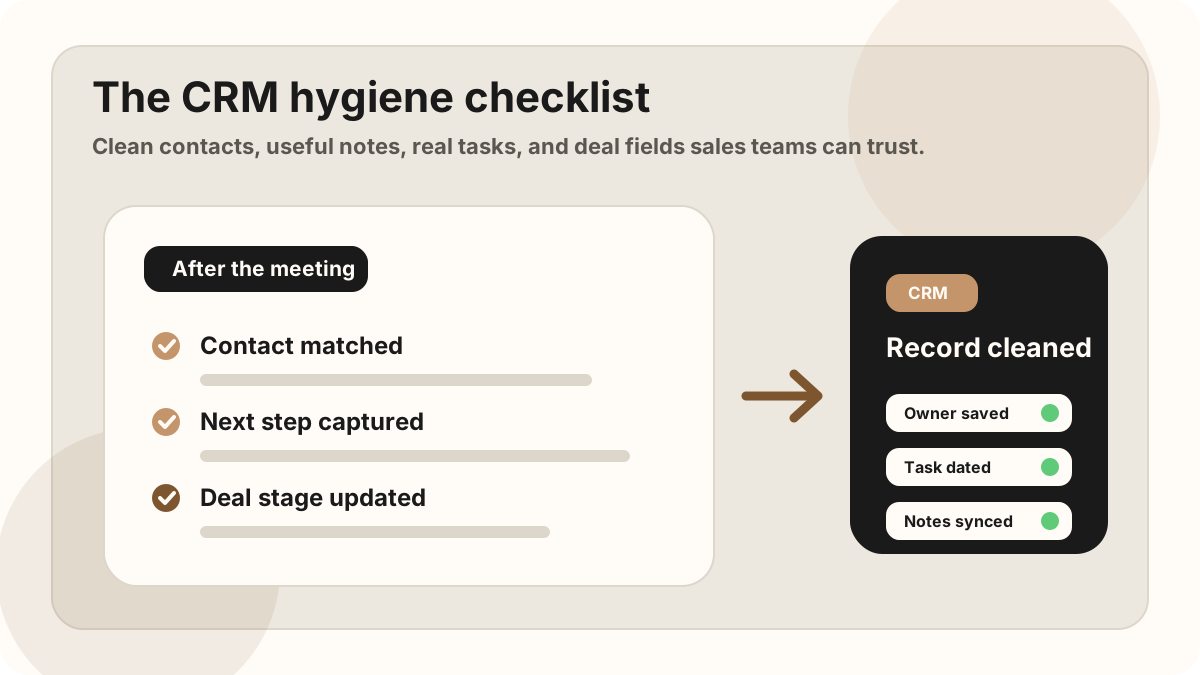
- Match the meeting to the right account or deal. If the note lands on the wrong record, the rest of the work gets hidden.
- Add or update the key contacts. Capture the people who influenced the conversation, especially buyers, blockers, technical reviewers, and decision makers.
- Write the meeting note in plain language. Summarize the problem, current process, objection, decision, and next step.
- Turn promises into tasks. Every "I will send," "we should book," or "please confirm" needs an owner and due date.
- Update the deal stage only if the buyer earned it. Do not move the stage because the meeting felt good. Move it because the buyer agreed to a new step.
- Check the next meeting or follow-up date. If there is no next date, there should be a task to create one.
- Record the origin of the update. Link the task or note back to the meeting so nobody has to hunt for context later.
- Mark the sync status. Decide whether the update is synced, queued, missing a field, or waiting for manager review before it changes CRM.
Field-by-Field CRM Hygiene Guide
Different CRMs label fields differently, but the hygiene logic is the same. Keep the fields that drive the next action clean first.
The four fields that matter most
If those four pieces are clear, the record is usually usable. If one is missing, the account will need cleanup later. If the meeting created several promises, use an action-item capture workflow before the details flatten into a generic note.
CRM Hygiene CRM Field Map for Sales Teams
A CRM hygiene checklist works best when the same CRM field map applies across Salesforce, HubSpot, Google Sheets, and mobile CRM workflows. The field names may differ, but the hygiene goal is the same: make the next action clear, fix exceptions in the CRM as soon as they land, and keep the record trustworthy.
| Hygiene field | Why it matters | Where it should land |
|---|---|---|
| Account or deal match | Keeps the note, task, and pipeline update connected to the right customer record. | Salesforce account/opportunity, HubSpot company/deal, or Google Sheets account row. |
| Contact and role | Shows who influenced the meeting and whether the right stakeholder is attached. | CRM contact, buying committee field, contact timeline, or stakeholder note. |
| Meeting summary | Explains what changed, why the next step exists, and what context future reps need. | CRM note, opportunity note, company timeline, or meeting recap row. |
| Task owner and due date | Turns meeting promises into accountable work instead of vague reminders. | CRM task, follow-up queue, calendar reminder, or team tracker. |
| Stage and close date evidence | Prevents pipeline optimism from replacing buyer-backed progress. | Opportunity stage, deal stage, close date, forecast note, or manager review field. |
| Sync or sync status | Shows whether a note has reached CRM, needs cleanup, or should stay in a temporary sheet. | Synced, queued, needs review, missing field, archived, no-action status, or manager after-sync hygiene. |
CRM Hygiene After Auto-Sync
Modern AI note tools, including LogicNotes, sync meeting notes to the CRM automatically. There is no approval screen between the meeting and the record, and that is the point: the rep stays out of data entry. The trust layer moves into the CRM itself, as a quick after-sync habit instead of a pre-sync gate.
After a synced note lands, a two-minute pass covers what matters: confirm the note attached to the right account or contact, make sure the next step exists as a real task with a date, and fix anything that looks off by editing the note or task directly in Salesforce, HubSpot, Zoho CRM, Dynamics 365, or Google Sheets. Edits made in the CRM are visible to managers and teammates right away, so the record stays trustworthy without slowing down the field day.
A 10-Minute CRM Hygiene Routine
The best time to clean a CRM record is before the meeting disappears into the rest of the day. You do not need an hour. You need a repeatable 10-minute routine.
Minute 1-2: Capture the real meeting outcome
Write one sentence that says what changed. Did the buyer agree to a proposal review? Did they reveal a blocker? Did the opportunity become less qualified?
Minute 3-5: Extract tasks from promises
Look for every promise made by you, the buyer, or someone else on the team. Turn each one into a task with a verb, owner, object, and date.
Minute 6-7: Update stage and timeline
Only move the deal if the buyer's behavior supports it. A great conversation is not the same thing as a qualified next step.
Minute 8-10: Attach context
Add the note, connect it to the right contact or deal, and make sure the next task can be understood without replaying the whole meeting.
This routine is also a useful way to reduce CRM admin for sales reps: capture once, structure once, review exceptions once, and sync the few fields that matter.
CRM Hygiene Handoff for Salesforce, HubSpot, and Sheets
CRM hygiene is not identical across every tool. Salesforce, HubSpot, and Google Sheets each need a slightly different review habit, especially when field sales reps are capturing notes from customer visits and sending them through CRM sync.
| Destination | Hygiene checks to prioritize | What should stay human-managed |
|---|---|---|
| Salesforce | Account match, contact role, opportunity note, task owner, due date, stage evidence, close date, and forecast note. | Stage, amount, close date, forecast category, and sensitive account-health changes. |
| HubSpot | Company match, contact timeline, deal note, lifecycle status, task owner, due date, and next activity. | Deal stage, lifecycle changes, amount, close date, and customer interpretation fields. |
| Google Sheets | Row owner, due date, status, last updated date, CRM status, next step, and whether the row should sync or archive. | Rows that will update CRM, trigger customer messages, or change pipeline priority. |
| Manager pipeline view | No-task meetings, overdue follow-up, stale close dates, stage changes without notes, and missing contacts. | Coaching interpretation, performance notes, and manager-only deal strategy. |
For destination-specific workflows, compare the Salesforce meeting-notes sync after-sync hygiene, the HubSpot meeting-notes sync after-sync hygiene, and the Google Sheets CRM template.
What Sales Managers Should Look For
Managers do not need to inspect every word in every note. They need to spot records where the next action is unclear or the after-sync hygiene is stuck. The highest-leverage signals are the same ones that show up in field sales conversion statistics: selling time, admin drag, and whether meeting context turns into clear follow-up.
| Signal | What it usually means | What to ask |
|---|---|---|
| No task after a meeting | The meeting may not have created a next step, or the next step was not captured. | What has to happen before this deal can move? |
| Task says only "follow up" | The task is too vague to drive action. | Follow up about what, with whom, by when? |
| Stage changed without note | The pipeline may be optimistic without evidence. | What did the buyer agree to? |
| Close date keeps moving | The timeline may be guessed rather than buyer-led. | What is the next dated decision point? |
Copyable CRM Hygiene Template
Use this after each in-person sales meeting. It is short enough to use consistently, but structured enough to keep the CRM useful.
CRM hygiene checklist
Record match: Account, contact, deal, opportunity, or sheet row.
Meeting origin: Visit, recording, recap, or sales call report.
Outcome: What changed because of the conversation?
Buyer context: Problem, objection, stakeholder, buying signal, or blocker.
Next action: Owner, verb, object, due date, and buyer reason.
Sync status: Synced, queued, missing field, manager review, or no action.
Stage/timeline: Only update when buyer behavior supports it.
Post-meeting CRM hygiene note
Meeting outcome: What changed after this conversation?
Buyer problem: What pain, priority, or blocker did they describe?
Objections: What concerns came up?
Promises made: What did each person agree to do?
CRM tasks: Owner + verb + object + due date.
Sync status: What can sync now, and what needs review first?
Stage/timeline change: What buyer behavior justifies the update?
How LogicNotes Helps
LogicNotes is built for sales people who have in-person meetings and need clean CRM updates without extra admin. Record the meeting on your iPhone, get an AI summary and action items, map the useful fields, review anything risky, then sync the clean parts to your CRM or Google Sheets automatically.
The point is simple: the CRM should remember the meeting while the sales person keeps selling.
CRM Hygiene FAQ
What is a CRM hygiene checklist?
A CRM hygiene checklist is a repeatable set of checks that keeps contacts, notes, tasks, deal stages, close dates, owners, and follow-up context accurate enough for the next sales action.
What is CRM hygiene for sales teams?
CRM hygiene for sales teams means keeping contacts, meeting notes, follow-up tasks, deal stages, CRM field maps, sync status, and dates accurate enough that the next sales action is obvious.
What should be updated in CRM after a sales meeting?
After a sales meeting, update the account or deal, key contacts, meeting summary, buyer problem, objections, promised follow-up, task owner, due date, sync status, and any stage or timeline changes supported by buyer behavior.
Which CRM fields should sales teams clean first?
Clean the fields that drive action first: account or deal match, key contacts, meeting summary, next step, task owner, due date, deal stage, close date, meeting origin, and sync status in the CRM field map.
How can field sales reps keep CRM data clean?
Field sales reps can keep CRM data clean by capturing meeting context while it is fresh, using a short mobile-first checklist, turning promises into dated tasks, reviewing exceptions, and syncing useful notes to the right CRM record before the next visit.
How do sales meeting notes affect CRM hygiene?
Sales meeting notes affect CRM hygiene because they provide the meeting details behind tasks, stage changes, close dates, objections, and follow-up. Vague notes create vague CRM records.
How can teams prevent CRM hygiene problems?
Teams can prevent CRM hygiene problems by capturing meeting context immediately, using a CRM field map, syncing notes to the right record, and fixing exceptions like missing next steps or stale dates directly in the CRM right after sync.
How do Salesforce, HubSpot, and Google Sheets hygiene workflows differ?
Salesforce hygiene usually focuses on account, opportunity, stage, close date, task, and forecast fields. HubSpot hygiene usually focuses on company, contact, deal, lifecycle, task, and timeline fields. Google Sheets hygiene usually focuses on row ownership, due dates, sync status, and whether a row has been synced or archived.
How does CRM hygiene reduce sales admin?
CRM hygiene reduces sales admin when reps capture meeting context once, structure the note into follow-up tasks and CRM fields, and let notes sync automatically to the right CRM record instead of rewriting vague notes during pipeline cleanup.
What should managers check in a CRM hygiene review?
Managers should check for missing next steps, vague follow-up tasks, overdue due dates, stage changes without buyer evidence, stale close dates, missing contacts, stuck sync statuses, and notes that do not explain why the account should move.
How often should sales teams clean CRM records?
Sales teams should clean the important parts of each CRM record immediately after meaningful customer meetings, then review exceptions weekly for missing tasks, vague notes, stale close dates, and stage changes without evidence.
Keep the CRM useful after the meeting.
If your sales meetings create useful context but your CRM only gets vague notes, LogicNotes was built for that gap.
Download LogicNotes for iOS