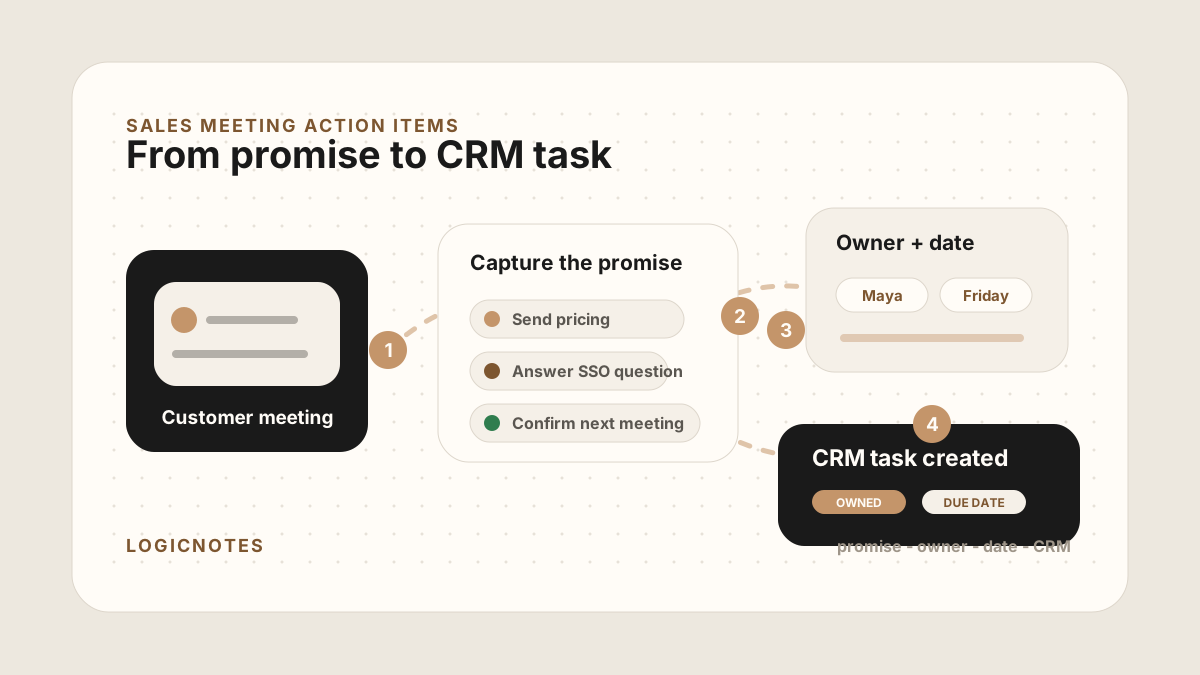
Most sales meetings do not fail because nobody took notes. They fail because the follow-up was too vague to act on.
A customer asks for pricing. Someone promises an intro. A technical question needs an answer. The next step sounds obvious while everyone is still sitting in the room. Two days later, the CRM says "follow up" and nobody remembers what that meant.
A good action item is not just a task. It is a promise with an owner, a date, and enough context for the next person to do the right thing.
Quick Answer: How Should Sales Teams Capture Meeting Action Items?
The best sales meeting action item workflow captures each customer promise as a specific action, owner, due date, customer reason, related account or opportunity, CRM destination, sync status, and sync status so the commitment becomes a visible CRM task, Salesforce or HubSpot follow-up, Google Sheets row, or field-rep reminder.
- If follow-up is too vague: prioritize action verb, deliverable, customer reason, buyer context, promised follow-up, and the originating meeting.
- If tasks stall: prioritize owner, due date, priority, related record, task status, and whether the customer is waiting on the action.
- If action items do not sync cleanly: prioritize CRM field map, destination record, sync status, blocked updates, and sync errors.
Why Sales Meeting Action Items Get Lost
Action items get lost in the gap between conversation and system of record. During the meeting, a promise feels specific because everyone has the same context. After the meeting, that context disappears. The sales person is driving to the next customer, the buyer is back in their inbox, and the CRM is waiting for a clean update.
The fix is not to write longer notes. The fix is to separate action items from general meeting context before the details blur.
For field sales reps, this is part of the larger field sales app CRM field map: plan the visit, capture the meeting, identify the commitments, and get the follow-up into CRM before the next customer stop. It also belongs in the rep-level where vague promises become owned work in the CRM.
- The task is too broad. "Follow up with ACME" does not say what to send, why it matters, or what the customer is waiting for.
- The owner is missing. If the task can belong to anyone, it usually belongs to no one.
- The date is vague. "Next week" is weaker than "send pricing by Friday morning before procurement review."
- The CRM loses context. A task without the originating meeting becomes another admin reminder instead of a useful sales step.
Best Action-Item Workflow by Sales Meeting Type
The right action-item workflow depends on the meeting. A discovery call, field visit, renewal conversation, conference lead, and technical review all create different follow-up pressure. The common thread is simple: each customer promise needs one owner, one date, and one place where the team will see it again.
| Meeting type | Action items to capture | Where they should land |
|---|---|---|
| Field customer visit | Promised samples, pricing, route-day follow-up, stakeholder intros, and site-specific objections. | Account, opportunity, sales call report, or field follow-up queue. |
| Discovery meeting | Qualification gaps, business case proof, product answers, and next meeting scheduling. | Lead, contact, company, opportunity, or deal record. |
| Conference or event conversation | Recap email, promised asset, intro request, lead source, and urgency signal. | Event lead list, campaign record, or Google Sheets CRM. |
| Renewal or expansion meeting | Commercial next steps, executive alignment, risk follow-up, product feedback, and success-owner tasks. | Account, renewal opportunity, customer success record, or manager review view. |
| Technical or security review | Security answers, integration docs, implementation owner, timeline blockers, and technical proof. | Opportunity task, sales engineer queue, or shared implementation checklist. |
This is where action items connect directly to the refreshed sales meeting notes to CRM tasks workflow. Notes explain what happened. Action items define what must happen next. CRM tasks make those commitments visible to the team.
What Every Sales Meeting Action Item Needs
Every action item should be written so that someone could complete it tomorrow without replaying the whole meeting. That means the action item needs more than a verb. The durable pattern is one owner, one clear deliverable, a due date, status, and the context that explains what done means.
| Field | What to capture | Example |
|---|---|---|
| Action | The specific thing that needs to happen. | Send two-page pricing summary for the operations team. |
| Owner | The person responsible for completing it. | Maya owns the pricing summary. Dana owns security questions. |
| Due date | When it should be done and why that timing matters. | Friday before the customer's Monday budget review. |
| Customer context | The problem, request, objection, or buying signal behind the action. | Customer wants to compare implementation effort with current manual process. |
| CRM destination | The account, contact, opportunity, or spreadsheet row where the task belongs. | Attach to ACME renewal opportunity and Dana Lee contact record. |
| Status | Open, waiting on customer, done, blocked, or no action needed. | Open until pricing is sent and CRM note is updated. |
| Originating meeting | The meeting, note, recording, or sales call report that created the action. | June 23 site visit recap or field-rep call report. |
The Action Item Capture Framework
Use this framework immediately after a sales meeting. It is short enough to use in the field, but structured enough to keep the CRM useful. If the conversation needs a fuller record first, start with the sales call report template, then turn the commitments into tasks.
Copy this structure
Examples of Good and Bad Sales Action Items
The easiest way to improve action items is to rewrite vague tasks into specific ones. The task should tell the future version of you exactly what to do.
Rewrite vague tasks like this
Weak: Follow up with Dana.
Better: Send Dana the two-page pricing summary by Friday before her Monday budget review. Attach task to ACME renewal opportunity.
Weak: Check security.
Better: Ask implementation lead to answer Dana's SSO and data-retention questions before the technical review. Add answers to CRM note.
Weak: Send recap.
Better: Send customer recap confirming three pain points, agreed next meeting, and owner for procurement checklist by end of day.
How to Turn Action Items Into CRM Tasks
The CRM should not just say that a meeting happened. It should show what the meeting created. That usually means a short note plus one or more tasks tied to the right person, deal, and date.
A useful CRM task title should usually start with a verb: send, schedule, confirm, introduce, answer, update, review, or draft. The task body should carry the customer reason, not the entire meeting transcript.
For a deeper CRM workflow, see how to turn sales meeting notes into CRM tasks. If your team uses a spreadsheet before a full CRM, keep the same action-item fields in your Google Sheets CRM and review uncertain rows in the Google Sheets CRM after-sync hygiene.
CRM task format for action items
Sales Meeting Action Item CRM Field Map
Action items create clean follow-up only when they map to predictable CRM fields. That field map lets reps capture once, then send the same structured action to Salesforce, HubSpot, or a Google Sheets tracker without rewriting the commitment.
| Action-item field | CRM destination | Why it matters |
|---|---|---|
| Account, contact, and opportunity | Salesforce account/contact/opportunity, HubSpot company/contact/deal, or Google Sheets account/contact columns. | The task is useful only when it lands on the right customer record. |
| Task title and follow-up type | CRM task title, activity type, or follow-up category. | A clear verb makes the task executable: send, schedule, confirm, answer, introduce, review, or update. |
| Owner and due date | Task owner, due date, reminder, or spreadsheet owner/date columns. | Ownership and timing keep the promise from becoming a vague reminder. |
| Customer reason | Task body, note summary, opportunity note, or deal timeline. | The task should explain the buyer request, objection, or deadline behind the work. |
| Status and priority | Open, done, blocked, waiting on customer, priority, or sync status. | Managers can spot overdue follow-up and reps can separate urgent customer promises from routine admin. |
| Originating meeting | Linked note, sales call report, visit log, or meeting recap URL. | The CRM keeps the action connected to the customer conversation that created it. |
Action Item Handoff for Salesforce, HubSpot, and Sheets
The destination changes the formatting, but the sales commitment should stay the same. A field rep should not need one version for the customer recap, another for the CRM task, and a third for a spreadsheet tracker.
| Destination | Best action-item handoff | What to avoid |
|---|---|---|
| Salesforce | Create a task on the account, contact, or opportunity with owner, due date, customer reason, and linked meeting note. | Changing stages or close dates automatically because a task was created. |
| HubSpot | Create a task on the company, contact, or deal timeline and keep the customer context in the task body. | Adding follow-up to the wrong deal when one company has multiple active opportunities. |
| Google Sheets | Add one row per action with account, contact, action, owner, due date, status, priority, and CRM status. | Free-text status values that make the sheet impossible to filter. |
| Manager review | Show overdue tasks, blocked tasks, waiting-on-customer tasks, and actions missing owner or due date. | Reviewing only activity volume without checking whether commitments are complete. |
For platform-specific setup, use the guides to sync sales meeting notes to Salesforce and sync sales meeting notes to HubSpot. For lightweight teams, use the Google Sheets CRM guide and keep the same action-item fields in each row.
After Action Items Sync: Keep the CRM Clean
Modern AI note tools, including LogicNotes, sync action items to the CRM automatically. There is no approval screen between the meeting and the record, and that is the point: the rep stays out of data entry. The trust layer moves into the CRM itself, as a quick after-sync habit instead of a pre-sync gate.
After a synced note lands, a two-minute pass covers what matters: confirm the note attached to the right account or contact, make sure the next step exists as a real task with a date, and fix anything that looks off by editing the note or task directly in Salesforce, HubSpot, Zoho CRM, Dynamics 365, or Google Sheets. Edits made in the CRM are visible to managers and teammates right away, so the record stays trustworthy without slowing down the field day.
Common Action Item Mistakes
Most action item problems look small at first. Then a buyer asks for an update, a manager checks the CRM, or the next meeting starts with someone trying to remember what was promised last time.
- Using meeting titles as task titles. "ACME meeting follow-up" is not a task. It is a container.
- Writing tasks without customer context. The task should explain why it exists, not just what to do.
- Leaving customer-owned actions invisible. If the customer needs to send technical requirements, track that too.
- Marking done too early. A task is not done when the email draft exists. It is done when the customer receives it and the CRM reflects it.
- Waiting until the end of the day. The longer the delay, the more likely the action item turns into a vague memory.
Field Sales Workflow for Action Items
A desk-based rep might have time to clean up tasks after a call. A field rep often moves straight from one customer visit to the next. The workflow has to be mobile, short, and tied to the route.
Use this after each visit
This connects naturally to sales route planning, mobile CRM for field sales reps, outside sales visit notes, and the meeting follow-up template. The route gets the rep to the customer; the action-item workflow makes sure the visit turns into visible follow-up.
It also protects CRM hygiene. A clean action item is easier to close, easier to review, and much less likely to become a vague activity log that someone has to fix later. If the team starts from route-day proof, pair action items with visit tracking.
Where LogicNotes Fits
LogicNotes is built for sales people who leave meetings with promises to keep. Record an in-person meeting on your iPhone with consent, get clean AI summaries and action items, then let the notes and tasks sync automatically to your CRM or Google Sheets automatically.
That means action items do not depend on memory or end-of-day admin. The meeting becomes action items, follow-up context, and CRM-ready work while the conversation is still fresh. For field teams, LogicNotes fits between iPhone recording, outside sales app workflows, sales rep app review, and the CRM destination.
Sales Meeting Action Item FAQ
What is an action item in a sales meeting?
A sales meeting action item is a specific commitment created during or after a customer conversation. It should describe what needs to happen, who owns it, when it is due, why it matters, and where it should live in the CRM.
How do you capture action items after an in-person sales meeting?
Capture the meeting or a quick recap while it is fresh, extract each promise or request, assign one owner, add a real due date, include customer context, and attach the action item to the right CRM record or sales tracker.
What fields should a sales action item include?
A useful sales action item should include the action, owner, due date, customer context, CRM destination, status, and originating meeting note.
What is the best format for sales meeting action items?
The best format is action plus owner plus due date plus customer reason plus CRM destination. For example: send pricing summary to Dana by Friday before the procurement review and attach it to the ACME renewal opportunity.
How soon should sales reps capture action items?
Sales reps should capture action items during the meeting or immediately after it, ideally before the next customer stop. The longer the delay, the more likely the action loses the owner, due date, or customer reason.
Should action items stay inside meeting notes?
No. Meeting notes are useful context, but action items should move into the CRM, task list, or sales tracker where the owner will actually complete them.
How do you turn action items into CRM tasks?
Create one CRM task for each promise, assign an owner and due date, attach it to the right account, contact, opportunity, or deal, and include a short note that explains which customer request created the task.
Can sales meeting action items sync to Salesforce, HubSpot, or Google Sheets?
Yes. Sales meeting action items can sync to Salesforce, HubSpot, or Google Sheets when each action has a customer, owner, due date, status, CRM destination, and enough context to explain why the follow-up matters.
What CRM fields should a sales action item create?
A sales action item should create or update fields for account, contact, opportunity or deal, task title, owner, due date, priority, customer reason, status, follow-up type, and sync status.
How can field reps stop action items from getting lost?
Field reps should review action items before leaving for the next stop, sync them to the CRM or Google Sheets, and use a mobile workflow that keeps owners, due dates, and customer context visible.
Can Google Sheets track sales meeting action items?
Yes. Google Sheets can track sales meeting action items if each row has a contact or account, action, owner, due date, status, priority, CRM status, and link or note from the meeting.
Turn sales promises into real follow-up.
If your action items start in an in-person conversation but need to end up in your CRM or Google Sheets, LogicNotes was built for that.
Download LogicNotes for iOS