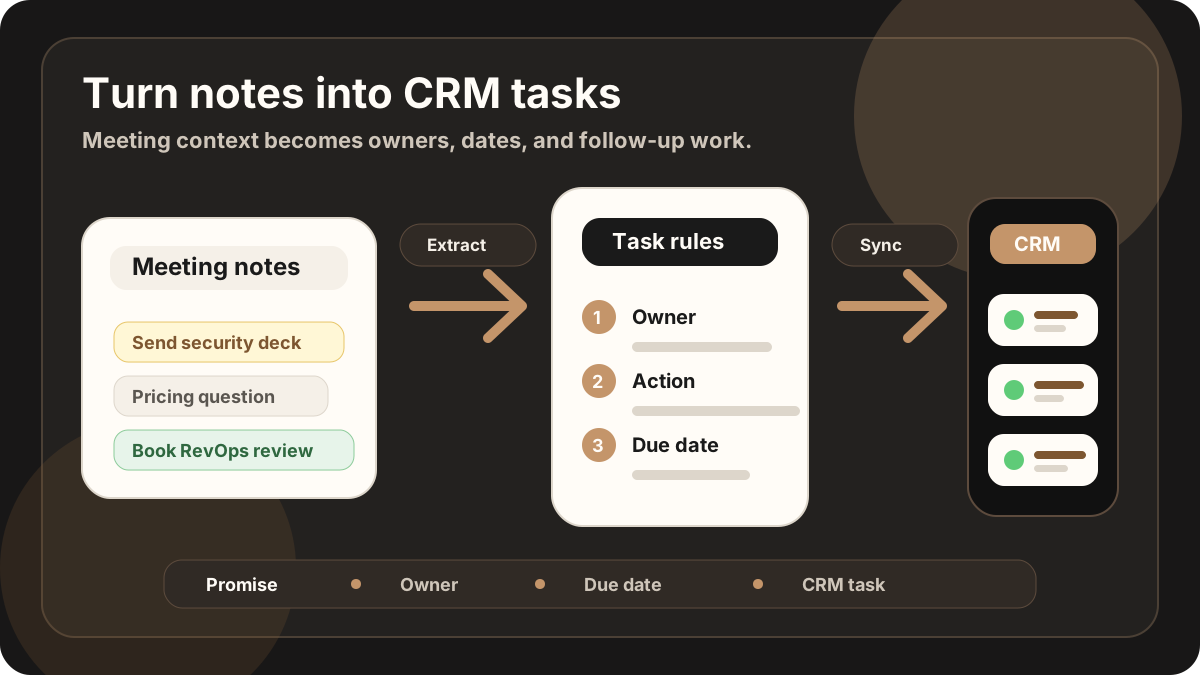
A sales meeting can sound productive and still create no movement. The buyer shared the problem. You promised to send something. Someone mentioned a deadline. There was a clear next step.
Then the meeting ends, the next conversation starts, and the promise becomes a vague note in the CRM: "Good meeting. Follow up." That is not a task. That is a memory test.
A good CRM task should make the next action obvious without forcing the sales person to reread the whole meeting.
Quick Answer: How Do Sales Teams Turn Meeting Notes Into CRM Tasks?
The best workflow turns each sales meeting note into CRM tasks by extracting the specific commitment, action verb, owner, due date, customer reason, related account or opportunity, destination CRM record, sync status, and sync status so follow-up lands as an owned Salesforce task, HubSpot task, Google Sheets row, or field-rep reminder instead of a vague note.
- If notes create generic tasks: prioritize the customer request, action verb, deliverable, buyer context, and originating meeting behind the task.
- If tasks miss ownership: prioritize owner, due date, related record, priority, task status, and whether the customer is waiting on the response.
- If task sync creates CRM noise: prioritize CRM field map, destination record, sync status, blocked updates, and sync errors.
Why CRM Tasks Get Lost After Sales Meetings
Most task problems start before the CRM is opened. In-person meetings are messy in a way online meetings are not. The important detail might come while walking to reception, answering a side question, or packing up after the meeting.
By the time the sales person updates the CRM, the context has already started to fade. The note captures the mood of the meeting, but not the work created by the meeting. The follow-up gets separated from the reason it matters.
That is why the task needs to be extracted from the meeting, not invented later. If the customer asked for pricing, the task is not "follow up." It is "Send pricing options to Priya by Thursday because procurement needs numbers before the review."
For field reps, this is part of the broader field sales app CRM field map. The route planner gets the rep to the meeting, the notes app captures what happened, and the CRM task is what makes the visit produce follow-through. It also belongs in the rep-level where vague next steps become owned follow-up tasks in the CRM. Broader AI workflow automation statistics show the same lesson: automation matters most when it reaches the next system of record.
The same pattern applies whether the team works in Salesforce, HubSpot, Zoho, Microsoft Dynamics 365, or a lightweight spreadsheet CRM. The note explains what happened. The task makes sure somebody acts on it.
What Counts as a CRM Task?
A CRM task is any action that should happen after the meeting and should be visible to the sales person, manager, or next team member who opens the record.
Not every meeting detail deserves a task. Some details belong in the summary. Some belong in opportunity notes. A task is different because it has a verb. Someone must do something.
| Meeting detail | Where it belongs | Why |
|---|---|---|
| The customer is replacing a spreadsheet workflow. | Meeting summary or opportunity note | It explains context, but no one needs to act on that sentence by itself. |
| You promised to send a pricing breakdown by Friday. | CRM task | It has an owner, action, deliverable, and due date. |
| The buyer is worried about team adoption. | Summary plus possible task | The concern is context. A task might be "Send rollout example." |
| The customer wants RevOps in the next meeting. | CRM task | Someone needs to book the next meeting with the right people. |
The Simple CRM Task Formula
The easiest way to stop vague CRM tasks is to force every task through the same shape. It does not need to be complicated. It just needs enough structure to survive the rest of the sales week. Current action-item guidance across meeting tools and CRMs keeps returning to the same pattern: one owner, clear deliverable, due date, and context.
Use this task formula
A weak task says: "Follow up with customer." A useful task says: "Send Alex the security checklist by Thursday so IT can review before the pilot call."
Best CRM Task Workflow by Sales Meeting Type
The right task workflow depends on the meeting. A customer visit, discovery call, renewal conversation, and conference lead all create different follow-up pressure. Use the meeting type to decide what should become a task and where that task should land.
| Meeting type | Best task workflow | Useful CRM destination |
|---|---|---|
| Field customer visit | Turn the visit note or sales call report into owner/date tasks before the next stop. | Account, opportunity, or route-day follow-up view. |
| Discovery meeting | Create tasks for qualification gaps, proof requests, stakeholder intros, and the next scheduled conversation. | Lead, contact, company, or open deal. |
| Conference or event lead | Convert the hallway conversation into a follow-up task with lead source, promised asset, and deadline. | New lead, contact, or campaign list. |
| Renewal or expansion visit | Separate relationship notes from renewal tasks, commercial next steps, risk follow-up, and executive alignment. | Account, renewal opportunity, or customer success record. |
| Technical or security follow-up | Assign the task to the right seller, sales engineer, or specialist with the exact document or answer requested. | Opportunity task, support handoff, or shared implementation checklist. |
This table also helps managers review whether reps are using CRM tasks as real follow-up work instead of generic activity logging. It pairs well with a CRM hygiene checklist because clean tasks are part of clean pipeline data.
The Workflow: From Meeting Notes to CRM Tasks
The workflow should happen as close to the meeting as possible. The longer the delay, the more the task becomes a guess.
If the original record is an in-person customer visit, start from a sales call report or in-person sales notes workflow. If the record is an iPhone recording, use the iPhone recording after-sync hygiene to create a task list while the conversation is still fresh.
1. Capture the full meeting context
Start with the actual meeting record: transcript, summary, handwritten notes, or a structured meeting note. The goal is to preserve what was promised, who asked for it, and why it mattered.
2. Highlight every promise and request
Look for phrases like "I will send," "Can you introduce," "We need to check," "Let's schedule," and "Please confirm." These are usually task signals.
3. Remove anything that is only context
Context is still valuable, but it should not become a task unless someone needs to act. "Budget is tight" is context. "Send lower-cost rollout option by Friday" is a task.
4. Attach the task to the right record
A task should land where the sales person will look next: contact, lead, account, opportunity, or deal. If it lands on the wrong record, it may as well not exist.
5. Add the origin note
The task should carry enough context to remind the owner why it exists. A short origin line is often enough: "Customer asked during June 17 site visit because rollout is blocked by IT approval."
6. Sync the task before it becomes stale
Push the task to the CRM while the meeting still feels recent. For Salesforce and HubSpot teams, that means the task should attach to the same record that managers and teammates already use to inspect deal health.
Examples: Turning Notes Into Tasks
The best way to test your workflow is to compare the raw note with the CRM task it creates. The task should be more specific than the note, but not bloated.
| Meeting note | Weak task | Better CRM task |
|---|---|---|
| "They asked if security can review before the pilot." | Follow up on security. | Send security review pack to Maya by Thursday before pilot approval. |
| "Pricing needs to be clear before next week's budget meeting." | Send pricing. | Send pricing options and discount assumptions to Sam by Tuesday. |
| "Ops should join the next call because they own rollout." | Book call. | Schedule next call with Ops owner and buyer before Friday. |
| "They want proof this works for field reps." | Send more info. | Send field sales workflow example and CRM sync screenshot by Wednesday. |
What Fields Should the CRM Task Include?
A task without metadata is easy to miss. A task with too much metadata becomes admin. The useful middle is simple: task title, owner, due date, related contact or deal, short context, and originating meeting.
| Field | What to put there | Example |
|---|---|---|
| Task title | The action in one sentence. | Send security review pack to Maya |
| Owner | The person responsible for completing it. | Account executive |
| Due date | The date the follow-up needs to happen. | Thursday, June 18 |
| Related record | The contact, company, deal, lead, or opportunity. | Maya Chen, Acme pilot deal |
| Context | Why this task exists. | Requested during site visit before IT review. |
| Status | Open, waiting, done, or blocked. | Open until pricing is sent and the customer confirms receipt. |
| Originating meeting | The meeting, call report, note, or visit that created the task. | June 17 field visit report. |
CRM Task Field Map for Sales Meeting Notes
Once the task formula is clear, the next question is where each field should land. A consistent field map keeps Salesforce, HubSpot, and Google Sheets usable even when reps capture the meeting from the road.
| Task field | CRM destination | How to write it |
|---|---|---|
| Account, contact, and deal | Salesforce account/contact/opportunity, HubSpot company/contact/deal, or Google Sheets account/contact/deal columns. | Attach the task to the record someone will open before the next customer touch. |
| Task title | CRM task title, activity title, or spreadsheet action column. | Start with a verb and name the deliverable: send pricing, schedule review, confirm stakeholder intro. |
| Owner and due date | Task owner, assignee, due date, reminder, or route-day follow-up column. | Use one accountable owner and one real date, not a shared team reminder. |
| Customer reason | Task body, activity note, deal timeline, or customer-context column. | Explain why the task matters: budget review, security approval, renewal risk, or next meeting. |
| Status and priority | Open, done, blocked, waiting on customer, priority, or sync status. | Keep manager review focused on overdue, blocked, or customer-waiting tasks. |
| Related note | Linked meeting note, sales call report, visit note, or transcript reference. | Make it easy to open the meeting context without putting the whole transcript in the task. |
After CRM Tasks Sync: Keep Records Clean
Modern AI note tools, including LogicNotes, sync meeting tasks to the CRM automatically. There is no approval screen between the meeting and the record, and that is the point: the rep stays out of data entry. The trust layer moves into the CRM itself, as a quick after-sync habit instead of a pre-sync gate.
After a synced note lands, a two-minute pass covers what matters: confirm the note attached to the right account or contact, make sure the next step exists as a real task with a date, and fix anything that looks off by editing the note or task directly in Salesforce, HubSpot, Zoho CRM, Dynamics 365, or Google Sheets. Edits made in the CRM are visible to managers and teammates right away, so the record stays trustworthy without slowing down the field day.
Salesforce, HubSpot, and Sheets Task Handoff
The same meeting promise can become a task in different systems. The important thing is that the task keeps the same owner, deadline, customer reason, and related record regardless of destination.
| Destination | Best task handoff | What to avoid |
|---|---|---|
| Salesforce | Create a task linked to the account, contact, and opportunity with due date, owner, and a short customer reason. | Updating forecast fields automatically just because a follow-up task was created. |
| HubSpot | Create a task on the company, contact, or deal timeline and keep the note summary nearby. | Creating orphan tasks that are not connected to the active deal. |
| Google Sheets | Add one follow-up row with account, contact, task, owner, due date, status, priority, and CRM status. | Letting every rep invent their own status values. |
| Manager review | Show tasks missing owner, due date, customer reason, or related record before pipeline review. | Measuring only task volume instead of task quality and completion. |
For deeper platform setup, use the guides to sync sales meeting notes to Salesforce, sync sales meeting notes to HubSpot, and maintain a Google Sheets CRM for meeting notes.
CRM Task Checklist
- Does the task start with a clear verb? Send, book, confirm, introduce, review, update, or draft.
- Does it name the owner? If no one owns it, it is not a task.
- Does it have a due date? "Soon" is where follow-ups go to disappear.
- Does it link to the right CRM record? The task should live where the deal context lives.
- Does it include enough meeting context? The owner should know why the task matters without rereading everything.
- Is it separate from the summary? Notes explain what happened. Tasks drive what happens next.
Field Sales Workflow: From Visit to Task
A field rep may have three customer visits before they sit down at a laptop. The workflow has to work from the road, not only from a desk.
Use this post-visit task loop
This connects naturally to mobile CRM for field sales reps, sales route planning, and the meeting follow-up template. If the team is still using a spreadsheet, the same task fields should land in the Google Sheets CRM and pass through its after-sync hygiene.
For reps who need a dedicated mobile flow, a sales visit notes app, or field sales follow-up app should make the task handoff visible before the rep gets pulled into the next appointment. If the route-day record starts with the task review should confirm that the check-in created useful follow-up instead of a bare activity stamp.
How LogicNotes Helps
LogicNotes is built for sales people who have in-person meetings and need the follow-up work to land in the CRM. Record the meeting on your iPhone, get a clean AI summary and action items, review the customer promises, then let the notes and tasks sync automatically to your CRM or Google Sheets automatically.
Instead of writing "follow up" from memory, you can turn the actual meeting promises into specific tasks with real meeting context. That keeps the field sales app, outside sales app, and CRM destination aligned around the same next step.
CRM Task FAQ
What is a CRM task?
A CRM task is a follow-up action tied to a customer, lead, account, opportunity, or deal record. It should have an owner, a clear action, a due date, and enough meeting context to explain why it matters.
How do you turn sales meeting notes into CRM tasks?
Extract every promise, request, and next step from the meeting notes, then convert each one into a task with an owner, verb, specific deliverable, due date, related CRM record, and short context from the meeting.
What should every CRM task include?
Every CRM task should include the task owner, action verb, deliverable, due date, related contact or deal, status, and a short note that says which customer conversation created the follow-up.
How soon should reps create CRM tasks after a sales meeting?
Sales reps should create CRM tasks immediately after the meeting or before the next customer stop. The sooner the task is created, the more accurate the owner, due date, and customer context will be.
Should every sales meeting note become a CRM task?
No. Context belongs in the meeting summary or opportunity note. Only commitments, requests, follow-ups, and next steps that require someone to act should become CRM tasks.
How can field sales reps create CRM tasks from the road?
Field sales reps can capture a quick meeting recap on mobile, extract the promised actions, assign owners and dates, attach each task to the right CRM record, and review open follow-ups before the next visit.
Can sales meeting notes create Salesforce, HubSpot, or Google Sheets tasks?
Yes. Sales meeting notes can create Salesforce tasks, HubSpot tasks, or Google Sheets follow-up rows when each task has an account or contact, action, owner, due date, status, and customer context.
What CRM fields should a task from meeting notes include?
A task from meeting notes should include account, contact, opportunity or deal, task title, owner, due date, customer reason, status, priority, related note, and sync status.
What is the difference between CRM notes and CRM tasks?
CRM notes explain what happened in the meeting. CRM tasks say what someone needs to do next. A clean CRM update usually needs both: a concise meeting note plus separate tasks for the follow-up work.
How can AI help turn meeting notes into CRM tasks?
AI can summarize the meeting, detect action items, suggest owners and due dates, and format the follow-up work for Salesforce, HubSpot, Zoho CRM, Dynamics 365, or a spreadsheet CRM.
How do CRM tasks reduce sales admin after meetings?
CRM tasks reduce sales admin by turning meeting promises into structured follow-up once, then syncing the owner, due date, customer context, and related record instead of asking reps to rewrite the same next step in multiple places.
Turn the meeting into the next action.
If your sales meetings create follow-ups that never quite make it into the CRM, LogicNotes was built for that job.
Download LogicNotes for iOS