Field sales looks simple on paper: meet customers, build trust, follow up, move deals forward. The hard part is everything that happens between those steps.
A sales person leaves one meeting with a buyer's objection, a promised follow-up, a new contact name, and a half-formed next step. Then they drive to the next appointment. By the end of the day, the details are spread across a notebook, a phone, a calendar invite, a CRM app, and memory.
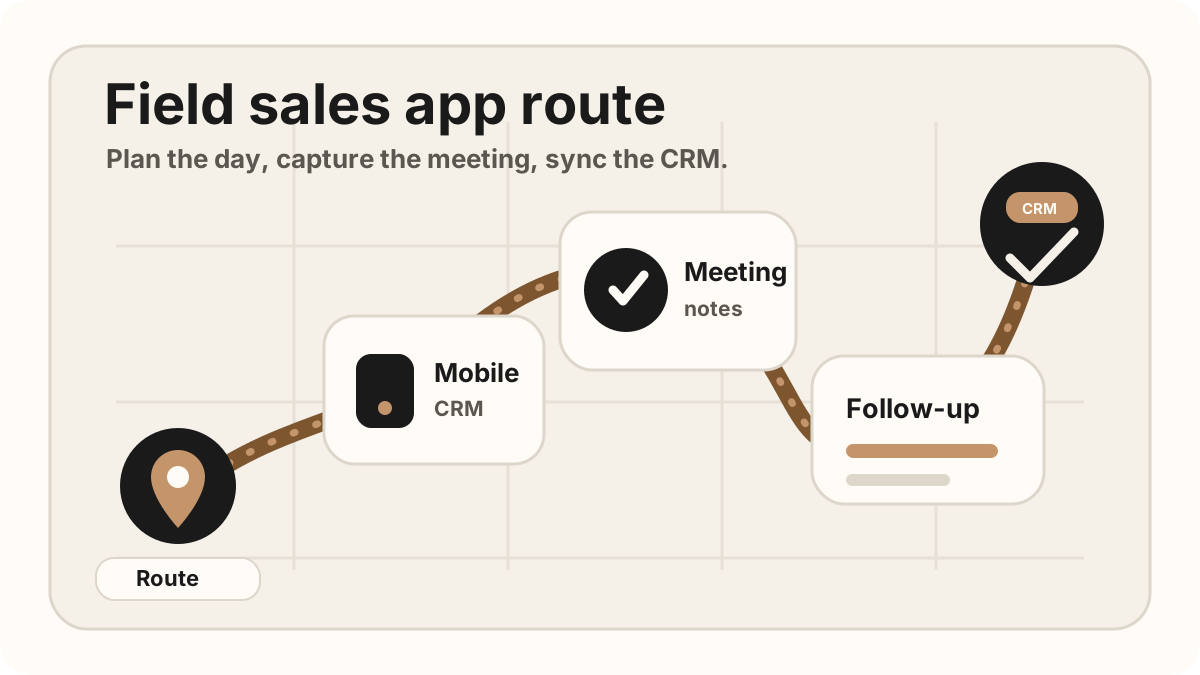
The stronger field sales app stack connects route planning, mobile CRM, visit tracking, meeting notes, CRM field maps, after-sync hygienes, follow-up tasks, Salesforce, HubSpot, Google Sheets, and CRM sync. That is the difference between a sales rep app that logs activity and an outside sales app that protects revenue context.
The best field sales app is the one that reduces the gap between the customer conversation and the next sales action.
Quick Answer: What Field Sales App Stack Should Reps Use?
The best field sales app stack is usually the smallest mobile workflow that covers five jobs: plan the route, open account context, capture the in-person visit, turn promises into tasks, and sync reviewed updates to CRM.
- If route waste is the bottleneck: start with route planning, territory mapping, appointment sequencing, and account priority.
- If CRM updates are late: start with mobile CRM, a CRM field map, sync status, and same-day sync.
- If follow-up is vague: start with meeting notes, action items, owners, due dates, and CRM-ready follow-up tasks.
Best Field Sales Apps by Use Case
If you want a quick shortlist, start with the job your reps need help with. Current field sales software pages tend to group around route optimization, mobile CRM, visit tracking, check-ins, notes, follow-up, territory management, and retail execution. Those categories overlap, but they are not interchangeable.
| Use case | Apps or app category to compare | Choose this when |
|---|---|---|
| Route optimization and territory coverage | SPOTIO, Badger Maps, SalesRabbit, RepMove, Map My Customers, and route-planning tools. | Reps need better stop sequencing, map-based planning, territory coverage, and lower drive-time waste. |
| Mobile CRM and account context | Salesforce, HubSpot, Zoho CRM, Dynamics 365, Pipeline CRM, or the CRM your team already uses. | The main problem is seeing account history, contacts, deals, tasks, and activity from the phone. |
| Visit tracking, check-ins, and manager visibility | Field sales platforms with activity logging, GPS check-ins, visit verification, and reporting. | Managers need to know which accounts were visited, what happened, and which visits need follow-up. |
| In-person meeting notes and CRM sync | LogicNotes alongside your CRM, calendar, route planner, and follow-up workflow. | The highest-value data is what the customer said, what was promised, which CRM fields should update, and which CRM-ready next step should happen. |
| Retail execution, store visits, and order workflows | Repsly, Skynamo, SimplyDepo-style tools, order-capture apps, and field execution platforms. | The rep needs merchandising, forms, order capture, store audits, inventory context, or distributor workflows. |
The practical answer is usually a stack, not a single magic app. A route planner can make the day efficient, a mobile CRM can show the account, and a notes-to-CRM workflow can make sure the sales conversation turns into a clean follow-up and trustworthy CRM sync.
What Is a Field Sales App?
A field sales app is a mobile tool, or a connected stack of mobile tools, that helps outside sales reps manage the day while they are away from a desk. It should help the rep plan visits, review customer context, capture what happened, create follow-up, map CRM fields, and keep the CRM current.
Some teams use one all-in-one field sales platform. Others use a focused stack: route planner, mobile CRM, meeting notes, follow-up, after-sync hygiene, files, and reporting. Either model can work if the handoff is clean. The problem starts when a rep has to copy the same meeting details into three systems after a long day.
Field Sales App vs CRM vs Route Planner
The terms often get blurred, but they do different jobs. A CRM stores the official record. A route planner helps reps move through a territory. A field sales app connects the work that happens between those two points. For the route-specific workflow, see sales route planning for field reps. If the bottleneck is CRM updates from customer visits, use the outside sales CRM app workflow.
| Tool type | Primary job | Where it breaks down |
|---|---|---|
| CRM | Store accounts, contacts, deals, activities, notes, and pipeline stages. | Many CRMs are still slow to update from the field, especially on mobile. |
| Route planner | Sequence stops, reduce drive time, and make the day visible on a map. | Routes do not automatically preserve what was promised in each meeting. |
| Field sales app | Help the rep execute the field day: plan, meet, capture, follow up, and sync back to the system of record. | If it does not sync cleanly to CRM with sync status, it becomes one more isolated place to check. |
Field Sales Apps vs Desk Sales Apps
Desk sales tools often optimize for inboxes, call queues, sequences, and dashboards. Those can help, but field reps have a different constraint: they are moving through physical space. The app has to work in a vehicle, at a customer site, in a hotel lobby, or between trade-show conversations.
That is why the best sales rep apps in the field overlap with mobile CRM for field sales reps, sales route planning, field sales CRM notes, outside sales visit notes, and field sales follow-up. The tool should meet the rep where the work actually happens.
Why Field Sales Reps Need a Different App Stack
Field sales is not the same as working a queue from a laptop. The sales person is moving through physical space. They may be in a customer office, a showroom, a hotel lobby, a conference booth, or a car between meetings. The tools have to fit that rhythm.
That means the app stack should be mobile-first, fast to use, and forgiving when a sales person has only a few minutes between conversations. It should help with route planning, customer context, meeting capture, CRM field maps, after-sync hygienes, follow-up, and reporting without adding more admin than it removes.
The wrong stack creates a familiar problem: the CRM looks clean in theory, but the actual sales context is trapped in the rep's head.
The Best Field Sales App Categories for Reps
Instead of looking for one giant tool to do everything, build around the moments that repeat every day. A useful field sales app stack usually has six parts.
| Field sales app category | What it should do | What to avoid |
|---|---|---|
| Route planning and territory | Help reps group meetings by location, reduce travel time, and avoid wasted gaps. | A map app that does not connect to the actual sales day or account priority. |
| Mobile CRM | Show account history, contacts, open deals, and recent activity from the phone. | Desktop-first CRM screens squeezed onto mobile. |
| In-person meeting notes | Capture in-person conversations, summarize key points, create action items, and map CRM-ready fields. | Bot-first tools that assume every meeting happens on Zoom or Teams. |
| Follow-up and tasks | Turn promises into emails, reminders, tasks, calendar next steps, and review-ready CRM updates. | Generic reminders with no meeting context. |
| Files, cards, and proposals | Keep contacts, decks, pricing, brochures, and contracts easy to capture or send from the field. | Files that only live on someone else's laptop. |
| Reporting | Make the day's meetings visible without asking reps to rewrite everything at night. | End-of-day reports that duplicate CRM work or hide sync exceptions. |
Best Sales Rep Apps by Role or Field Motion
The best sales rep app is different for a territory rep, an account executive on customer visits, an event rep collecting leads, and a retail rep checking store execution. Before comparing vendor lists, choose the job the app has to own.
| Rep motion | Best app category to prioritize | Why it matters |
|---|---|---|
| Territory or route-heavy rep | Route planner, map-based account list, visit tracking, and mobile CRM. | The rep needs to group nearby stops, see account priority, capture each visit, and avoid losing notes after the route changes. |
| Relationship-heavy account rep | Mobile CRM, customer meeting notes, action items, and follow-up tasks. | The rep needs the latest account context before the visit and a reliable way to turn the conversation into CRM-ready next steps. |
| Trade-show or event rep | Fast capture, qualification notes, contact capture, reminders, and same-day follow-up. | The rep may talk to dozens of buyers quickly, so the app has to preserve names, intent, objections, and promised next actions. |
| Retail, distributor, or store-visit rep | Store-visit tracking, forms, photos, order capture, merchandising notes, and reporting. | The rep needs structured execution data as much as relationship context. |
| Manager-led field team | Activity logging, check-ins, visit outcomes, coaching notes, and CRM reporting. | Managers need visibility, but the workflow still has to be fast enough that reps keep it current. |
For most B2B field teams, the best stack is a small set of connected tools: a route or calendar workflow, a mobile CRM, a note-capture layer, and a follow-up system that pushes the useful details back into CRM.
If the rep motion is mostly outside sales, compare the outside sales app stack and the workflow. If the rep motion is mostly route coverage, compare sales route planning, and sales rep visit tracking before buying another generic productivity tool.
2026 Field Sales App Comparison Snapshot
Most field sales app comparisons in 2026 are really comparing different jobs. A route planner, a mobile CRM, a door-to-door canvassing platform, and a meeting-notes app can all show up for the same search, but they do not solve the same problem.
Use this snapshot to decide which category belongs in the buying conversation before you compare demos or pricing pages.
| Team motion | Apps to compare | Best fit | Watch for |
|---|---|---|---|
| Route-heavy territory teams | SPOTIO, Badger Maps, SalesRabbit, RepMove, Map My Customers, and similar route or mapping platforms. | Teams that need optimized stops, territory coverage, check-ins, and manager visibility. | A route can be efficient and still lose the customer promise if notes and tasks do not reach the CRM. |
| CRM-first sales teams | Salesforce, HubSpot, Zoho CRM, Dynamics 365, Pipeline CRM, or the CRM your team already uses. | Teams that want one system of record for accounts, contacts, deals, pipeline, and activity history. | Mobile CRM screens can still be too slow for notes, follow-up, and field updates between meetings. |
| B2B account reps with scheduled visits | RepMove, Outfield, mobile CRM tools, calendar workflows, and focused notes or task apps. | Reps who need account context, visit logging, meeting notes, follow-up, and CRM updates from the road. | Manager tracking is not the same as rep-friendly capture. The rep still needs a fast way to preserve what was said. |
| In-person discovery and customer meetings | LogicNotes alongside your current CRM, route planner, calendar, and follow-up workflow. | Teams where the sales conversation creates the next step and the CRM update has to be accurate. | Consent-aware capture, clean summaries, specific tasks, CRM field maps, after-sync hygienes, and reliable CRM sync matter more than another generic note field. |
| Retail, CPG, or store-visit teams | Repsly, Skynamo, SimplyDepo-style retail execution tools, plus your CRM or order system. | Teams that need store visits, merchandising notes, order capture, forms, and field execution reporting. | Retail execution tools may be heavier than needed for B2B reps whose main output is notes, tasks, and follow-up. |
If you are comparing named vendors, split the decision into two parts: the system that helps reps move through the territory, and the workflow that turns customer conversations into CRM-ready notes and follow-up. Those are often different layers of the same field sales app stack.
Field Sales App Decision Matrix
The strongest field sales app choice usually starts with the failure point, not the vendor list. A team with wasted drive time needs a different first layer than a team losing customer promises after every visit.
| If the bottleneck is | Start with this layer | Success metric |
|---|---|---|
| Reps spend too much time between accounts. | Route planning, territory mapping, appointment sequencing, and account priority. | More high-priority visits per day and fewer low-value gaps. |
| Reps walk into meetings without context. | Mobile CRM, account history, contacts, open opportunities, and prior activity. | Better prep before each visit and fewer repeated customer questions. |
| Managers cannot see what happened in the field. | Visit tracking, check-ins, activity logging, outcomes, and reporting. | Clearer account coverage without asking reps to rebuild the day manually. |
| Customer promises disappear after visits. | In-person notes, AI summaries, action items, owners, due dates, and follow-up tasks. | More specific follow-up and fewer vague CRM tasks. |
| CRM updates happen late or not at all. | CRM sync, after-sync hygienes, CRM field maps, Salesforce, HubSpot, Zoho CRM, Dynamics 365, or Sheets handoff. | Cleaner records after each visit and less end-of-day admin. |
If more than one bottleneck is true, define which app owns each step. The common mistake is buying one broad platform, then leaving route planning, notes, and CRM follow-up loosely connected.
Before you pick the pilot metric, compare the bottleneck against the field sales conversion benchmarks: selling time, admin drag, in-person trust, and whether the visit turns into a clear CRM next step.
Field Sales App Rollout Plan for Adoption
A field sales app rollout should start smaller than the vendor pitch. Pick the workflow that is costing the team the most time or revenue context, prove it in one route or territory, then connect the CRM handoff after reps can use it naturally between stops.
This matters because field adoption is fragile. A tool can look excellent in a demo and still fail if it asks reps to clean up records at night, duplicate CRM fields, or untangle messy records without a routine. For the mobile CRM side, pair the rollout with a field sales mobile CRM field map. For the follow-up side, use a meeting follow-up after-sync hygiene so customer promises become clear tasks.
| Rollout step | What to prove | What to avoid |
|---|---|---|
| Pick one bottleneck first. | The app improves one measurable issue: route waste, missing account context, late follow-up, or CRM admin. | Buying a broad field sales platform before naming the failure point. |
| Pilot one territory or route. | Reps can use the workflow between customer stops without waiting for desktop cleanup. | Rolling out to every rep before the mobile workflow is proven. |
| Map CRM fields before sync. | Summaries, owners, due dates, destinations, and sync status land in the right CRM fields. | Syncing transcripts, vague tasks, or sensitive pipeline changes directly into CRM. |
| Connect follow-up to the visit. | Every customer promise becomes an email, reminder, CRM task, or reviewed next step. | Separating the customer recap from the CRM task that proves it will happen. |
| Measure adoption weekly. | Notes sync the same day, after-sync hygienes get cleared, and vague follow-up tasks decline. | Measuring only check-ins or logins while customer context still goes missing. |
If CRM admin is the adoption blocker, use the CRM admin reduction field map before adding another app. The field sales stack should remove duplicate typing, not create a more polished place to postpone it.
Supporting Workflows for the Field Sales App Stack
Current field sales software is converging around the same jobs: route planning, mobile CRM access, visit capture, notes, follow-up tasks, and CRM sync. The risk is buying a bigger tool without deciding which workflow each app owns.
Use the field sales app guide as the overview, then go deeper into the part of the day that is breaking down for your team.
If your bottleneck is the CRM handoff, compare the dedicated Salesforce meeting-notes sync after-sync hygiene and HubSpot meeting-notes sync after-sync hygiene. If the problem starts at capture, use the iPhone sales meeting recording workflow before choosing heavier field sales software.
How to Choose Apps for Field Sales
The best test is not whether an app looks powerful in a demo. The best test is whether a tired sales person can use it between meetings without breaking their flow.
Three questions to ask before adding an app
For field sales, the winner is usually not the app with the most features. It is the app that makes the next step easier to capture while the meeting is still fresh.
- Offline capture: The rep should be able to record notes, log visit context, or save the next step even when the connection is weak.
- Fast mobile entry: If an update takes a long form and a laptop, it will happen late or not at all.
- CRM handoff: The app should move useful context into the system of record instead of creating another silo.
- After-sync hygiene: Sensitive stage, close-date, forecast, and account changes should stay human-managed before sync.
- Clear ownership: Follow-up should include who owns it, what they promised, and when it is due.
What a Field Sales App Should Sync After Each Visit
The CRM handoff is where field sales app value either compounds or leaks away. A visit tracker can confirm that a rep arrived, and a route planner can make the day efficient, but the CRM still needs the customer context that changes the next action.
| Visit output | Where it should go | What should stay human-managed |
|---|---|---|
| Account and contact match | Salesforce account/contact, HubSpot company/contact, Zoho/Dynamics record, or Google Sheets row. | Low-confidence matches, duplicate contacts, and new account creation. |
| Meeting summary | CRM activity note, timeline note, call note, or visit summary field. | Sensitive customer wording, pricing language, legal context, and internal interpretation. |
| Action item | CRM task with owner, due date, priority, related record, and status. | Unclear owners, missing dates, strategic accounts, and customer-facing commitments. |
| Buyer pain, objection, or risk | Note body, deal context, risk field, manager review note, or follow-up draft. | Forecast, close date, amount, deal stage, discount strategy, and competitive positioning. |
| Follow-up message | Email draft, CRM task detail, reminder, or next-step note. | Tone, promises, pricing, technical claims, and anything the customer did not explicitly agree to. |
That is why the field sales app stack should connect to the same post-meeting workflows your team already trusts: CRM tasks from sales meeting notes, CRM admin reduction, and the right Salesforce or HubSpot sync path.
CRM Field Map for a Field Sales App Stack
A field sales app should not treat CRM sync as a giant text dump. It needs a CRM field map that decides which parts of the visit become account context, activity notes, follow-up tasks, pipeline fields, manager review items, or Google Sheets rows.
| Field sales output | CRM field map destination | Why it matters |
|---|---|---|
| Visit note and buyer context | CRM note, activity timeline, account history, or Google Sheets row. | The next rep or manager should understand what changed without replaying the whole meeting. |
| Customer promise | Follow-up task, owner, due date, priority, and related record. | Field sales follow-up only works when a promise becomes owned work. |
| Stage or forecast signal | Opportunity stage, deal stage, forecast note, or manager review field. | Pipeline changes need buyer evidence, not just a good-feeling visit. |
| Sync and sync status | Synced, queued, needs review, missing field, no action, or archived. | Reps and managers need to know whether the CRM is current or still waiting on cleanup. |
For deeper field-map examples, use the CRM hygiene field map, the Google Sheets CRM field map, and the CRM admin reduction field map.
After a Field Sales App Syncs CRM: Keep Records Clean
Modern AI note tools, including LogicNotes, sync field sales visit notes to the CRM automatically. There is no approval screen between the meeting and the record, and that is the point: the rep stays out of data entry. The trust layer moves into the CRM itself, as a quick after-sync habit instead of a pre-sync gate.
After a synced note lands, a two-minute pass covers what matters: confirm the note attached to the right account or contact, make sure the next step exists as a real task with a date, and fix anything that looks off by editing the note or task directly in Salesforce, HubSpot, Zoho CRM, Dynamics 365, or Google Sheets. Edits made in the CRM are visible to managers and teammates right away, so the record stays trustworthy without slowing down the field day.
A Practical Daily Workflow for Field Sales Reps
A good app stack should support the shape of the day, not force the day into a software workflow.
Before the first meeting
Check the route, review the account, confirm the meeting purpose, and open the most recent notes or CRM activity. The goal is to walk in with context, not a blank page.
During the meeting
Stay present. If you are recording with consent, let the notes app capture the details. If you are not recording, capture only the details that will matter later: names, objections, numbers, dates, and promises.
Right after the meeting
Convert the conversation into the next action. This is where field sales teams lose the most value. A great meeting can turn into a vague CRM task if the update happens too late or skips the after-sync hygiene.
At the end of the day
Review the accounts touched, tasks created, notes synced, after-sync hygiene exceptions, and follow-ups sent. The best day-end review should feel like a check, not a reconstruction.
Common Field Sales App Mistakes
The most common mistake is buying more software when the real problem is handoff. Meeting context is captured in one place, but tasks live somewhere else. The CRM gets updated, but the follow-up email says something different. A route is planned, but the account history is not reviewed before the rep walks in.
- Too many capture tools. If notes live in three places, the CRM will never be complete.
- No source of truth. The CRM should know what happened, not just that a meeting occurred.
- Desktop-first workflows. Field sales reps need tools that work in the field, not only at a desk.
- Tasks without context. "Follow up" is not enough. The task needs the promise, owner, and due date.
- No after-sync hygiene. Field sales apps should not push risky pipeline, forecast, or duplicate-record changes without a human check.
- No consent-aware recording habit. If a meeting is recorded, the rep should be clear and professional about it.
Field Sales App Checklist
Use this checklist when choosing or cleaning up your app stack.
- Route planning: Can the rep see the day clearly before leaving?
- Calendar: Are meetings, locations, attendees, and notes connected?
- CRM: Can the rep view account context from mobile and sync reviewed updates back cleanly?
- Meeting notes: Can in-person conversations become summaries and action items without a meeting bot?
- Follow-up: Can promises become emails, reminders, and CRM tasks?
- Files: Can the rep send the right deck, quote, or brochure quickly?
- CRM field map: Are visit notes, tasks, owners, due dates, sync status, and sync status mapped before the update leaves the field sales app?
- Reporting: Can managers see activity without making reps rewrite the day?
A Simple Field Sales App Stack
If you want to keep the stack simple, start with this structure.
Recommended stack shape
CRM: HubSpot, Salesforce, Zoho CRM, Dynamics 365, or the CRM your team already uses.
Calendar and route: A calendar plus maps workflow that makes the day visible before the first meeting. For more detail, use a sales route planning workflow that includes account priority and post-visit follow-up, then pair it with a so each stop creates useful CRM context.
Meeting notes: A phone-first notes app that captures in-person meetings and syncs summaries, action items, and context to the CRM. For the CRM-specific version, use a field sales CRM notes workflow.
CRM field map and after-sync hygiene: A clear map for notes, tasks, owners, due dates, sync status, and sync status before updates reach Salesforce, HubSpot, or Sheets.
Follow-up: Email, reminders, and tasks connected to the originating meeting.
Lightweight reporting: CRM activity views or Google Sheets after-sync hygienes that show what happened without extra admin.
Where LogicNotes Fits
LogicNotes is built for the meeting-notes and CRM-handoff part of the field sales app stack. Record an in-person meeting on your iPhone with consent, get a clean AI summary and action items, map the useful CRM fields, review exceptions, then sync the clean parts to your CRM or Google Sheets automatically.
It is not trying to replace your CRM, calendar, route planner, or full field sales management app. It sits between the conversation and the system of record, so field sales reps can keep moving without losing the details that make follow-up work.
Field Sales App FAQ
What is a field sales app?
A field sales app is a mobile tool or connected app stack that helps outside sales reps plan visits, review account context, capture meeting notes, create follow-up tasks, review CRM field maps, and update the CRM while they are away from a desk.
What is the best field sales app?
The best field sales app depends on how your team sells. Territory-heavy teams may need route planning and map-based account coverage. CRM-heavy teams may need fast mobile updates. Teams that win through in-person meetings need strong meeting capture, action items, after-sync hygienes, and CRM sync.
What apps do field sales reps actually need?
Most reps need route planning, mobile CRM access, meeting notes, follow-up tasks, proposal or file access, and lightweight reporting. The stack should stay small enough that reps actually use it during the day.
What features should a field sales app include?
A field sales app should include mobile account context, route planning or map support, visit tracking, check-ins, offline-friendly notes, follow-up tasks, reporting, CRM field maps, after-sync hygienes, and clean CRM sync. The exact stack depends on whether the team needs territory coverage, CRM updates, in-person meeting capture, or retail execution.
How do I choose the right field sales app?
Choose the field sales app by bottleneck. If reps waste time driving, start with route planning. If account context is missing, fix mobile CRM. If customer promises disappear after visits, prioritize meeting notes, action items, follow-up tasks, and CRM sync.
Should a field sales app sync with Salesforce or HubSpot?
Yes, if Salesforce or HubSpot is the system of record. The field sales app should sync concise visit notes, action items, owners, due dates, related contacts or accounts, and follow-up status automatically, and leave sensitive pipeline changes to a quick after-sync check in the CRM.
What should a field sales app capture after every visit?
After every visit, the app should capture the account, contact, meeting summary, buyer pain, objections, promised follow-up, action items, owners, due dates, CRM destination, CRM field map, and sync status.
Can one field sales app replace route planning, CRM, and notes?
Sometimes, but many teams do better with a focused stack. The important thing is clear ownership: one layer plans the route, one system stores the customer record, and one workflow captures visit notes, maps CRM fields, and sends CRM-ready follow-up.
What is the difference between a CRM and a field sales app?
A CRM is the system of record for accounts, contacts, deals, and pipeline stages. A field sales app is the system a rep uses during the field day to plan stops, capture visit context, log activity, and move the next action into the CRM.
Should a field sales app work offline?
Yes. Field reps often work in customer sites, conference halls, rural routes, basements, and parking lots where signal can be unreliable. The app should let reps capture the meeting or update the record first, then sync when the connection returns.
Which field sales apps should I compare in 2026?
Compare field sales apps by job rather than by a generic rank. Route-heavy teams often compare SPOTIO, Badger Maps, SalesRabbit, RepMove, Map My Customers, and similar platforms. CRM-first teams should compare the mobile experience in Salesforce, HubSpot, Zoho CRM, Dynamics 365, Pipeline CRM, or their current CRM. Teams that win through in-person conversations should also compare how notes, tasks, after-sync hygienes, and CRM sync are handled after each visit.
Do I need a field sales app if I already use a CRM?
You may not need a separate all-in-one field sales platform if your CRM, route planner, and meeting-notes workflow already cover the field day. You do need a better field sales app layer when reps cannot plan visits, capture notes, create tasks, or update the CRM quickly from mobile.
How should a team roll out a field sales app?
Roll out a field sales app by starting with one bottleneck, one territory, and one success metric. Pilot the workflow with reps who can test it between customer stops, map the CRM fields before syncing, do a quick after-sync check for risky changes, connect follow-up tasks, and measure adoption weekly.
Where does LogicNotes fit in a field sales app stack?
LogicNotes fits in the meeting-notes layer. It records in-person sales meetings on iPhone with consent, generates summaries and action items, and syncs CRM-ready context to tools like Salesforce, HubSpot, Zoho CRM, Dynamics 365, or Google Sheets.
Turn field sales meetings into CRM-ready notes.
If your reps have good conversations but the CRM only gets vague updates later, LogicNotes was built for that exact gap.
Download LogicNotes for iOS