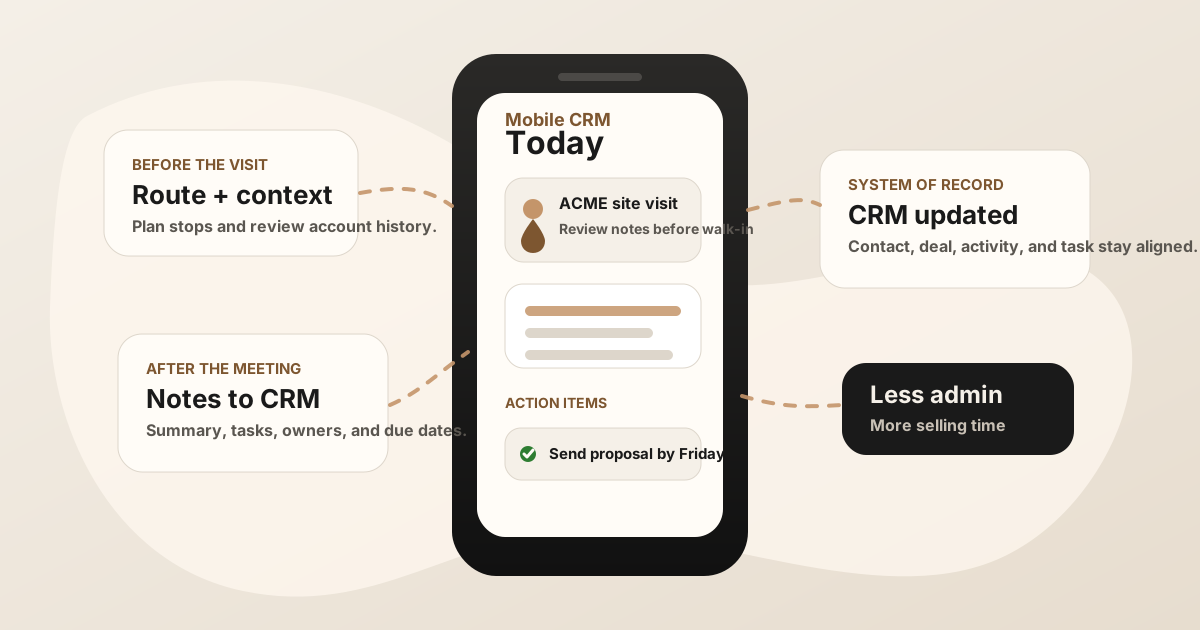
Mobile CRM should make field sales easier. In practice, many reps still treat the CRM as a system they check before the meeting and repair after the day is over.
The gap is not just screen size. Field reps need CRM context while they are moving: account history before walking in, notes right after the meeting, follow-up tasks before the next stop, and clean sync back to the system of record.
The best mobile CRM workflow for field sales is not just a smaller CRM. It is a faster path from customer visit to useful next action.
Quick Answer: What Mobile CRM Workflow Do Field Reps Need?
The best mobile CRM workflow for field sales gives reps account context before the visit, offline-friendly note capture during the field day, fast follow-up tasks after the conversation, and automatic sync back to Salesforce, HubSpot, Sheets, or the CRM system of record.
- If reps lack context before visits: prioritize saved account history, contacts, open deals, route or calendar context, and recent activity.
- If updates happen too late: prioritize quick visit notes, action items, owners, due dates, and same-day CRM sync.
- If mobile sync creates messy records: prioritize CRM field maps, after-sync hygienes, sync status, and exceptions for low-confidence updates.
Inside a field sales app stack, mobile CRM has to connect the route, the visit, and the CRM update. That means it should work cleanly with sales route notes, sales rep visit tracking, not sit beside them as another disconnected app.
Best Mobile CRM App by Use Case
The best mobile CRM app for field sales depends on how reps spend the day. Some teams need the native mobile app for Salesforce, HubSpot, Zoho, or Dynamics. Others need a field-sales layer for routes, territories, check-ins, visit tracking, and note capture around the CRM.
| Field sales use case | Mobile CRM workflow to prioritize | Why it matters |
|---|---|---|
| Teams already using Salesforce, HubSpot, Zoho, or Dynamics | Native CRM records plus a faster field capture layer for notes, tasks, and reviewed updates. | The CRM stays the system of record, but reps get a lighter path from customer meeting to usable update. |
| Route-heavy territory reps | Account maps, route or calendar context, nearby customers, visit tracking, and quick post-stop notes. | The rep needs CRM context tied to the actual route, not a separate desktop cleanup workflow. |
| Low-signal customer sites | Offline-friendly note capture, saved drafts, queued task creation, and reliable sync after signal returns. | If notes disappear or forms fail, reps stop trusting the mobile CRM during the field day. |
| Manager-led field teams | Visit outcomes, check-ins, activity history, task ownership, and manager visibility without duplicate reporting. | Leaders need to see what happened in the field without asking reps to rewrite every customer stop. |
| Relationship-heavy B2B reps | Meeting notes, buyer language, objections, stakeholders, promised follow-up, and CRM-ready action items. | The most valuable CRM update is not only that a visit happened; it is what the buyer said and what happens next. |
For LogicNotes, the strongest fit is the meeting-to-CRM handoff. Keep the CRM your team already uses, then make the field update easier by turning the in-person conversation into structured notes, action items, and sync-ready context.
What Is Mobile CRM for Field Sales Reps?
Mobile CRM for field sales reps is CRM access designed around a rep who is away from a desk. It should make the core record usable from a phone: accounts, contacts, opportunities, recent activity, meeting notes, tasks, and follow-up status.
A basic mobile CRM lets reps look up records. A useful field sales mobile CRM lets reps do work while the meeting is fresh: log the visit, capture notes, create action items, update the next step, and keep the right contact or deal current.
For the broader stack around CRM, route planning, meeting capture, files, and reporting, see the field sales app guide. For the CRM-note capture layer, use the field sales CRM notes app workflow. For the route-specific workflow, see sales route planning for field reps and the . For the outside-sales version of the same problem, see the and the outside sales app guide.
Mobile CRM App vs Field Sales App
Mobile CRM and field sales apps overlap, but they are not the same thing. Mobile CRM is usually the phone version of the system of record. A field sales app is the day-in-the-field workflow around that record: routes, check-ins, visit tracking, meeting capture, follow-up, reporting, and CRM sync.
| Layer | What it should do | Where it can break |
|---|---|---|
| Mobile CRM | Show account history, contacts, opportunities, tasks, notes, and pipeline context from the phone. | Reps can read records but still avoid updating them because the mobile workflow is too slow. |
| Field sales app | Connect route planning, visit tracking, check-ins, notes, follow-up tasks, and manager visibility. | It can become another activity log unless useful context syncs back to CRM. |
| Meeting notes layer | Turn the customer conversation into summaries, action items, owners, due dates, and CRM-ready context. | Notes stay outside the CRM or become too vague to help the next action. |
The strongest setup keeps ownership clear. CRM stores the account record. Field sales workflows organize the day. A phone-first notes workflow preserves what happened in the customer conversation. If the buyer is still choosing the rep's full phone stack, point them to the ; if they are mapping the whole route-to-CRM system, point them to the field sales app CRM field map.
Why Field Sales Reps Need More Than Desktop CRM on a Phone
Field sales has a different rhythm than desk-based selling. Reps may have five minutes between meetings. They may be in a parking lot, hallway, trade show booth, showroom, or customer site. They may have spotty signal. They may need to record a quick recap before driving.
If the mobile CRM feels like a compressed desktop screen, reps will wait until later. Later is where the problem starts: notes become vague, tasks lose context, and the CRM shows activity without explaining what changed.
What to Look For in a Mobile CRM for Field Sales
| Feature | Why it matters in the field | What to avoid |
|---|---|---|
| Fast record access | Reps need account history, contacts, and open opportunities before walking into a meeting. | Search and navigation that only work well from a desktop. |
| Offline-friendly updates | Customer sites and road days do not always have reliable signal. | Forms that fail or discard notes when the connection drops. |
| Meeting note capture | The customer conversation is where the sales context lives. | Activity logs that only say a visit happened. |
| Task creation | Follow-up needs an owner, date, promise, and reason it matters. | Generic tasks like "follow up" with no context. |
| Route and calendar context | CRM work should fit the rep's actual day, not fight it. | Separate route, calendar, and CRM workflows that never connect. |
Mobile CRM Field Map for Field Sales Visits
A mobile CRM workflow should make the next update obvious. Reps should not have to decide from scratch where every detail belongs while they are walking to the next meeting. A clear CRM field map tells the rep which details become notes, tasks, statuses, or review items.
| Field visit output | Mobile CRM destination | Field rule |
|---|---|---|
| Account and contact match | Account, company, contact, lead, opportunity, deal, or Sheets row. | Suggest matches from route, calendar, attendee, or company context; ask the rep when confidence is low. |
| Visit summary | Activity note, timeline note, call note, visit summary, or field sales report. | Keep it concise enough for another rep or manager to scan from a phone. |
| Buyer pain, objection, or risk | Note body, deal context, risk field, manager review note, or next-step detail. | Preserve buyer wording, but keep sensitive interpretation reviewable. |
| Action item | Task title, owner, due date, priority, related record, and status. | Create automatically when the owner, due date, related record, and next action are clear. |
| Follow-up status | Waiting on rep, waiting on customer, sent, synced, failed, or manager review. | Make status visible so end-of-day review is a check, not a reconstruction. |
| Sync status | Approved, queued, needs rep review, needs manager review, or blocked by record match. | Keep sensitive notes, uncertain matches, and pipeline-sensitive changes out of automatic sync until they are checked. |
This CRM field map connects the mobile CRM page back to the broader field sales app CRM field map: route planning gets the rep to the right stop, mobile CRM shows the account, and the notes workflow turns the visit into useful CRM fields. If the team uses a lightweight tracker instead of a full CRM, pair this with the Google Sheets CRM field map. If the bottleneck is duplicate typing, compare the CRM admin reduction map.
Offline Mobile CRM and Sync Checklist
Offline support matters because many field sales conversations happen in warehouses, customer sites, hotels, conferences, showrooms, vehicles, and buildings where signal is uneven. The workflow should degrade gracefully instead of punishing the rep for being in the field.
- Saved account context: Reps can review recent notes, contacts, and open tasks even when signal is weak.
- Draft visit notes: Notes and voice recaps can be saved before the connection returns.
- Queued follow-up tasks: Owners, due dates, and promised deliverables are preserved until sync is available.
- After-sync hygiene before sensitive updates: Stage, forecast, amount, close-date changes, and high-value promises should usually require confirmation.
- Clear sync status: Reps can see synced, queued, failed, needs review, or waiting on customer.
Offline capture is not only a technical feature. It is an adoption feature. When reps trust that their notes and tasks will survive the field day, they are more likely to update CRM while the meeting is still fresh. For the broader rollout sequence, use the field sales app rollout plan before expanding the workflow across every territory.
A Practical Mobile CRM Workflow
The mobile CRM should support the whole field day, not just the end-of-day cleanup.
Before the meeting
Open the account, review the last note, check open tasks, confirm the opportunity stage, and understand why the buyer agreed to meet. The rep should walk in with context, not a blank page.
During or right after the meeting
Capture the details that change the next action: buyer need, objection, stakeholder, timeline, promised follow-up, and due date. If recording is appropriate, get consent and record the meeting or a structured recap.
Before the next stop
Turn the meeting into a summary, task, and CRM update. The goal is not perfect prose. The goal is a useful record that another person could understand later.
The Meeting Notes Handoff
This is where mobile CRM often breaks. The CRM is ready to store the record, but the rep still has to convert the conversation into structured notes and tasks.
That handoff should be light. A good workflow turns a customer conversation into:
- Meeting summary: What happened, why it mattered, and what changed.
- Action items: Who owns the next step, what they promised, and when it is due.
- CRM placement: The right contact, account, opportunity, deal, or Google Sheets row.
- Follow-up context: The exact customer need, objection, or decision that makes the task meaningful.
For a phone-first capture workflow, see how to record a meeting on iPhone for sales notes. For the narrower CRM note workflow, use the field sales CRM notes app guide. For reducing the admin burden after those meetings, see how to reduce CRM admin for sales reps.
Where Mobile CRM Updates Should Land
A mobile update should land where the next sales action will happen. That destination changes by team and CRM, but the structure is usually the same: account, contact, meeting summary, visit outcome, action items, owner, due date, and follow-up status.
| CRM destination | Best mobile update | Helpful guide |
|---|---|---|
| Salesforce | Account or opportunity note, related task, owner, due date, and reviewed field changes. | Salesforce meeting-notes after-sync hygiene |
| HubSpot | Contact or deal note, task, follow-up status, and next meeting context. | HubSpot meeting-notes after-sync hygiene |
| Google Sheets | Field sales tracker row with meeting summary, action item, owner, due date, and status. | Google Sheets CRM after-sync hygiene |
The mobile CRM job is not to collect every possible field. It is to preserve the few fields that make the next customer action obvious and trustworthy.
After Mobile CRM Sync: Keep Records Clean
Modern AI note tools, including LogicNotes, sync visit notes to the CRM automatically. There is no approval screen between the meeting and the record, and that is the point: the rep stays out of data entry. The trust layer moves into the CRM itself, as a quick after-sync habit instead of a pre-sync gate.
After a synced note lands, a two-minute pass covers what matters: confirm the note attached to the right account or contact, make sure the next step exists as a real task with a date, and fix anything that looks off by editing the note or task directly in Salesforce, HubSpot, Zoho CRM, Dynamics 365, or Google Sheets. Edits made in the CRM are visible to managers and teammates right away, so the record stays trustworthy without slowing down the field day.
Common Mobile CRM Mistakes
- Treating mobile as read-only. Reps need to update the record from the field, not only check it.
- Skipping offline behavior. If updates fail when signal is weak, reps will stop trusting the workflow.
- Capturing activity without meaning. A completed visit is less useful than knowing what the buyer said and what happens next.
- Forcing too many fields. Required fields should protect follow-up quality, not punish reps for moving quickly.
- Separating notes from tasks. The task should carry the context that created it.
Mobile CRM Checklist for Field Sales
Use this before rolling out or cleaning up mobile CRM
- Can reps find account context in seconds?
- Can reps save notes or tasks with weak signal?
- Can meeting notes become summaries and action items?
- Can tasks land on the right contact, account, or opportunity?
- Can managers see useful context without asking for a second report?
- Can the workflow be repeated after every customer visit?
Where LogicNotes Fits
LogicNotes does not replace your CRM. It sits before the mobile CRM update, where the in-person conversation still needs to become a clean summary, action items, and follow-up context.
Record an in-person sales meeting on iPhone with consent, get structured notes and tasks, then let the notes and tasks sync automatically to Salesforce, HubSpot, Zoho CRM, Dynamics 365, or Google Sheets. The CRM gets a better update, and the rep spends less time rebuilding the meeting from memory.
Mobile CRM FAQ
What is mobile CRM for field sales reps?
Mobile CRM for field sales reps is CRM access designed for reps who work away from a desk. It should make account history, visit notes, tasks, deal updates, and follow-up easy to use from a phone.
What should field sales reps look for in a mobile CRM?
Field sales reps should look for fast mobile updates, offline access, route and calendar context, easy note capture, clear follow-up tasks, and reliable sync back to the system of record.
What is the best mobile CRM app for field sales reps?
The best mobile CRM app for field sales reps is the workflow that fits the team's existing CRM and field motion. Reps need fast account context, offline access, route or calendar context, visit tracking, meeting notes, follow-up tasks, and reliable sync to the system of record.
What features should a mobile CRM app include for field sales?
A mobile CRM app for field sales should include account and contact search, route and calendar context, offline note capture, visit tracking, task creation, manager visibility, and clean integrations with Salesforce, HubSpot, Zoho CRM, Dynamics 365, Google Sheets, or another CRM.
What mobile CRM fields should field reps update after a visit?
After a visit, field reps should update the account or contact, meeting summary, visit outcome, buyer pain or objection, promised follow-up, action items, owners, due dates, next step, CRM destination, and sync status.
How do teams keep Salesforce or HubSpot clean when notes sync automatically?
Routine summaries and tasks sync automatically. Sensitive items - customer language, low-confidence record matches, deal stage, forecast, amount, close date, and pricing commitments - deserve a quick check in Salesforce or HubSpot right after the sync, where anything can be edited directly.
Can mobile CRM work offline for field sales reps?
Yes. A useful mobile CRM workflow for field sales should let reps review saved account context, capture notes, create draft tasks, and queue updates when signal is weak, then sync when the connection returns.
Can mobile CRM sync to Salesforce, HubSpot, or Google Sheets?
Yes. Mobile CRM workflows can sync field meeting summaries, visit outcomes, action items, owners, due dates, and follow-up status to Salesforce, HubSpot, Zoho CRM, Dynamics 365, Google Sheets, or another system of record.
Does mobile CRM replace a field sales app?
Not always. Mobile CRM is the system of record on a phone. A field sales app may add route planning, territory coverage, visit logging, meeting capture, and reporting around that CRM.
Is mobile CRM enough for route-heavy field sales teams?
Mobile CRM may be enough if reps only need account context and quick updates. Route-heavy teams often need a field sales app layer for route planning, account priority, check-ins, visit tracking, route notes, and post-visit follow-up.
How do field reps reduce CRM admin on mobile?
Field reps reduce CRM admin on mobile by capturing the customer conversation once, reviewing a structured summary, turning promises into tasks, and syncing only useful CRM-ready fields instead of rewriting the same note in multiple tools.
Why do meeting notes matter in mobile CRM?
Meeting notes preserve what the buyer said, what changed, what was promised, and what needs to happen next. Without that context, a mobile CRM update often becomes a vague activity log.
Where does LogicNotes fit with mobile CRM?
LogicNotes fits between the in-person meeting and the mobile CRM update. It records the meeting on iPhone with consent, creates summaries and action items, and syncs CRM-ready context to Salesforce, HubSpot, Zoho CRM, Dynamics 365, or Google Sheets.
Turn field meetings into better mobile CRM updates.
If your CRM is only as good as the notes reps remember to type later, LogicNotes helps capture the conversation and sync the follow-up while it is still fresh.
Download LogicNotes for iOS