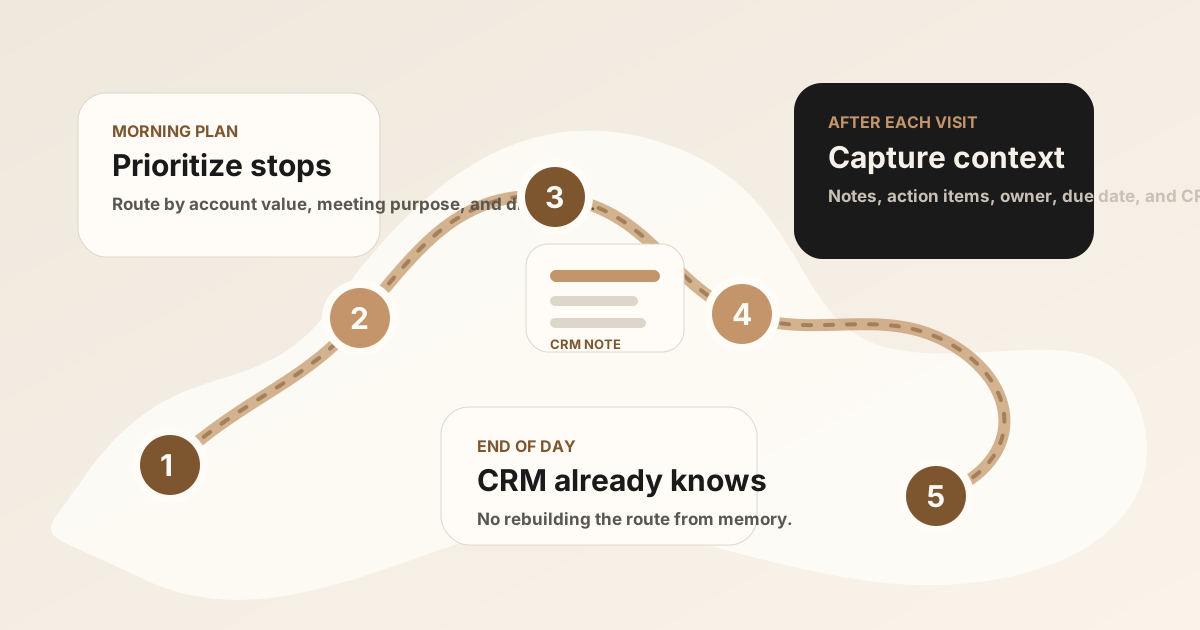
Sales route planning is usually discussed as a driving problem: fewer miles, less backtracking, more customer visits. That matters. But for field sales reps, the route is only useful if each stop turns into a clear next action.
A rep can use a route planner app to build the perfect day and still lose value if the CRM is vague after every visit. The route gets them to the customer. The meeting notes, action items, and follow-up keep the opportunity moving.
For teams comparing a broader field sales app or stack, route planning is the movement layer. It works best when it connects to mobile CRM, visit tracking, route notes, CRM field maps, after-sync hygienes, follow-up tasks, Salesforce, HubSpot, Google Sheets, and CRM sync.
The best sales route planning workflow connects three things: where the rep goes, why the visit matters, and what needs to happen after the meeting.
Quick Answer: What Sales Route Planning Workflow Do Field Reps Need?
The best sales route planning workflow helps field reps choose the right stops, see account context before they arrive, capture visit notes and outcomes after each meeting, and turn route-day promises into clear CRM follow-up tasks.
- If reps waste time between stops: prioritize route sequencing, appointment windows, nearby accounts, territory coverage, and account priority.
- If visits lack context: prioritize mobile CRM history, open opportunities, last meeting notes, stakeholder details, and visit goals before the rep walks in.
- If route days do not create follow-up: prioritize visit outcomes, action items, owners, due dates, sync status, and sync back to Salesforce, HubSpot, Sheets, or the CRM system of record.
What Is Sales Route Planning?
Sales route planning is the process of organizing customer visits into a practical sequence so field reps spend less time driving and more time in useful conversations. A strong route considers geography, appointment windows, customer priority, account history, visit frequency, and expected follow-up.
For smaller field teams, that may start with a calendar and map. For larger territories, it may involve a dedicated route planner, territory tool, field sales app, outside sales app, or mobile CRM workflow.
Sales Route Planning vs Basic Maps
Basic maps are good at directions. They tell a rep how to get from point A to point B. Sales route planning asks a broader question: which stops should happen today, in what order, and with what context?
| Tool | What it solves | What field sales still needs |
|---|---|---|
| Basic maps | Directions, traffic, and estimated drive time. | Account priority, CRM context, visit history, and follow-up tasks. |
| Route planner | Multi-stop sequencing, territory coverage, and fewer wasted miles. | A clean handoff from each meeting into CRM notes and action items. |
| Field sales app | Route, mobile CRM, visit logging, notes, tasks, and reporting in one workflow. | A habit that keeps the CRM meaningful after every visit. |
For the broader stack around routes, mobile CRM, notes, follow-up, and reporting, see the field sales app guide. For outside teams that need customer context before and after each stop, compare the outside sales app guide and the .
Sales Rep Route Planner App Comparison
Current sales route planner software is converging around a few jobs: multi-stop routing, territory coverage, CRM data, account priority, visit logging, and follow-up capture. Before comparing vendors, decide which version of the route problem you are solving.
| Route workflow | Best for | Must include | Watch for |
|---|---|---|---|
| Calendar plus maps | Small teams with scheduled visits and light territories. | Accurate locations, meeting times, customer names, and a fast way to capture notes after the stop. | No account priority, visit frequency, CRM history, or automatic follow-up handoff. |
| Sales rep route planner app | Reps with multiple stops, mixed priority accounts, and changing field days. | Multi-stop routing, appointment windows, account priority, nearby opportunities, and mobile access. | Routing can still become isolated if notes and tasks do not reach CRM. |
| Route planner plus mobile CRM | Teams that need account history and pipeline context before each visit. | CRM records, contacts, open deals, recent activity, visit notes, and task status at each stop. | CRM screens may be too slow for fresh meeting notes between stops. |
| Field sales app stack | Teams that need routes, visit tracking, notes, follow-up, files, reporting, and CRM sync. | Clear ownership between route planning, notes, CRM updates, and manager visibility. | Buying a bigger app without deciding how the customer conversation becomes the next CRM action. |
If you are still choosing the broader phone stack, use the . If you already know you need the full field-sales workflow, use the field sales app guide and its field sales app rollout plan before piloting the route workflow across every territory.
How to Prioritize Route Stops
The most efficient route is not always the best sales route. A field rep can save miles and still spend the day on low-value stops. Route planning should weigh travel time against the account context that changes pipeline outcomes.
Use account priority before geography when the visit has a clear business reason. Then use the route planner to sequence those stops into a realistic field day.
| Stop type | Why it should move up | What to prepare |
|---|---|---|
| Open opportunity | The account has active pipeline, a stakeholder meeting, or a decision point. | Last CRM note, open objection, buyer list, and next-step goal. |
| Promised follow-up | The rep already owes the customer a resource, answer, proposal, sample, or intro. | Promise owner, due date, customer-facing recap, and CRM task status. |
| Renewal or account risk | Timing, usage, support issue, competitor pressure, or contract risk needs a human visit. | Account health, risk note, decision owner, and recovery action. |
| Nearby expansion account | A short detour can create a useful touch when the rep is already nearby. | Relevant product, customer story, and reason for the drop-in. |
| Low-priority check-in | Only when it fits the route without crowding out higher-value work. | Clear outcome choice so the visit does not become vague activity. |
This is where sales route planning connects to field sales conversion. The route is not only about reaching more doors. It is about reaching the accounts where a visit can create a next step, clean CRM context, or faster follow-up.
If the team needs a stronger record of which stops happened and why, pair route planning with the sales rep visit tracking app workflow. If the manager report is too thin, use the workflow to connect outcomes, notes, tasks, and CRM activity.
A Practical Daily Route Workflow
A useful route-planning workflow starts before the rep leaves and ends only after the last meeting context has landed somewhere useful.
1. Prioritize the route
Sort stops by account value, meeting purpose, urgency, promised follow-up, and travel time. The closest account is not always the best next stop.
2. Review CRM context before walking in
Open the account, last meeting note, recent activity, open opportunity, and outstanding tasks. The rep should know the reason for the visit before the conversation starts.
3. Capture the meeting while it is fresh
After the visit, capture the customer need, objection, buying signal, stakeholder, promised asset, and due date. A short structured recap is better than a long vague note written at night.
4. Update the next action before the next stop
Turn the visit into an owner, task, due date, and CRM location. The route should not end with a pile of half-remembered conversations.
Why CRM Context Belongs in Route Planning
The best next stop is not only the closest stop. It may be the account with an open objection, a renewal date, a stalled opportunity, or a buyer who asked for a follow-up last week.
That is why route planning and mobile CRM should be connected. Reps need both movement and meaning: where to go, who to meet, what happened last time, and what should happen next. For the CRM-specific layer, see mobile CRM for field sales reps.
What Should Happen After Each Visit
The route gets the rep to the customer. The post-visit workflow protects the value of the meeting.
- Capture the meeting summary: What happened, what changed, and why the conversation mattered.
- Extract action items: Owner, promised task, due date, and relevant context.
- Attach to the right CRM record: Contact, account, opportunity, deal, or Google Sheets row.
- Prepare customer follow-up: Recap the promise while the details are still accurate.
- Review exceptions later: End-of-day review should be cleanup, not reconstruction.
For phone-first capture after a route stop, see how to record a meeting on iPhone for sales notes. If your reps need a repeatable route-day notes workflow, use the sales route notes app guide, the sales visit notes app guide, or the . If the notes are captured but promises still drift, use the field sales follow-up app guide or the outside sales follow-up app guide. If the CRM update itself is the weak point, use the .
Sales Route Planning CRM Field Map
A sales route planning app should not create a separate record of the day that managers have to reconcile later. The useful parts of each stop should map cleanly into the same CRM, mobile CRM, or field sales tracker the team already uses. The CRM field map is what turns route activity into searchable account history.
| Route-day signal | What the rep captures | Where it should land |
|---|---|---|
| Account priority | Priority tier, open opportunity, risk, or reason the account made the route. | Account field, opportunity note, or territory planning view. |
| Appointment window and location | Scheduled time, arrival context, customer location, and route exception if timing changed. | CRM activity, calendar note, route-day report, or Google Sheets route tracker. |
| Pre-visit context | Last meeting summary, open tasks, customer promise, objection, stakeholder, and visit goal. | Mobile CRM account view before the rep walks in. |
| Visit outcome | Next meeting, quote request, no action, buying signal, risk, renewal issue, or expansion interest. | CRM activity outcome, opportunity stage note, or manager route summary. |
| Promised follow-up | Resource to send, sample, proposal, intro, owner, due date, and customer-facing recap. | Salesforce task, HubSpot task, CRM reminder, or Sheets action row. |
| Sync status | Ready to sync, needs review, unclear account match, missing owner, or manager review needed. | After-sync hygiene before the final CRM sync. |
This CRM field map keeps the route planner, mobile CRM, visit tracking, and follow-up workflow aligned. Reps do not need more reporting surfaces; they need the customer conversation to become the right CRM fields without rewriting the day from memory.
Route Stop to CRM Handoff Checklist
The route planner can tell a manager which accounts were visited. The CRM handoff tells the team what changed. A useful field sales route planning app should make this handoff easy enough to finish between stops, not at the end of the night.
| Handoff item | Question to answer | Destination |
|---|---|---|
| Visit outcome | Did the visit create a next meeting, quote request, objection, renewal risk, no action, or customer follow-up? | CRM activity, route-day report, or field sales tracker. |
| Meeting note | What did the customer actually say that the next rep or manager needs to know? | Account, contact, deal, opportunity, or company note. |
| Action items | What did someone promise, who owns it, and when is it due? | CRM task, follow-up reminder, or Google Sheets action row. |
| CRM sync status | Has the useful visit context reached Salesforce, HubSpot, Zoho CRM, Dynamics 365, or Sheets? | Synced, needs review, waiting on customer, or no action needed. |
For CRM-specific handoffs, compare the Salesforce meeting-notes sync guide, the HubSpot meeting-notes sync guide, and the Google Sheets CRM template. If reps are rewriting the same route-day notes in multiple tools, the CRM admin reduction guide is the next layer.
After Route-Day CRM Sync: Keep Records Clean
Modern AI note tools, including LogicNotes, sync route-day notes to the CRM automatically. There is no approval screen between the meeting and the record, and that is the point: the rep stays out of data entry. The trust layer moves into the CRM itself, as a quick after-sync habit instead of a pre-sync gate.
After a synced note lands, a two-minute pass covers what matters: confirm the note attached to the right account or contact, make sure the next step exists as a real task with a date, and fix anything that looks off by editing the note or task directly in Salesforce, HubSpot, Zoho CRM, Dynamics 365, or Google Sheets. Edits made in the CRM are visible to managers and teammates right away, so the record stays trustworthy without slowing down the field day.
Common Sales Route Planning Mistakes
- Planning only by distance. A route should reflect opportunity value and follow-up urgency, not just miles.
- Ignoring CRM history. The rep should know what happened last time before walking in again.
- Capturing visits as generic activity. "Visited account" does not help the next person understand the deal.
- Waiting until night to update CRM. Route notes lose detail quickly when several visits blur together.
- Separating route planning from follow-up. A productive route still fails if promised next steps are not captured.
Sales Route Planning Checklist
Before the field day starts
- Route: Are stops sequenced by travel time and priority?
- CRM: Does each stop have recent account context?
- Purpose: Is the reason for each visit clear?
- Capture: Is there a fast way to record notes after each meeting?
- Follow-up: Can promises become tasks before the next stop?
- Review: Can managers see what happened without asking for a second report?
Where LogicNotes Fits
LogicNotes does not plan routes. It fits after each customer visit, when the field rep needs the conversation to become CRM-ready notes and follow-up.
Record an in-person meeting or immediate recap on iPhone with consent, get a clean AI summary and action items, then let the notes and tasks sync automatically to Salesforce, HubSpot, Zoho CRM, Dynamics 365, or Google Sheets. Your route planner gets you to the meeting. LogicNotes helps make sure the meeting is not lost afterward.
Sales Route Planning FAQ
What is sales route planning?
Sales route planning is the process of organizing customer visits into a practical sequence so field reps spend less time driving and more time in useful customer conversations.
What should a sales route planner include?
A sales route planner should account for drive time, customer priority, appointment windows, CRM history, visit frequency, nearby opportunities, and the follow-up work that happens after each stop.
How is sales route planning different from using maps?
Maps help you get from one place to another. Sales route planning also considers account priority, sales goals, CRM context, visit timing, and what needs to happen after the meeting.
What is the best sales rep route planner app?
The best sales rep route planner app depends on the route motion. Simple reps may only need maps and a calendar. Territory-heavy teams should compare route planners that account for CRM data, appointment windows, account priority, visit frequency, nearby opportunities, notes, and follow-up tasks.
Should a sales route planner sync with CRM?
Yes. A sales route planner is more useful when it connects to CRM context, because reps need account history before the visit and CRM-ready notes, tasks, and follow-up after the visit.
What should a sales route planning app sync to CRM?
A sales route planning app should sync the account visited, appointment context, visit outcome, meeting notes, promised follow-up, owners, due dates, next step, sync status, and sync status to the right CRM record.
How should route planning connect to mobile CRM?
Route planning should connect to mobile CRM by showing account history before the stop and giving reps a fast way to capture visit notes, tasks, and CRM field updates immediately after the stop.
How should field reps prioritize route stops?
Field reps should prioritize route stops by account value, appointment window, open opportunity, promised follow-up, renewal risk, nearby whitespace, and the likelihood that a visit will create a real next step.
Can sales route planning sync to Salesforce, HubSpot, or Google Sheets?
Yes. A route planning workflow can sync visit outcomes, meeting notes, action items, owners, due dates, sync status, and follow-up status to Salesforce, HubSpot, or a Google Sheets field sales tracker after each stop.
What should reps do after each route stop?
After each route stop, reps should capture a short meeting summary, mark the visit outcome, create follow-up tasks, attach the note to the right CRM record, and review anything that needs manager or customer follow-up.
How can field reps keep route-day follow-up clean after sync?
Field reps can keep route-day follow-up clean by checking low-confidence account matches, missing next steps, route exceptions, high-value opportunities, and customer promises in Salesforce, HubSpot, or Sheets right after updates land, and editing anything that looks off.
Why do meeting notes matter in sales route planning?
Route planning gets the rep to the customer. Meeting notes preserve what happened there, what was promised, and what should land in the CRM before the next stop.
Where does LogicNotes fit with sales route planning?
LogicNotes fits after the customer visit. It records in-person meetings on iPhone with consent, creates summaries and action items, and syncs CRM-ready follow-up to Salesforce, HubSpot, Zoho CRM, Dynamics 365, or Google Sheets.
Do not let good route days become vague CRM notes.
LogicNotes helps field reps turn in-person customer visits into summaries, action items, and CRM-ready follow-up while the route is still fresh.
Download LogicNotes for iOS