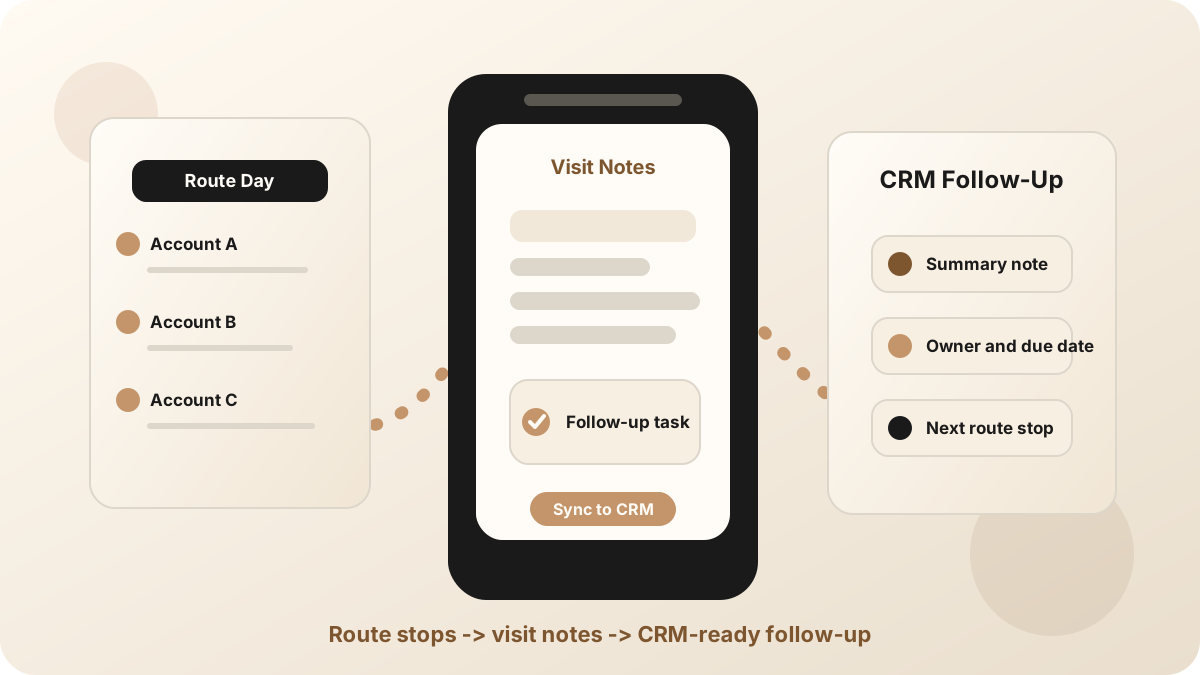
An outside sales rep can have a strong customer visit and still lose the value of the conversation. The buyer explains a blocker, names another stakeholder, asks for a sample, and gives a clue about timing. Then the rep walks back to the car, checks the next route stop, and the detail starts to fade.
That is the job of an outside sales visit notes app: capture the visit while the context is still sharp, turn it into a clean note and task list, then move the useful parts into CRM. It is one layer inside the broader outside sales app, outside sales CRM app, and field sales app stack.
The goal is not more notes. The goal is for every customer visit to leave behind a clear account update, a real next step, and a CRM record the team can trust.
Why Outside Sales Visit Notes Break
Outside sales is not a tidy desk workflow. Reps move between customer sites, showrooms, counters, trade events, job sites, and parking lots. A notes workflow that works on a laptop can break the moment a rep has only three minutes before the next drive.
Current field-sales and outside-sales tools often bundle route planning, visit tracking, check-ins, photos, mobile CRM, note logging, task reminders, and manager visibility. Those features help, but the customer note still has to be fast enough for the field. If capturing the visit feels like a form, reps will wait until later.
- Route pressure compresses memory. Specific buyer language becomes a generic note like "interested, follow up."
- Visit proof replaces visit context. A check-in shows the stop happened, but not what changed in the account.
- Follow-up separates from the conversation. The task exists, but it does not explain what the rep promised.
- End-of-day CRM updates get vague. After five stops, the details blur together.
What an Outside Sales Visit Notes App Should Capture
The best outside sales visit note is short enough to scan and specific enough to act on. It should preserve the customer context, the buyer's real concern, the next step, and the CRM record where that context belongs.
| Visit detail | Why it matters | Where it goes next |
|---|---|---|
| Account and location | Explains who the rep visited, where the stop happened, and which account or opportunity was discussed. | CRM contact, account, company, deal, or opportunity record. |
| Visit objective and outcome | Shows why the rep stopped there and whether the visit moved the account forward. | CRM activity, account note, or visit report. |
| Buyer pain and objections | Preserves the real reason follow-up matters instead of flattening the visit into a generic status. | Opportunity context, customer note, or sales call report. |
| Promised follow-up | Turns promises into work with an owner and due date. | CRM task, follow-up email, or reminder. |
| Source visit | Lets the team trace a task or note back to the stop that created it. | CRM note, task description, route-day report, or customer meeting note. |
Connect Visit Notes to Route Follow-Up
Route planning helps outside reps get to the right accounts. Visit notes make sure those stops create follow-through. A route without notes can improve coverage while still leaving the CRM thin.
Use sales route planning to prioritize the day, then use a visit notes workflow after each meaningful customer conversation. For the route-stop version of this habit, use the sales route notes app workflow. The handoff should be simple: stop, capture, confirm action items, sync, then move to the next account. If the gap is reminders and ownership, use the outside sales follow-up workflow.
Check-In App vs Outside Sales Visit Notes App
A field sales check-in app answers whether the rep visited the customer. An outside sales visit notes app answers what happened during that visit and what should happen next. A field team may need both, but they should not be treated as the same job.
Check-ins, location logs, photos, and route completion are useful for coverage and accountability. Notes, outcomes, objections, and follow-up tasks are useful for sales execution. If your current tool proves the stop but does not preserve the conversation, pair it with a notes workflow.
A Rep Workflow for Outside Sales Visit Notes
The workflow has to be simple enough to use between stops. This is the version that holds up during a real outside sales day.
Use this after every customer visit
If your team needs a note format, start with the customer meeting notes template. If the problem is commitments getting lost, use the sales meeting action-item workflow.
How Outside Sales Visit Notes Should Sync to CRM
An outside sales visit note should not become another hidden notebook. The useful parts need to land where the next sales action happens.
- Sync the summary as a note. Keep it concise enough for another rep or manager to understand quickly.
- Create tasks from promises. Pricing, demos, samples, intros, technical answers, and next meetings should become visible work.
- Attach the route context. Include the account, visit source, and customer stop that created the follow-up.
- Match the right record. Attach the note to the contact, account, company, opportunity, or deal where the follow-up belongs.
- Keep judgment fields reviewable. Stage, forecast, amount, and close date should usually require human confirmation.
For CRM-specific handoff, compare the Salesforce meeting-notes sync workflow and the HubSpot meeting-notes sync workflow. For task structure, see how to turn sales meeting notes into CRM tasks.
Common Outside Sales Visit Notes Mistakes
Most teams do not fail because they lack a notes tool. They fail because the note is too slow, too vague, or disconnected from the route, follow-up, and CRM workflow.
- Waiting until the route is over. By then, the note is usually a summary of a memory, not the visit.
- Saving only a check-in. A timestamp does not explain the buyer's objection or promised next step.
- Saving only a transcript. The transcript is backup. The CRM needs a concise summary and tasks.
- Creating generic reminders. "Follow up" is not enough. The task needs context, owner, and due date.
- Letting notes live outside CRM. Notes that never reach the account record are hard to reuse before the next visit.
Where LogicNotes Fits
LogicNotes is built for the outside sales visit that happens away from a video call. You record the in-person meeting on iPhone with consent or capture an immediate recap, get a structured AI summary and action items, then sync the useful context to your CRM or Google Sheets.
It pairs naturally with sales route planning, sales visit notes, and the broader field sales app guide: the route gets the rep to the visit, LogicNotes captures what happened, and the CRM gets the follow-up. If the handoff after the visit is your bottleneck, use the field sales follow-up app workflow. If you are starting from check-ins, use the sales rep visit tracking workflow.
Outside Sales Visit Notes App FAQ
What is an outside sales visit notes app?
An outside sales visit notes app helps reps capture what happened during face-to-face customer visits, structure the note, create follow-up tasks, and sync useful context to CRM from the field.
What should outside sales visit notes include?
Outside sales visit notes should include the account, contact, location, visit objective, customer pain, objections, buying signals, promised follow-ups, owners, due dates, and the CRM record that should be updated.
How are outside sales visit notes different from a check-in?
A check-in confirms that a rep visited an account. Outside sales visit notes explain what happened, what changed, what was promised, and what follow-up should happen next.
When should outside sales reps write visit notes?
Outside sales reps should capture visit notes during the meeting when appropriate or immediately after the visit, before starting the drive to the next stop. Waiting until the end of the route makes notes less specific.
Should outside sales visit notes sync to CRM?
Yes. Outside sales visit notes, outcomes, and follow-up tasks should sync to CRM when the CRM is the system of record for account history, activity, and pipeline follow-through.
Where does LogicNotes fit?
LogicNotes fits between the customer visit and the CRM. It records in-person meetings on iPhone with consent, generates summaries and action items, and syncs CRM-ready notes and tasks to tools such as Salesforce, HubSpot, Zoho, Dynamics, or Google Sheets.
Capture each outside sales visit before it fades.
LogicNotes turns in-person customer visits into summaries, action items, and CRM-ready follow-up while the route-day details are still fresh.
Download LogicNotes for iOS