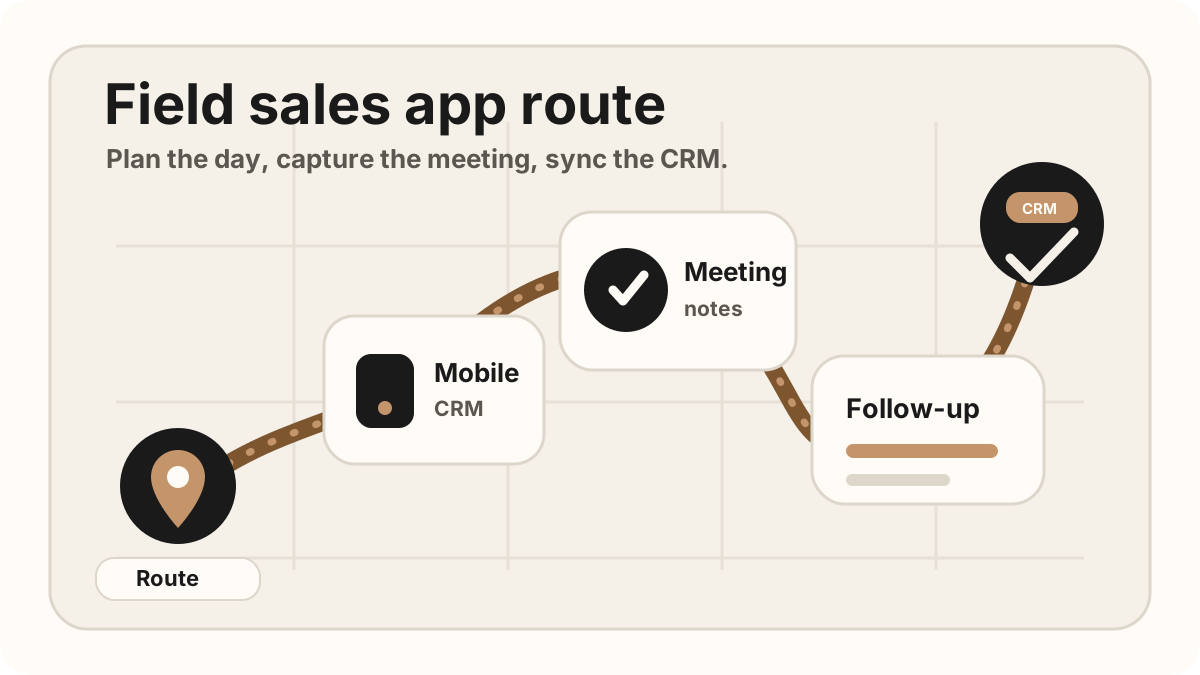
Outside sales reps work in the spaces between meetings: customer offices, job sites, conference floors, parking lots, hotel lobbies, and the drive to the next stop. The right outside sales app should make that day easier, not turn every customer visit into a night of admin.
The core problem is handoff. A rep has a real conversation, learns something useful, promises a follow-up, and then has to move that context into the CRM before it fades. If the tools are disconnected, the CRM gets a vague note and the next step becomes guesswork.
The best outside sales app stack helps reps plan the day, stay present in the meeting, and turn what happened into a clear CRM update.
Quick Answer: What Outside Sales App Stack Should Reps Use?
The best outside sales app stack is usually a small mobile workflow that covers route planning, mobile CRM, customer visit notes, follow-up tasks, proposal or file access, lightweight reporting, and automatic CRM sync.
- If territory coverage is the bottleneck: start with route planning, account priority, nearby customers, and visit tracking.
- If customer context is missing: start with mobile CRM, account history, open opportunities, previous notes, and files.
- If follow-up breaks after visits: start with in-person notes, action items, owners, due dates, after-sync hygienes, and CRM-ready tasks.
This guide is the outside-sales-specific companion to the broader field sales app guide. Use the field-sales hub when you are mapping the whole route-to-CRM architecture, the field sales app rollout plan when you are piloting that stack across territories, the when you are choosing a rep's phone stack, and this outside sales app guide when the day is built around in-person customer visits, route context, and CRM follow-through.
Best Outside Sales Apps by Use Case
Most outside sales app comparisons mix several different jobs into one list. Before comparing vendors, choose the part of the field day that is actually breaking down: route planning, customer context, visit tracking, notes, follow-up, files, or reporting.
| Use case | App category to compare | Best fit |
|---|---|---|
| Route and territory planning | Route planners, map-based field sales apps, territory tools, and calendar workflows. | Reps who need to sequence stops, reduce drive time, cluster accounts, and plan around priority or appointment windows. |
| Mobile CRM and account context | Salesforce, HubSpot, Zoho CRM, Dynamics 365, Pipeline CRM, or your current CRM's mobile app. | Reps who need account history, contacts, deals, open tasks, and recent activity before walking into a customer visit. |
| Visit tracking and check-ins | Field sales apps with check-ins, activity logging, GPS visit verification, and manager reporting. | Teams that need visibility into which customers were visited, what happened, and which visits still need follow-up. |
| Visit notes and follow-up | Phone-first notes apps, task workflows, CRM activity capture, and LogicNotes for in-person meeting capture. | Relationship-heavy reps whose customer conversations create action items, objections, stakeholder updates, and next steps. |
| Proposals, files, and field materials | Document access, proposal tools, e-signature apps, business card capture, and file-sharing workflows. | Reps who need to send the right deck, quote, brochure, agreement, or contact details immediately after a visit. |
The practical outside sales app is usually a connected stack, not one oversized tool. A route app can get the rep to the customer, a CRM app can show account context, and a notes-to-CRM workflow can protect the customer promise after the meeting.
What Is an Outside Sales App?
An outside sales app is a mobile tool, or a connected set of mobile tools, that helps reps manage customer visits while they are away from a desk. It should support route planning, account context, visit tracking, check-ins, meeting capture, follow-up, file sharing, reporting, and CRM sync. For the route layer specifically, see sales route planning for field reps. For the notes attached to each stop, use the . For route-day proof and manager visibility, compare the visit tracking after-sync hygienes.
Some teams buy one all-in-one field platform. Others combine a route planner, CRM mobile app, meeting-notes tool, email, and reporting view. Both approaches can work if the rep does not have to retype the same customer conversation into every system.
If you are comparing the broader category, start with the field sales app CRM field map. This article focuses specifically on the outside sales rep's day: planning stops, meeting customers face to face, and getting the next step into the system of record. If CRM updates from the field are the main bottleneck, use the outside sales CRM app guide.
Why Outside Sales Apps Are Different From Inside Sales Tools
Inside sales tools assume the rep is working from a laptop, with stable internet, tabs open, and time to type. Outside sales tools have to work when the rep is moving, talking, driving, or standing outside the next customer site.
| Need | Inside sales workflow | Outside sales workflow |
|---|---|---|
| Planning | Queue, calendar, inbox, and call list. | Route, territory, nearby accounts, and drive time. |
| Meeting context | CRM record beside the video call. | Mobile account history before walking into the meeting. |
| Notes | Typed notes, call recording, or meeting bot. | Consent-aware in-person recording, voice recap, or structured mobile note. |
| Follow-up | Email and task while still at the desk. | Task or recap before the next drive, while details are fresh. |
The Outside Sales App Stack
A useful outside sales app stack usually has seven pieces. The names of the tools matter less than whether the handoff works.
- Route planning: Show the rep where to go, which accounts are nearby, and how to avoid wasted travel.
- Mobile CRM: Make account history, contacts, open deals, and recent activity usable from the phone.
- Visit tracking and check-ins: Confirm which customer stops happened, capture outcomes, and give managers useful visibility without replacing context.
- Meeting notes: Capture the customer conversation, summarize what mattered, and identify action items. If this is the weak spot, use a dedicated outside sales visit notes app workflow.
- Follow-up: Turn promises into emails, reminders, CRM tasks, owners, and due dates. If promises are getting fuzzy between stops, use an outside sales follow-up app workflow or the broader field sales follow-up after-sync hygiene.
- Files and proposals: Keep the right deck, quote, brochure, or agreement ready to send from the field.
- Reporting: Show what happened today without making the rep rewrite the day at night.
Outside Sales App Workflow by Field Stage
The best outside sales app stack should follow the rep through the day. Each stage should produce a useful handoff instead of another loose note or disconnected dashboard.
| Field stage | App layer to use | Useful handoff |
|---|---|---|
| Route planning | Route planner, territory map, calendar, account priority list, and mobile CRM. | A realistic day plan with the right accounts, appointment windows, and open tasks. |
| Before the customer visit | Mobile CRM, route notes, contact history, and previous follow-up. | A clear visit objective, last-touch context, and the customer detail the rep should remember. |
| During the conversation | Phone-first notes, consent-aware recording, or a structured visit note. | Buyer pain, objections, stakeholder changes, numbers, dates, and promised next steps. |
| Right after the visit | AI summary, action-item extraction, follow-up task creation, and CRM sync. | A CRM-ready note, owner, due date, follow-up context, and next meeting reminder. |
| Manager review | Visit outcomes, activity logs, CRM dashboards, and coaching notes. | Visibility into account progress without asking reps to write a separate end-of-day report. |
Outside Sales App vs CRM
A CRM should remain the system of record. It stores accounts, contacts, opportunities, activity history, tasks, and pipeline stages. The outside sales app is the layer that helps the rep execute the day and move useful context back into that system.
The mistake is expecting a desktop-first CRM screen to solve every field workflow. A rep who just finished a customer visit should not need a laptop, a long form, and twenty required fields before they can capture the next action.
For meeting-specific CRM handoff, see how to record a meeting on iPhone for sales notes. For the CRM app layer itself, compare the outside sales CRM field map. For reducing the admin after those meetings, see how to reduce CRM admin for sales reps.
Outside Sales App CRM Field Map
An outside sales app does not need to own the whole CRM record. It needs to capture the parts of the field visit that would otherwise disappear, then send them to the right account, contact, deal, task, or sheet row.
| Field data | Why it matters | Where it should land |
|---|---|---|
| Account and contact | Attaches the visit to the right customer before notes drift into a private app. | Salesforce account or opportunity, HubSpot company or deal, or Google Sheets account row. |
| Visit outcome | Shows what changed because the customer visit happened. | Activity outcome, route report, call report, or pipeline status. |
| Conversation summary | Preserves the buyer language, objection, stakeholder change, timing, or decision signal. | CRM note, contact timeline, opportunity note, or account history. |
| Action item | Turns the customer promise into a trackable next step. | CRM task, reminder, follow-up queue, or shared task row. |
| Owner and due date | Makes follow-up specific enough that another teammate can pick it up. | Task owner, due date, next-step field, or team tracker. |
| Sync status | Shows whether the field update reached CRM or still needs review. | Synced, queued, needs review, or no-action status. |
For CRM-specific setup details, use the guides on Salesforce sync after-sync hygienes, HubSpot sync after-sync hygienes, Google Sheets CRM field maps, the Google Sheets CRM after-sync hygiene, and CRM admin reduction. For the full category map, compare the field sales app CRM field map.
After Outside Sales CRM Sync: Keep Records Clean
Modern AI note tools, including LogicNotes, sync outside sales visit notes to the CRM automatically. There is no approval screen between the meeting and the record, and that is the point: the rep stays out of data entry. The trust layer moves into the CRM itself, as a quick after-sync habit instead of a pre-sync gate.
After a synced note lands, a two-minute pass covers what matters: confirm the note attached to the right account or contact, make sure the next step exists as a real task with a date, and fix anything that looks off by editing the note or task directly in Salesforce, HubSpot, Zoho CRM, Dynamics 365, or Google Sheets. Edits made in the CRM are visible to managers and teammates right away, so the record stays trustworthy without slowing down the field day.
A Practical Outside Sales Workflow
The app stack should match the shape of the rep's day.
Before the first visit
Review the route, confirm the meeting goal, check the account history, and look at any open tasks or recent notes. The rep should know why they are walking in.
During the customer meeting
Stay present. If the meeting is recorded, handle consent clearly. If not, capture the few details that will matter later: names, objections, numbers, dates, promised assets, and next steps.
Right after the meeting
Create the follow-up while the conversation is still fresh. The useful output is not just a note. It is a summary, action item, owner, due date, and CRM location.
At the end of the day
Review exceptions, not every detail. A good outside sales app stack should already have captured the activity, notes, tasks, and follow-up context.
Common Outside Sales App Mistakes
- Buying a route planner but ignoring meeting capture. Getting to more visits is not enough if the CRM loses what happened.
- Using too many apps. Every extra handoff is another place for notes, contacts, and follow-up to drift.
- Making mobile a read-only experience. Reps need to update the record from the field, not just look things up.
- Tracking location but not context. A check-in proves a visit happened. It does not explain the buyer's objection or the next step.
- Waiting until night to write CRM notes. The longer the delay, the more generic the update becomes.
Outside Sales App Checklist
Use this checklist before adding another app to a rep's phone.
What the app stack should prove
- Fast on mobile: The rep can capture or update important context in a few taps.
- Offline-friendly: Notes, tasks, or visit context can be saved when signal is weak.
- CRM-connected: Useful details reach the system of record without copy-paste.
- Meeting-aware: The app preserves what the customer said, not just that a meeting occurred.
- Manager-visible: Leaders can see activity and follow-up without asking reps to write a second report.
- Small enough to use: The stack should reduce admin, not become a second job.
Where LogicNotes Fits
LogicNotes fits in the meeting-notes layer of the outside sales app stack. Record an in-person customer meeting on iPhone with consent, get a clean AI summary and action items, then let the notes and tasks sync automatically to Salesforce, HubSpot, Zoho CRM, Dynamics 365, or Google Sheets.
It does not replace the CRM, route planner, calendar, or proposal tool. It handles the handoff between the real customer conversation and the CRM-ready follow-up that needs to happen next.
Outside Sales App FAQ
What is an outside sales app?
An outside sales app is a mobile tool or connected app stack that helps reps plan customer visits, review account context, capture meeting notes, create follow-up tasks, and update the CRM while they are working away from a desk.
What apps do outside sales reps need?
Most outside sales reps need route planning, mobile CRM access, in-person meeting notes, follow-up tasks, proposal or file access, and lightweight reporting. The stack should stay small enough that reps use it between customer visits.
What is the best outside sales app?
The best outside sales app depends on the rep's motion. Territory-heavy reps may need route planning and visit tracking, CRM-heavy reps need fast mobile updates, and relationship-heavy reps need strong visit notes, follow-up tasks, and CRM sync.
What features should an outside sales app include?
An outside sales app should include mobile CRM access, route or territory planning, visit tracking, check-ins, offline-friendly notes, follow-up tasks, proposal or file access, lightweight reporting, and clean CRM sync.
Is an outside sales app the same as a CRM?
No. A CRM is the system of record for accounts, contacts, deals, and pipeline stages. An outside sales app helps the rep execute the field day and move useful context back into the CRM.
Can an outside sales app sync to Salesforce, HubSpot, or Google Sheets?
Yes. An outside sales app can sync to Salesforce, HubSpot, or Google Sheets when account, contact, visit outcome, conversation summary, action item, owner, due date, and sync status fields are structured before the update is sent.
What should an outside sales app sync to CRM?
An outside sales app should sync the account, contact, visit outcome, conversation summary, buyer signal, objection, promised follow-up, owner, due date, next step, CRM destination, and sync status.
How should outside sales apps connect to mobile CRM?
Outside sales apps should connect to mobile CRM by showing account history before the visit and giving reps a fast way to capture notes, tasks, field updates, and follow-up immediately after the customer conversation.
How does an outside sales app reduce CRM admin?
An outside sales app reduces CRM admin when reps capture each customer visit once, turn the conversation into a summary and follow-up tasks, and let the notes and tasks sync automatically to CRM instead of rewriting the day later.
How is an outside sales app different from a field sales app?
The terms overlap. Field sales app is the broader category for teams that sell or service customers in person. Outside sales app usually refers to the rep's daily stack for routes, customer visits, notes, follow-up, and CRM updates.
Should an outside sales app work offline?
Yes. Outside sales reps often work in customer sites, parking lots, trade shows, rural routes, and buildings with unreliable signal. The app should capture notes or updates first and sync later.
Should reps check outside sales updates after they sync?
Yes. After a sync lands, reps should give the CRM record a quick check when the account match looks uncertain, the next step is missing, a customer promise was captured, a high-value opportunity changed, or manager reporting will be affected. Fixes happen directly in the CRM record.
Where does LogicNotes fit in an outside sales app stack?
LogicNotes fits in the meeting-notes layer. It records in-person sales meetings on iPhone with consent, creates summaries and action items, and syncs CRM-ready context to Salesforce, HubSpot, Zoho CRM, Dynamics 365, or Google Sheets.
Turn outside sales meetings into CRM-ready notes.
If your reps have strong customer visits but weak CRM updates later, LogicNotes helps capture the conversation and sync the follow-up while it is still fresh.
Download LogicNotes for iOS