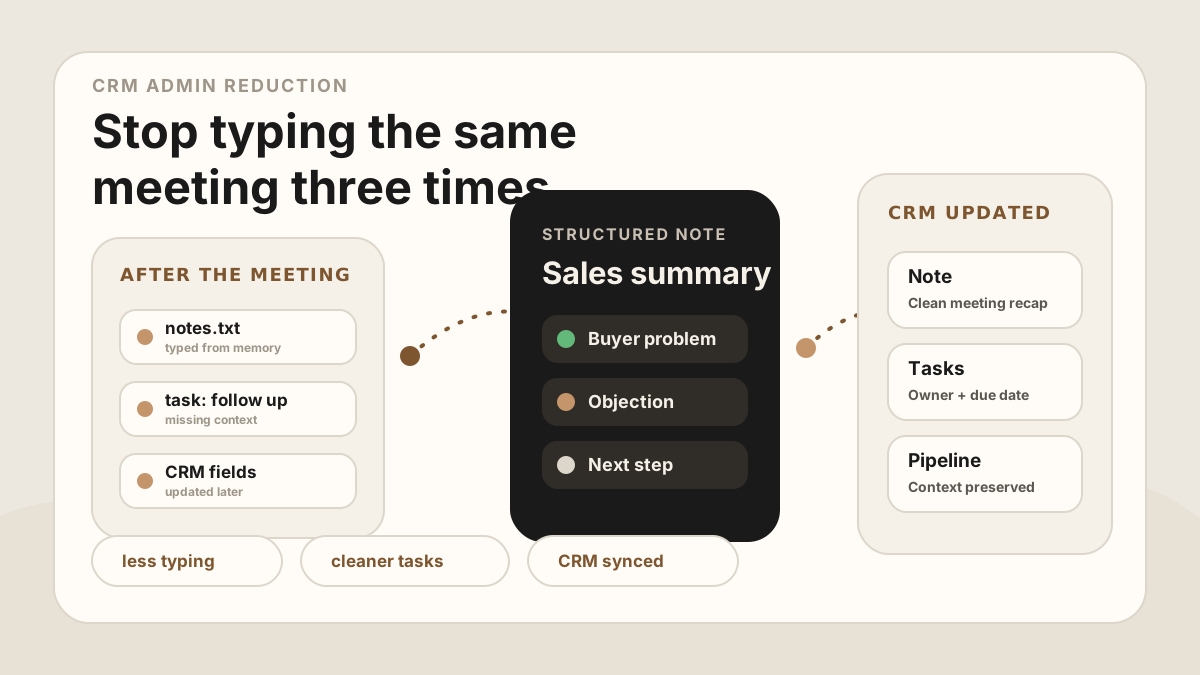
CRM admin rarely feels like one big task. It shows up as five minutes after a customer visit, ten minutes before the next call, a half-written note at lunch, and a vague task you create because you know you promised something but cannot remember the wording.
The work matters. A clean CRM helps the next follow-up, the next handoff, and the next forecast. But the way most reps update CRM is broken: they have the real conversation in one place, notes in another, tasks in another, and the CRM gets whatever they still remember when they finally sit down.
That pain is sharper for field reps. A field sales app stack should reduce the typing between customer visits: route planning gets the rep to the right account, a phone-first note workflow captures the meeting, and mobile CRM sync keeps the record useful before the next stop.
For teams comparing a broader sales rep app, outside sales app, or the admin reduction layer should connect visit tracking, CRM field maps, after-sync hygienes, follow-up tasks, Salesforce, HubSpot, Google Sheets, and CRM sync instead of creating another place for reps to type.
The 2026 version of CRM admin reduction is not "ask reps to type faster." It is capture once, structure once, and route the output to the right place: Salesforce activity, HubSpot timeline note, CRM task, Google Sheets row, follow-up email, or manager after-sync hygiene.
The fix is not "be more disciplined." The fix is to capture the meeting once, structure it once, and let the notes and tasks sync automatically.
Quick Answer: How Can Sales Reps Reduce CRM Admin After Meetings?
Sales reps can reduce CRM admin by capturing the meeting once from the phone, turning it into a reviewed summary and follow-up task list, mapping the useful details to CRM fields, and syncing only approved notes, owners, due dates, outcomes, Salesforce or HubSpot updates, Google Sheets rows, and manager-review items to the right destination.
- If reps retype the same meeting: prioritize one structured source note, reusable CRM field map, follow-up task extraction, and destination-specific sync rules.
- If tasks are still manual: prioritize action item, customer reason, task owner, due date, related record, priority, and sync status.
- If automation creates risk: prioritize human review for stage, amount, close date, forecast, deal health, blocked updates, and sync errors.
Why CRM Admin Piles Up
Sales reps are usually not avoiding CRM because they hate data. They avoid CRM because the admin step happens after the useful part of the work. The meeting is live, specific, and human. The CRM update is delayed, repetitive, and easy to get wrong.
That delay creates a gap. In the meeting, the buyer says why the timing matters. Later, the CRM says "follow up." In the meeting, the buyer names the internal blocker. Later, the note says "budget concern." The admin gets done, but the useful context leaks out.
Recent sales research keeps pointing at the same problem: reps lose too much selling capacity to non-selling work such as CRM updates, meeting logging, follow-up scheduling, and internal coordination. The same pattern shows up in broader AI workflow automation statistics: automation creates value only when outputs land back in trusted systems.
- Notes are captured too late. By the time the rep writes the update, the best phrases and details are gone.
- Tasks are too vague. "Follow up" does not say what to send, who owns it, or why it matters.
- Fields are duplicated. The same context gets typed into notes, tasks, emails, deal fields, and spreadsheets.
- CRM hygiene competes with selling time. Reps have to choose between updating records and moving to the next customer conversation.
What to Stop Doing Manually
Reducing CRM admin starts with a simple audit. Look at the work a rep does after a meeting and separate judgment from transcription. Judgment should stay human. Transcription, formatting, summarizing, and task creation should not eat the afternoon.
| Manual task | Better system | Why it helps |
|---|---|---|
| Typing meeting notes from memory | Record or recap the meeting right away. | The CRM gets what happened, not what survived the day. |
| Writing generic follow-up tasks | Extract owner, action, due date, and context. | The task tells the rep exactly what to do next. |
| Copying the same summary into multiple tools | Use one structured note as the source. | Notes, tasks, and spreadsheets stay consistent. |
| Updating only the deal stage | Capture the reason the stage changed. | Managers can see the real signal, not just the label. |
| Rebuilding context before every follow-up | Link notes, tasks, and buyer details to the contact. | The next touch starts from the last real conversation. |
Capture Once, Then Structure the Meeting
The lowest-admin CRM workflow starts during or immediately after the meeting. If recording is appropriate and consent is clear, capture the conversation. If recording is not appropriate, record a short private recap after the meeting while the details are still fresh.
The goal is not to store more raw information. The goal is to create one reliable source that can become a summary, CRM note, task list, and follow-up draft. Once the meeting is structured, the rep should not have to retype the same context four different ways.
Post-meeting capture checklist
CRM Fields That Actually Matter
One reason CRM admin feels heavy is that every field starts to look equally important. It is not. For sales reps, the highest-value fields are the ones that improve the next action.
If your team uses spreadsheets as a lightweight CRM, the same principle applies. A clean row with meeting date, summary, action items, owner, due date, and next step is more useful than a long block of pasted notes. See Google Sheets CRM for sales meeting notes for a spreadsheet version of this workflow.
CRM Admin Reduction CRM Field Map
The fastest way to reduce CRM admin is to stop asking reps to translate the same meeting into five formats. Use one meeting output and a CRM field map to route each detail to the CRM field where it creates the most follow-up value.
| Meeting output | CRM destination | Admin rule |
|---|---|---|
| Account and contact match | Lead, contact, account, company, opportunity, deal, or spreadsheet row. | Auto-suggest when the email, attendee, company, or deal context is confident; ask the rep when it is not. |
| Meeting summary | Activity note, timeline note, call note, or meeting row summary. | Keep it short enough for another teammate to scan in under a minute. |
| Buyer pain or objection | Note body, risk field, deal next step, or manager review note. | Preserve buyer wording, but review anything sensitive before customer-facing follow-up. |
| Action item | Task title, owner, due date, priority, related record, and status. | Create automatically when action, owner, date, and record are clear. |
| Follow-up message | Email draft, task detail, or follow-up note. | Draft automatically; require rep review for tone, pricing, security, and promises. |
| Sync status | Needs review, synced, task created, waiting on customer, or manager review. | Make exceptions visible instead of asking reps to manually inspect every field. |
The Low-Admin CRM Workflow
The workflow should be simple enough to use after every in-person meeting. If it requires a long form, a desktop session, and ten required fields, reps will eventually work around it.
Use this five-step system
For the action-item piece, see how to capture action items from sales meetings. For keeping the whole database cleaner, see the CRM hygiene checklist for sales teams.
If you are evaluating the broader phone-first toolkit around this workflow, the field sales app guide covers route planning, mobile CRM, visit tracking, meeting notes, follow-up, files, and reporting. Use the field sales app rollout plan before adding another admin layer to every territory. For the CRM-specific layer, see mobile CRM for field sales reps and sales rep visit tracking.
CRM Admin Reduction by Destination
The same meeting can create different admin work depending on where the team expects the output to land. A low-admin workflow makes those destinations explicit before reps are buried in duplicate typing.
| Destination | What should sync | What the rep should review |
|---|---|---|
| Salesforce | Meeting summary, activity note, action items, task owner, due date, related record, and originating meeting. | Opportunity stage, amount, close date, forecast, and deal health. See the Salesforce meeting-notes sync workflow. |
| HubSpot | Timeline note, associated contact or company, deal context, follow-up tasks, owner, due date, and status. | Deal stage, lifecycle changes, amount, close date, and sensitive customer interpretation. See the HubSpot meeting-notes sync workflow. |
| Google Sheets CRM | One clean row with meeting date, account, contact, summary, next step, owner, due date, and CRM status. | Duplicate rows, stale owners, unclear next steps, and open follow-up that should move to a real CRM task. |
| Follow-up email | Recap, promised assets, buyer questions, next meeting details, and who owns each commitment. | Tone, sensitive wording, pricing language, legal/security claims, and anything the customer did not explicitly agree to. |
| Manager review | Deal risk, blocked follow-up, discount request, procurement issue, new stakeholder, and stalled next step. | Whether the issue needs manager action, internal escalation, or a cleaner customer-facing follow-up. |
CRM Admin Workflow for Field Sales Reps
Field sales CRM admin has a different rhythm than desk-based sales. The rep might be in a customer lobby, parking lot, conference booth, or on the way to the next account. The system has to work from the phone.
Use this after each field visit
This workflow pairs with sales route planning because the rep needs both the route and the post-visit update loop. If your team syncs into a specific CRM, compare the Salesforce sync workflow, HubSpot sync workflow, and meeting follow-up template.
What to Automate and What to Review
The goal is not to remove judgment from sales. The goal is to remove repetitive formatting, copying, task creation, and CRM cleanup so reps can use judgment where it matters.
CRM admin guardrails
For teams deciding whether they need a meeting bot or phone-first capture, use the AI note taker without a meeting bot guide. If the first friction point is capture, start with how to record a meeting on iPhone for sales notes. If the next step is customer communication, use the in-person sales call follow-up template.
Manager Spot-Checks for Low-Admin CRM
Modern AI note tools, including LogicNotes, sync meeting notes to the CRM automatically. There is no approval screen between the meeting and the record, and that is the point: the rep stays out of data entry. The trust layer moves into the CRM itself, as a quick after-sync habit instead of a pre-sync gate.
After a synced note lands, a two-minute pass covers what matters: confirm the note attached to the right account or contact, make sure the next step exists as a real task with a date, and fix anything that looks off by editing the note or task directly in Salesforce, HubSpot, Zoho CRM, Dynamics 365, or Google Sheets. Edits made in the CRM are visible to managers and teammates right away, so the record stays trustworthy without slowing down the field day.
Common CRM Admin Mistakes
Most CRM admin problems are workflow problems, not personality problems. Reps will maintain better records when the system respects how sales actually happens.
- Making reps rewrite the same meeting several times. One meeting should create one structured source of truth.
- Tracking activity but not meaning. A completed task is less useful than knowing what was promised and why.
- Waiting until end of day. The later the CRM update happens, the more generic the note becomes.
- Forcing every detail into required fields. Required fields should support follow-up, not punish reps for moving quickly.
- Ignoring in-person meetings. Bot-based meeting tools do not capture the customer visit, hallway chat, field demo, or conference conversation.
Where LogicNotes Fits
LogicNotes is built for sales people who have real-world conversations and need the CRM to reflect what actually happened. Record an in-person meeting or immediate recap on your iPhone, then turn it into a clean summary, action items, follow-up context, and CRM or Google Sheets updates.
That means reps spend less time typing CRM notes and more time selling. The CRM still gets the useful details: what happened, what changed, who owns the next step, and what needs to happen next. If the team is comparing tools, the AI meeting notes apps guide for in-person sales teams shows how phone-first capture, CRM sync, and follow-up fit together.
CRM Admin FAQ for Sales Reps
How can sales reps reduce CRM admin after meetings?
Sales reps can reduce CRM admin by capturing the meeting or an immediate recap once, turning it into a structured AI summary and action items, then syncing the useful note and tasks to the right CRM record.
What CRM admin should stay manual?
Judgment-heavy updates should stay manual or require review, including deal stage, forecast category, close date, amount, and sensitive customer interpretation.
What CRM fields matter most after a sales meeting?
The highest-value fields are the meeting summary, action items, owners, due dates, objections, next meeting context, associated contact or account, sync status, and the originating meeting.
How should field sales reps update CRM from the road?
Field sales reps should capture the customer visit or a quick recap on their phone, review the summary and follow-up tasks, then sync the update before the next stop. A CRM field map and after-sync hygiene keep the update useful without adding more typing.
Can AI meeting notes reduce CRM admin?
Yes, if AI meeting notes produce structured sales output instead of just a transcript. The useful output is a summary, customer pain, objections, action items, owners, due dates, CRM tasks, and the right destination record.
How do Salesforce and HubSpot sync reduce CRM admin?
Salesforce and HubSpot sync reduce CRM admin when meeting summaries and follow-up tasks land on the right record automatically, while the rep only reviews judgment-heavy changes such as stage, amount, close date, forecast, or deal health.
What CRM admin can be automated safely?
Routine meeting summaries, task creation, related records, follow-up status, and Google Sheets rows can be automated end to end. Sensitive customer language and pipeline fields are best adjusted by a person directly in the CRM after the sync lands.
What CRM fields should AI meeting notes create?
AI meeting notes should create a scannable summary, buyer pain, objections, action items, task owners, due dates, related contact or account, follow-up status, CRM field map, and sync status. They should suggest, not silently change, deal stage, amount, forecast, or close date.
What is the fastest post-meeting CRM workflow for field reps?
The fastest workflow is to capture the meeting or recap on the phone, review the AI summary, approve the action items, sync the CRM note and tasks, and send the follow-up before the next customer stop.
Should a CRM store the full meeting transcript?
Usually no. The transcript can be useful as backup, but the CRM should stay scannable with a concise summary, buyer context, clear action items, and follow-up tasks.
How can managers reduce CRM admin without losing visibility?
Managers can reduce CRM admin by standardizing which fields matter, automating routine notes and tasks, using after-sync hygienes for risk or forecast changes, and auditing whether follow-up tasks have owners, due dates, and customer context.
Stop rebuilding every meeting by hand.
LogicNotes turns in-person sales conversations into summaries, action items, and CRM updates while the details are still fresh.
Download LogicNotes for iOS