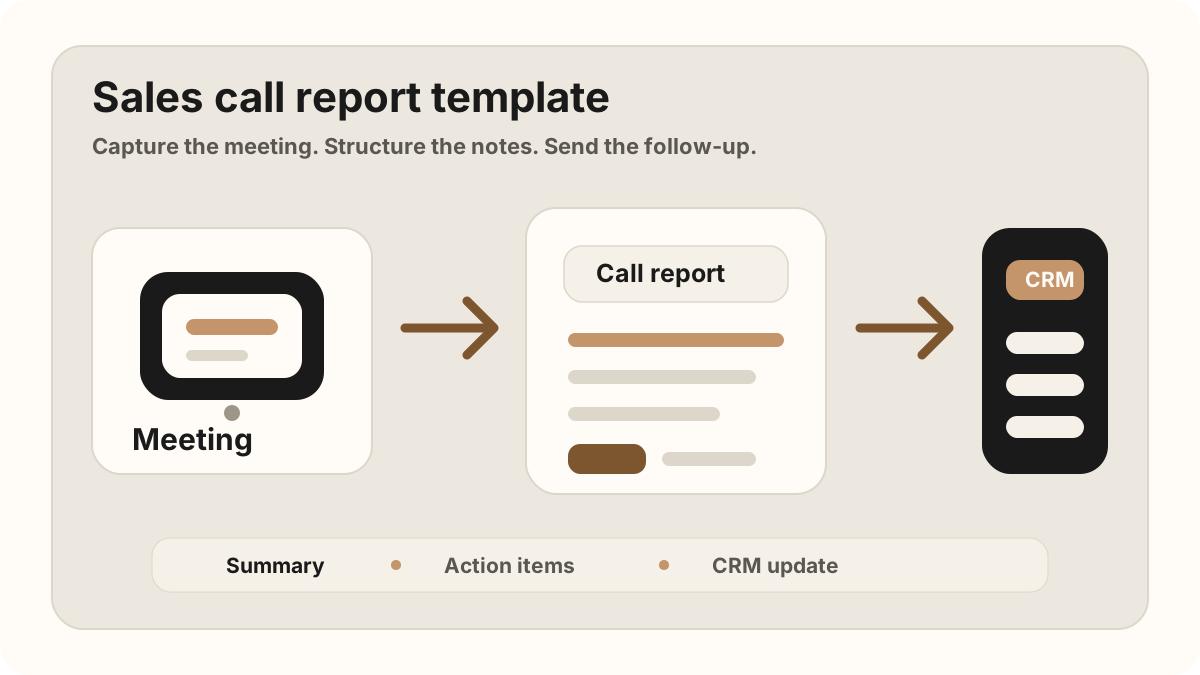
A field rep walks out of a customer meeting with the whole deal in their head. The buyer explained the problem. Someone mentioned budget. A decision-maker asked for a follow-up. There was one objection that could slow everything down.
Then the day keeps moving. Another meeting, a commute, a quick call, a few messages. By the time the rep gets back to the CRM, the report becomes a few loose sentences: "good meeting, send follow-up." That is not a sales call report. It is a memory leak with a timestamp.
A good sales call report does one job: it turns a real customer conversation into the next useful action.
Why Sales Call Reports Matter for Field Reps
Field sales is high-context work. The useful details are often not in a form fill. They are in how the customer describes the problem, which words they repeat, who seems skeptical, what they need before moving forward, and what the sales person promised before leaving the room.
That is why the report should be short, structured, and written close to the meeting. It should not try to capture every sentence. It should capture the information that helps the next rep, manager, sales engineer, or customer success person understand what happened.
The best sales call reports are also CRM-friendly. They do not create more admin. They make Salesforce, HubSpot, or a Google Sheets CRM easier to trust because each customer visit creates the same core fields.
If the report is part of a broader road workflow, connect it to the field sales app CRM field map. Route planning gets reps to the customer, mobile CRM keeps records available, and the report turns the visit into follow-up. It also belongs in the rep-level where field sales check-ins, visit tracking, activity tracking, call reports, and follow-up tasks stay aligned before CRM sync.
Quick Answer: What Should a Sales Call Report Template Include?
A sales call report template for field reps should include account and contact context, visit type, meeting outcome, customer need, buyer quotes or signals, objections or risks, promised follow-up, action items, owner, due date, CRM destination, sync status, manager notes, and sync status. The report should be short enough to finish before the next stop and structured enough to become Salesforce, HubSpot, Google Sheets, or CRM task updates without rewriting the meeting later.
- If managers need visibility: prioritize meeting outcome, stage evidence, buyer signal, risk, next step, and whether the CRM record is complete.
- If reps miss follow-up: prioritize promised action, owner, due date, customer reason, related account or opportunity, and task creation status.
- If reports create admin: prioritize a reusable CRM field map, after-sync hygiene, required fields, sync status, and blocked fields that need rep attention.
The Sales Call Report Template
Use this structure after any in-person sales meeting, customer visit, conference conversation, product demo, partner meeting, or field check-in. If the meeting had business value, this template is enough to capture the signal without turning the report into a diary.
Current sales report templates tend to include contact details, call outcome, notes, next steps, and follow-up status. For field reps, the missing piece is usually not the template itself; it is the habit of turning the meeting into CRM action before the next stop.
Copyable sales call report format
Best Sales Call Report Format by Use Case
The best sales call report format depends on what the field team needs to do next. A customer visit report, a manager review note, and a CRM task handoff should share the same facts, but each one emphasizes a different part of the conversation.
| Use case | Report should emphasize | CRM handoff |
|---|---|---|
| Field rep customer visit | Visit outcome, buyer problem, objections, promised follow-up, and next route-day action. | Account note plus owned follow-up task before the next stop. |
| Manager review | Qualified outcome, next step, blockers, deal risk, and whether the CRM record is complete. | Opportunity note, stage-change recommendation, and task list for the rep. |
| Technical or security follow-up | Questions asked, proof requested, stakeholders involved, and promised technical materials. | Task for sales engineer or owner, due date, and linked customer context. |
| Conference or event conversation | Where the conversation happened, why the buyer engaged, lead quality, and next reason to follow up. | New contact, event context, follow-up task, and qualification status. |
| Renewal or expansion visit | Current relationship health, usage feedback, objections, expansion signal, and promised next step. | Account note, renewal risk or expansion signal, and owner for next action. |
Manager-Readable Sales Call Report Format
Managers do not need long reports. They need enough evidence to understand whether a customer conversation moved the account forward, created risk, or exposed missing CRM data. A report that works for manager review answers five questions quickly.
| Manager question | Report evidence | What the manager can review |
|---|---|---|
| Did the visit create pipeline movement? | Outcome, buyer signal, next step, and stage evidence. | Whether the deal stage, close date, or forecast note needs human review. |
| What did the rep promise? | Action item, owner, due date, and buyer reason for the follow-up. | Whether the task is specific enough to execute before the next touch. |
| What could block the deal? | Objection, open question, missing stakeholder, or technical/security concern. | Whether another teammate, sales engineer, or executive sponsor should help. |
| Is the CRM complete? | Linked account, contact, opportunity, note, task, and sync status. | Whether the report fixes or creates CRM hygiene issues. |
| Can someone else act on this? | Clear summary, customer language, context, and next action. | Whether the record is usable by another rep, manager, or customer-success teammate. |
A Completed Sales Call Report Example
Here is what a useful report looks like when it is written for action rather than decoration.
| Field | Example | Why it helps |
|---|---|---|
| Meeting context | June 15, customer office, met with VP Sales and RevOps lead. | Gives the CRM record basic context without another search. |
| Conversation summary | The team wants to reduce manual CRM updates after field visits. They are losing follow-ups because reps wait until Friday to enter notes. | Explains the pain in plain language. |
| Customer need | Capture in-person meeting notes and push summaries plus tasks into the CRM automatically. | Connects the conversation to a real workflow. |
| Objection | RevOps asked how consent, transcripts, and CRM permissions are handled. | Shows what the next follow-up must address. |
| Action items | Send CRM sync overview by Wednesday. Schedule pilot review next week. Confirm mobile recording policy with the customer. | Turns the report into visible next steps. |
What Should Go Into the CRM?
The CRM does not need every word from the meeting. It needs the parts that make the next sales motion clearer. A good rule: if the information would help someone make a decision, follow up faster, or avoid asking the customer to repeat themselves, it belongs in the CRM.
That usually means a concise summary, customer needs, objections, action items, owners, due dates, and any important record-matching context. Raw transcripts can be useful as backup, but they should not replace a clear report. For the task handoff, see how to turn sales meeting notes into CRM tasks. For the field-notes layer before the report, use the in-person sales meeting notes workflow.
Keep judgment-heavy changes separate
Meeting reports can suggest that a deal stage, close date, or forecast should change, but most teams should avoid fully automatic pipeline edits. Let the sales person review those changes. Automate the notes and tasks first. Keep the judgment with the person closest to the deal.
Sales Call Report CRM Field Map
A sales call report becomes more valuable when every report maps to the same CRM fields. That field map keeps account updates consistent across route days, customer visits, conference follow-ups, and manager reviews.
| Report field | CRM destination | How to write it |
|---|---|---|
| Account and contact | Salesforce account/contact, HubSpot company/contact, or Google Sheets account/contact columns. | Confirm the customer, attendees, buying role, and whether a new stakeholder should be added. |
| Visit outcome | Activity record, timeline note, visit log, or sales call report field. | Use plain labels such as discovery completed, proposal requested, renewal risk found, or no opportunity. |
| Summary and buyer signal | Opportunity/deal note, account note, or pipeline row. | Explain what changed because of the meeting and which buyer signal supports that conclusion. |
| Action item | CRM task, HubSpot task, Salesforce activity, or follow-up column in Sheets. | Name the task, owner, due date, and buyer reason so the follow-up does not become generic admin. |
| Objection or risk | Opportunity risk field, manager review note, or account health update. | Capture who raised the concern, what evidence is needed, and who owns the answer. |
| Sync status | CRM sync status, manager after-sync hygiene, or spreadsheet status column. | Mark whether the report is pending rep review, synced, manager-reviewed, or missing a destination. |
After Call Reports Sync: Keep Records Clean
Modern AI note tools, including LogicNotes, sync call reports to the CRM automatically. There is no approval screen between the meeting and the record, and that is the point: the rep stays out of data entry. The trust layer moves into the CRM itself, as a quick after-sync habit instead of a pre-sync gate.
After a synced note lands, a two-minute pass covers what matters: confirm the note attached to the right account or contact, make sure the next step exists as a real task with a date, and fix anything that looks off by editing the note or task directly in Salesforce, HubSpot, Zoho CRM, Dynamics 365, or Google Sheets. Edits made in the CRM are visible to managers and teammates right away, so the record stays trustworthy without slowing down the field day.
Sales Call Report Handoff for Salesforce, HubSpot, and Sheets
The same report can create different records depending on the team’s system. The key is to separate the customer conversation from the destination format so field reps do not need to rewrite the report three times.
| Destination | Best report handoff | What to watch |
|---|---|---|
| Salesforce | Activity note, opportunity update, task owner, due date, and manager-review fields. | Avoid changing stages or close dates without rep review unless the team has strict rules. |
| HubSpot | Timeline note, company/deal context, task, owner, due date, and follow-up reminder. | Confirm the report attached to the correct company, contact, and deal after sync. |
| Google Sheets | One row per visit with account, contact, outcome, summary, task, owner, due date, and CRM status. | Keep status values controlled so spreadsheet reports stay filterable. |
| Manager dashboard | Outcome, risk, next action, owner, due date, and missing-field status. | Review for coaching and data quality, not just activity volume. |
What Not to Put in a Sales Call Report
A sales call report gets worse when it tries to become everything. The point is not to preserve a perfect archive of the conversation. The point is to make the next action obvious and keep the customer record useful.
Leave out filler like "great conversation" unless the report explains what made it great. Leave out every small tangent that will not affect the deal, the customer relationship, or the follow-up plan. And be careful with internal guesses. If the customer did not say they have budget, do not turn a hopeful read into a CRM fact.
The cleanest reports separate what happened, what the customer said, what the sales person promised, and what the team should do next. That makes the note useful for a manager, a sales engineer, or another rep who opens the record later.
| Avoid writing | Write this instead | Why it is better |
|---|---|---|
| Good meeting, interested. | Customer wants to reduce manual note entry after site visits and asked about CRM task creation. | Specific pain is easier to follow up on than a mood. |
| Send more info. | Send security overview and pricing options by Thursday. | The task has a clear object and deadline. |
| Probably ready to buy. | VP Sales asked for a pilot plan, but RevOps still needs to review permissions. | Separates signal from assumption. |
Field Rep Checklist After Every Sales Meeting
- Write the report while the meeting is still fresh. The first ten minutes after a customer conversation are usually more accurate than the end of the day.
- Name the real customer problem. Avoid vague language like "interested" or "good fit" unless the report explains why.
- Capture exact commitments. If someone promised pricing, a deck, an intro, or a technical answer, turn it into an action item.
- Record objections without softening them. Price, timing, security, and implementation concerns are useful when they are specific.
- Link the report to the right CRM record. A perfect note on the wrong account is still lost context.
- Use consent-aware recording when appropriate. If you record the conversation, make sure the customer knows and agrees.
A Field Sales Call Report Workflow
Field reps do not need a bigger reporting ritual. They need a short loop that works between visits and still leaves clean data for the team.
Use this after each customer stop
This workflow pairs naturally with sales route planning: each stop creates a report, each report creates a task, and each task keeps the pipeline moving. If the team needs visit-level capture first, use the sales visit notes app workflow or the . If the team still works from a spreadsheet, use the Google Sheets CRM guide to keep rows clean.
How LogicNotes Helps
LogicNotes is built for sales people who spend time in real customer conversations. You record the in-person meeting on your iPhone, get a clean AI summary and action items, then send the useful parts into your CRM or Google Sheets automatically.
That means the sales call report is no longer a separate admin task. The conversation becomes structured notes, follow-ups, and CRM-ready context while the meeting is still fresh.
If the report needs to live inside the CRM workflow instead of a separate document, see mobile CRM for field sales reps and the outside sales app workflow. If the customer-facing recap is the next bottleneck, use the meeting follow-up template.
Sales Call Report FAQ
What is a sales call report template?
A sales call report template is a repeatable format for turning a customer conversation into meeting context, customer needs, buying signals, objections, action items, follow-up tasks, and CRM-ready updates.
What should a sales call report include?
A sales call report should include meeting context, customer need, conversation summary, buying signals, objections, action items, owners, due dates, and the CRM record that should be updated.
When should field reps write a sales call report?
Field reps should write or generate the report as soon as possible after the customer visit, ideally before the next stop. The details are most accurate while the conversation is still fresh.
What is the best sales call report format for field reps?
The best format for field reps is short, mobile-friendly, and CRM-ready: account context, visit outcome, buyer need, objections, promised follow-up, owner, due date, and the record that needs updating.
What is the difference between a sales call report and CRM notes?
A sales call report is the structured summary of what happened in the customer conversation. CRM notes are where that report becomes part of the account, contact, opportunity, task, or pipeline record.
Should a sales call report include the full transcript?
Usually no. A transcript can be useful backup, but the report should summarize the business context, objections, buying signals, action items, owners, and due dates.
How should sales call reports become CRM tasks?
Sales call reports should become CRM tasks by extracting each promised follow-up, assigning an owner, adding a due date, linking the task to the right contact or opportunity, and preserving the buyer reason behind the task.
Can sales call reports sync to Salesforce, HubSpot, or Google Sheets?
Yes. Sales call reports can sync to Salesforce, HubSpot, or Google Sheets when the report is structured into account context, visit outcome, summary, action items, owner, due date, and CRM destination.
What CRM fields should a sales call report update?
A sales call report should update fields for account, contact, activity outcome, meeting summary, buyer signal, objection or risk, next step, task owner, due date, stage evidence, and sync status.
How should managers review sales call reports?
Managers should review whether the report names a real customer outcome, includes the next step, identifies risks or objections, assigns owners and due dates, and leaves the CRM record complete enough for another teammate to act.
How can field reps reduce sales call reporting admin?
Use a repeatable template, capture the meeting or recap on mobile, separate notes from tasks, sync the report to the right CRM record, and avoid rewriting the same conversation in multiple tools.
Turn field meetings into CRM-ready notes.
If your problem is getting in-person sales meeting notes into your CRM, LogicNotes was built for that job: record, summarize, and sync the follow-up without rebuilding the meeting from memory.
Download LogicNotes for iOS