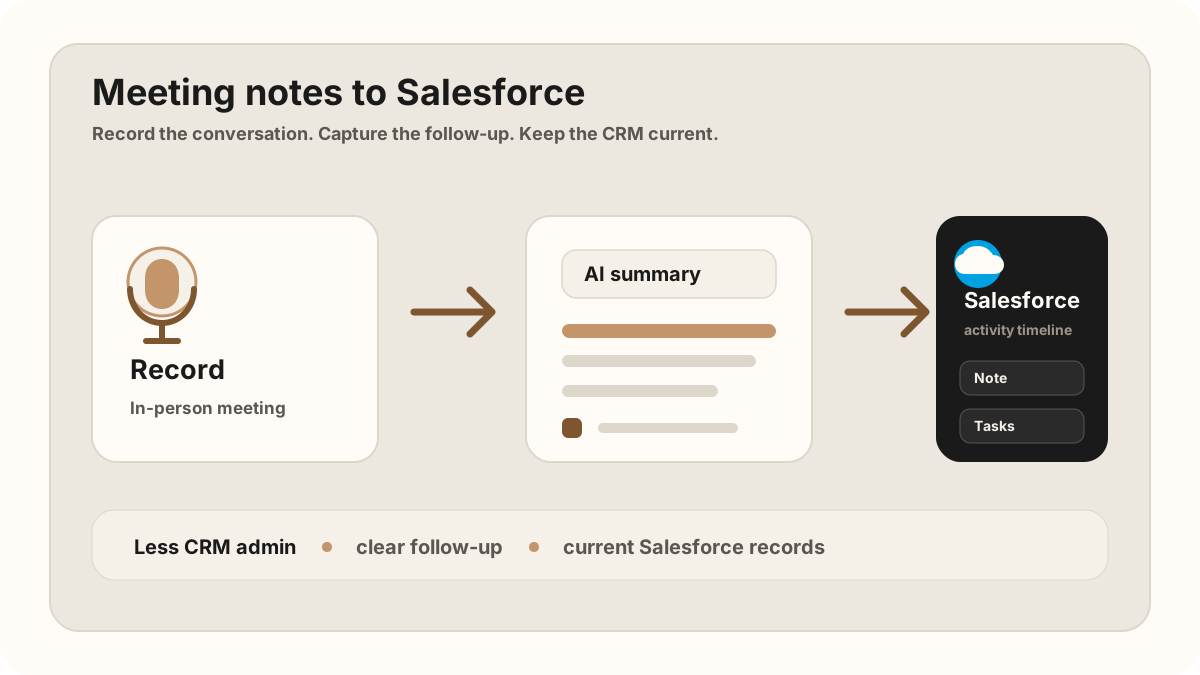
A sales person gets back from a customer visit, opens Salesforce, and tries to rebuild the meeting from memory. The conversation was useful. The buyer had a real objection. Someone asked for pricing. Someone else wanted a technical follow-up. But the details are now split between a notebook, a voice memo, a half-written email, and whatever the rep can still remember.
This is how Salesforce gets stale. Not because the CRM is weak. Salesforce can track tasks, events, calls, notes, and activity history across leads, contacts, accounts, and opportunities. The problem is that in-person sales meetings happen away from the desk, while CRM admin waits until later.
For field reps, Salesforce sync belongs inside the broader field sales app workflow. A route planner gets the rep to the meeting, a phone-first note workflow captures what happened, and a mobile CRM update makes the follow-up visible before the next customer stop.
For teams comparing a sales rep app, outside sales app, or the Salesforce workflow needs the same structure as the field-sales stack: visit tracking, CRM field maps, after-sync hygienes, follow-up tasks, and CRM sync that reps can finish from the phone.
The 2026 version is not just "send a transcript to CRM." The useful version turns a customer conversation into a scannable Salesforce activity, concrete tasks, due dates, account context, and a short follow-up plan. That is the difference between activity logging and actual pipeline memory.
The goal is not to send every word into Salesforce. The goal is to sync the parts that help the next follow-up, the next pipeline review, and the next person who opens the record.
Quick Answer: What Salesforce Meeting Notes Sync Workflow Do Sales Teams Need?
The best Salesforce meeting notes sync workflow captures the sales conversation on the phone, turns it into a reviewed summary and follow-up task list, maps the right details to leads, contacts, accounts, opportunities, activities, and tasks, then syncs only approved notes, owners, due dates, outcomes, and field updates into Salesforce.
- If Salesforce notes are too thin: prioritize buyer context, objections, promised follow-up, meeting outcome, source meeting, and related account or opportunity.
- If tasks are vague: prioritize action item, owner, due date, customer reason, contact, opportunity, priority, and the note that created the task.
- If automation creates CRM noise: prioritize the Salesforce field map, sync status, blocked updates, sync errors, and destination record IDs.
Why Salesforce Notes Fail After Real Sales Meetings
Most sales note workflows are built around the laptop. That is fine for online calls. It gets harder when the meeting happens at a customer office, conference table, trade show booth, or coffee shop.
The failure mode is familiar: the rep remembers the headline, but not the specifics. Salesforce gets an activity that says "good meeting" or a task that says "follow up." Two weeks later, nobody knows what the buyer cared about, which objection mattered, or why the opportunity moved forward.
For Salesforce to stay useful, the meeting record needs more than proof that the meeting happened. It needs the summary, objections, promised follow-ups, owners, dates, and the record where that context belongs.
Salesforce treats tasks and events as activities, and the activity timeline is designed to help teams scan customer work across records such as leads, contacts, accounts, and opportunities. That is why the best meeting-note sync is not a data dump. It is a clean activity history plus the tasks needed to move the deal forward.
What Should Actually Sync Into Salesforce?
The best Salesforce sync is selective. A raw transcript can be useful when someone needs the full detail, but it should not be the default thing dropped into an activity timeline. Sales people need a clean record they can scan quickly.
| Meeting detail | Why it matters | Where it belongs |
|---|---|---|
| Meeting summary | Gives the sales team context without replaying the entire conversation. | A note or activity on the right lead, contact, account, or opportunity. |
| Key objections | Shows what could block the deal and what the follow-up should address. | Inside the note body, close to the meeting summary. |
| Action items | Turns promises into visible follow-up work. | Salesforce tasks with owners, due dates, and status. |
| Owners and dates | Prevents vague next steps from becoming pipeline noise. | Task owner, due date, and activity fields where available. |
| Record match | Makes sure the note updates the right deal or person. | The matching lead, contact, account, or opportunity record. |
| Originating meeting | Shows where the note and tasks came from. | The original meeting, recap, recording, or sales call report reference. |
| Sync status | Keeps automation from silently changing judgment-heavy deal fields. | After-sync hygiene, sync log, needs review, synced, task created, or no action needed. |
The Automatic Workflow
A useful automatic sync has five steps.
1. Capture the meeting where it happens
For in-person sales, the capture tool should be phone-first. You should be able to record the conversation with consent or capture a quick recap, then move on with the rest of the sales day instead of rebuilding the meeting later. If there is no video meeting for a bot to join, use a no-bot AI note taker workflow. For iPhone-specific capture, use the iPhone sales meeting recording workflow.
2. Turn the recording into structured notes
The transcript is raw material. The output you want is a short summary, the buying signals, the objections, and the action items. That structure is what makes the Salesforce update useful.
3. Match the meeting to the right Salesforce record
A meeting note is only useful if it lands in the right place. Calendar attendees, contact emails, account names, and opportunity context can help decide whether the update belongs on a lead, contact, account, or opportunity.
4. Create notes and tasks automatically
The meeting summary should become a clean Salesforce note or activity. Promised follow-ups should become tasks. "Send pricing by Friday" should not live as a sentence buried in someone's notebook. For the task structure, use the same owner, due date, and context pattern from sales meeting action items.
5. Leave judgment-heavy fields to the rep
Automatic sync should reduce admin, not create silent pipeline changes. For most teams, it is safer to sync notes and tasks automatically, then let the sales person confirm changes to stage, amount, close date, or forecast category.
Where This Lands in Salesforce
Salesforce activity timelines are useful because they collect the work around a customer relationship: tasks, events, calls, emails, and other activities. A good meeting-note sync should make that timeline easier to trust.
The clean workflow is simple: identify the right record, add a concise meeting note, then create follow-up tasks from the action items. You do not need to turn Salesforce into a transcript warehouse. You need the record to show what happened and what happens next.
If your sales team uses Salesforce seriously, the highest-leverage sync is not "save transcript." It is "make the next follow-up impossible to miss."
Salesforce Meeting Notes Field Map
The most reliable sync starts with a CRM field map. Sales meeting notes are not one blob of text; they include the record match, summary, buyer signal, objection, action item, owner, due date, and review state. Each piece should land where a rep or manager will naturally look for it later.
This Salesforce CRM field map is also what keeps automation from becoming noisy. The note body can carry the meeting story. Tasks carry the work. Sync status tells the rep what was created, what still needs approval, and which Salesforce fields were left untouched on purpose.
| Meeting note element | Salesforce destination | After-sync hygiene rule |
|---|---|---|
| Account, contact, or lead match | Related lead, contact, account, or opportunity lookup. | Auto-select only when the attendee, email, company, or opportunity context is confident. |
| Meeting summary | Activity, call note, or note body on the matched record. | Safe to sync automatically after the rep approves the summary. |
| Buyer pain, objection, or decision signal | Note body, opportunity next step, or a team-specific risk field. | Keep in the note automatically; ask for review before changing opportunity fields. |
| Promised follow-up | Task subject, task description, owner, due date, related record, and status. | Create the task automatically when the action, owner, and date are clear. |
| Next meeting or reminder | Task, event, or next-step field depending on the team's Salesforce setup. | Confirm timing if the customer used vague language such as next week or after procurement. |
| Sync status and sync status | Custom status, note label, or internal sync log. | Mark as needs review, synced, task created, or no action needed. |
Salesforce Sync Workflow by Meeting Type
Salesforce updates should reflect the meeting you actually had. A field visit, conference conversation, account review, and post-demo follow-up all produce different next steps. Use the capture method and sync target that fit the selling motion.
| Meeting type | Capture workflow | Salesforce output |
|---|---|---|
| Customer office visit | Record with consent or capture a structured phone recap before the next stop. | Account or opportunity activity, summary note, objections, next meeting, and dated follow-up tasks. |
| Field demo or site walk | Capture technical questions, constraints, implementation risks, and requested materials while details are fresh. | Opportunity note, implementation risks, product questions, task owner, and due date for the promised answer. |
| Conference or trade show conversation | Record a quick recap after the booth conversation with company, buyer role, interest level, and promised follow-up. | Lead or contact note, lead source, priority, follow-up task, and event context. |
| Expansion or renewal check-in | Summarize account health, adoption gaps, new stakeholders, risks, and expansion interest. | Account activity, opportunity context if needed, risk notes, and internal follow-up tasks. |
| Post-meeting manager review | Use the synced note and task list as the review source, not the rep's memory. | Clean activity history, visible open tasks, and a clear audit trail for what changed after the meeting. |
Salesforce Meeting Notes Sync Checklist
- Connect Salesforce before the meeting. Do not wait until the end of the day to configure the workflow.
- Use attendee and account context. Matching is cleaner when emails, names, and calendar details are available.
- Keep the note scannable. A Salesforce note should help another person understand the deal quickly.
- Turn commitments into tasks. Pricing, demos, security reviews, and technical answers should become visible work.
- Avoid silent deal changes. Let the sales person confirm stage, amount, forecast, and close date updates.
- Audit recent activity weekly. Open recent meetings and check whether the Salesforce record reflects what actually happened.
Field Sales Salesforce Sync Workflow
A desk-based rep might update Salesforce right after a video call. A field rep may go straight from one visit to another. The sync workflow has to work from the road.
Use this after each customer visit
This connects naturally to sales route planning, visit tracking, field sales follow-up, customer meeting notes, and CRM task creation. The point is to make Salesforce reflect the customer conversation while the rep is still close to the details.
Automation Guardrails for Salesforce Notes
The best sync workflow removes repetitive admin while leaving judgment with the seller. A sales meeting note can safely create a summary and tasks, but it should not quietly rewrite the pipeline without review.
Use this approval pattern
This is also where Salesforce sync helps reduce CRM admin. Reps should not have to write the meeting in a notebook, summarize it in a note app, paste it into Salesforce, recreate tasks by hand, and then draft the follow-up email from scratch. For the broader operating rhythm, see how to reduce CRM admin for sales reps and the in-person sales call follow-up template.
Salesforce Hygiene After Auto-Sync
Modern AI note tools, including LogicNotes, sync meeting notes to the CRM automatically. There is no approval screen between the meeting and the record, and that is the point: the rep stays out of data entry. The trust layer moves into the CRM itself, as a quick after-sync habit instead of a pre-sync gate.
After a synced note lands, a two-minute pass covers what matters: confirm the note attached to the right account or contact, make sure the next step exists as a real task with a date, and fix anything that looks off by editing the note or task directly in Salesforce, HubSpot, Zoho CRM, Dynamics 365, or Google Sheets. Edits made in the CRM are visible to managers and teammates right away, so the record stays trustworthy without slowing down the field day.
How LogicNotes Handles This
LogicNotes is built for the meeting that does not happen inside a video-call bot. You record the in-person conversation on your iPhone, get a structured AI summary and action items, then let the notes and tasks sync automatically into your CRM.
For Salesforce users, that means the meeting can become a clean note and follow-up tasks without the usual copy-paste routine. It is especially useful for sales people who spend the day in customer conversations but still need Salesforce to reflect what actually happened. If the team is still choosing tools, compare this workflow with the AI meeting notes apps guide for in-person sales teams.
Salesforce Meeting Notes Sync FAQ
How do you sync sales meeting notes to Salesforce automatically?
A practical workflow captures the meeting on mobile, turns the recording or recap into a structured AI summary and action items, matches the meeting to the right Salesforce lead, contact, account, or opportunity, then creates the appropriate note, activity, or task.
What should sync from sales meeting notes to Salesforce?
Sync the meeting summary, customer pain, objections, promised follow-up, action items, owners, due dates, related record, CRM field map, and sync status. Avoid turning Salesforce into a transcript archive unless your team has a clear reason to store the full transcript.
Should the full transcript sync into Salesforce?
Usually no. The full transcript can be useful as backup, but the Salesforce record should stay scannable with a clean summary, customer context, objections, action items, owners, due dates, and originating meeting details.
Where should meeting notes land in Salesforce?
Meeting notes should land on the Salesforce record where the next sales action happens, such as the lead, contact, account, or opportunity. Follow-up commitments should become tasks with owners and due dates.
What Salesforce fields should sales meeting notes update?
The safest fields to update from sales meeting notes are the activity or note body, related lead, contact, account, or opportunity, task subject, task owner, due date, status, priority, and a sync status. Deal stage, amount, close date, and forecast fields are safest changed by a person directly in Salesforce after the note lands.
What Salesforce fields should sales meeting tasks include?
Useful Salesforce tasks should include a clear action, owner, due date, related record, customer context, status, and the originating meeting that created the follow-up.
Should Salesforce tasks be created automatically from meeting notes?
Routine follow-up tasks can be created automatically when the action, owner, due date, and related record are clear. Reps should still double-check ambiguous commitments, customer-facing wording, stage changes, and low-confidence matches in Salesforce after the sync.
How should field sales reps update Salesforce from the road?
Field sales reps should capture the meeting or a quick recap from their phone, let the note and tasks sync to Salesforce automatically, and glance over the record before the next customer stop.
Can a no-bot AI note taker create Salesforce tasks?
Yes. A no-bot AI note taker can turn an in-person meeting recording or recap into structured action items, then those action items can become Salesforce tasks with owners, due dates, account context, and follow-up notes.
What should stay manual instead of automatic in Salesforce?
Salesforce notes and routine follow-up tasks can often sync automatically, but judgment-heavy fields such as stage, amount, forecast category, close date, and deal health should usually be reviewed by the sales rep or manager before changing.
How should field reps review Salesforce sync before saving?
Field reps should check the matched Salesforce record, the note summary, action items, and dates in Salesforce right after the sync lands. A quick after-sync glance keeps automation useful without letting incorrect CRM changes linger.
Stop rebuilding Salesforce from memory.
If your problem is getting in-person sales meeting notes into Salesforce, LogicNotes was built for that job: record, summarize, and sync the follow-up while the details are still fresh.
Download LogicNotes for iOS