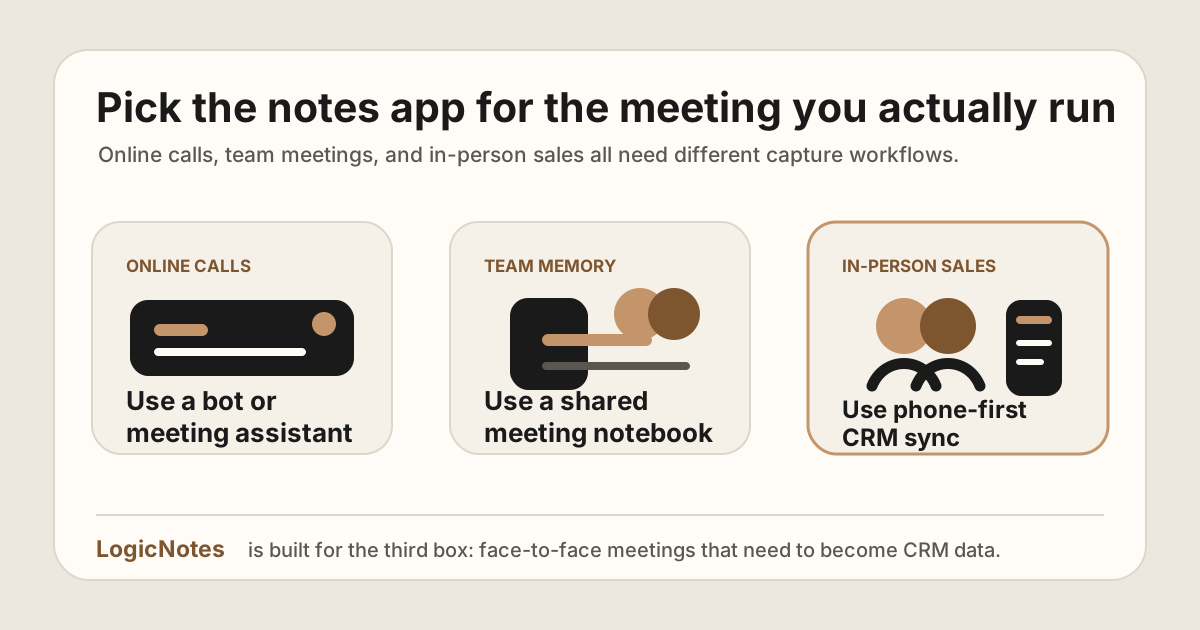
Most AI meeting notes lists are written for people sitting at a laptop. They compare transcription accuracy, Zoom bots, searchable meeting libraries, and whether the tool joins Google Meet politely.
That is useful if your sales motion happens on video calls. It is less useful if your best conversations happen in person: at a conference booth, a client site, a founder coffee, a showroom, a dinner, or the ten minutes after a demo when the real objection finally comes out.
For in-person sales teams, the question is not simply, "Which AI note taker has the most features?" The better question is: "Which tool gets the useful parts of this real-world conversation into the CRM before we forget them?"
If you are evaluating this as part of a broader field sales app stack, also look at how notes move into a mobile CRM workflow. The AI notes app is only useful if it helps the rep follow up and update the CRM after the visit.
Quick answer: if your team sells mostly face to face and needs notes, action items, and CRM updates from an iPhone workflow, start with LogicNotes. If your meetings are mostly Zoom, Google Meet, or Teams, tools like Fathom, Fireflies, Otter, Fellow, Avoma, Granola, or Gong may fit better depending on your sales motion. If you want a general phone-first recorder or bot-free note taker, Speakwise, Jamie, and Wave are the ones to test.
The short version: pick by meeting type
There is no single best AI meeting notes app for everyone. There is a best fit for the kind of meeting you run every day.
| Tool | Best fit | Why sales teams consider it | Watch-out for in-person sales |
|---|---|---|---|
| LogicNotes | In-person sales meetings that need CRM sync | Phone-first recording, summaries, action items, and CRM or Google Sheets sync. | Built for iOS-first capture, not for joining online calls as a meeting bot. |
| Granola | Back-to-back meetings and personal/team meeting memory | Strong note-taking experience for founders and operators; useful for searchable meeting context. | CRM sync and sales workflow depth may require the right integrations or workflow setup. |
| Speakwise | iPhone transcripts and AI notes for in-person meetings | iOS-native recorder with transcripts, speaker labels, summaries, and action items. | Notes end in a notes tool; CRM handoff is not the core workflow. |
| Jamie | Bot-free notes across online, hybrid, and offline meetings | No bot joins the call; strong summaries with GDPR-focused hosting. | Document-first workflow; check the field-sales CRM handoff. |
| Wave | Recording meetings, calls, and lectures across devices | One recorder on iPhone, Android, desktop, and web with transcripts and summaries. | General-purpose capture; sales-specific CRM follow-up is not the focus. |
| Fathom | Video-call notes with HubSpot or Salesforce workflows | Popular AI notetaker for online meetings, summaries, action items, and CRM integrations. | Strong online-call workflow; test the capture flow for spontaneous field conversations. |
| Fireflies.ai | Teams that want a broad meeting assistant and many integrations | Large integration ecosystem, transcription, summaries, and CRM workflow support. | Can be overbuilt if the only problem is capturing in-person sales context quickly. |
| Otter | Transcription-heavy teams and online meeting capture | Real-time transcription, summaries, action items, and meeting assistant features. | Great for transcript access; less specialized for CRM-ready field sales updates. |
| Fellow | Meeting lifecycle, agendas, notes, and team workflows | Useful when meetings need agendas, recaps, action items, and integrations across tools. | May be more process-heavy than a rep needs after an in-person customer meeting. |
| Avoma | Revenue teams that want notes plus coaching and conversation intelligence | Combines note-taking, scheduling, coaching, CRM updates, and revenue workflows. | Better for structured sales orgs than a founder who just needs clean field notes in CRM. |
| Gong | Revenue intelligence at scale | Captures customer interactions and supports revenue intelligence, deal insights, and coaching. | Usually more platform than an early team needs for in-person note capture alone. |
Meeting Bot vs Phone-First AI Note Taker
Many AI meeting notes tools were designed for online calendars. They join a scheduled meeting, listen as a visible participant, and create a transcript or summary after the call. Some also offer bot-free, desktop, or manual capture modes now, which is why the real test is the workflow your reps will actually use.
In-person sales is different. There may be no calendar invite, no video link, no laptop, and no polite way for a bot to join. The rep may be in a customer office, on a showroom floor, at a conference table, or in the car between stops. The capture workflow has to be faster and more natural.
| Workflow | Best for | What to check |
|---|---|---|
| Meeting bot | Scheduled online calls, demos, webinars, internal meetings, and remote revenue teams. | Calendar support, bot visibility, transcript quality, CRM integration, and recording consent process. |
| Phone-first recorder | Customer visits, field sales routes, conference conversations, founder-led sales, and in-person follow-up. | Mobile capture speed, consent flow, summary quality, action items, and CRM or Google Sheets sync. |
| Manual notes plus AI cleanup | Teams that cannot record but still need structured notes and follow-up after meetings. | How quickly reps can convert rough notes into a sales call report, CRM tasks, and follow-up messages. |
If your team is specifically trying to avoid visible meeting bots, pair this guide with the AI note taker without a meeting bot guide. If the main pain is accountability, connect the output to sales meeting action items and CRM tasks.
How to prepare for a sales meeting with AI
Use AI to compress source material before the meeting, not to invent account knowledge. Start with the last meeting note, open CRM tasks, recent email commitments, and the current opportunity record. If a claim has no source, keep it out of the brief or label it as something to verify.
- Open the correct account record. Confirm the company, contacts, opportunity, last meeting, and outstanding commitments before asking AI to summarize anything.
- Build a one-page brief. Ask for the last confirmed priority, people involved, unresolved question, current risk, promised follow-up, and the date each item was last confirmed.
- Choose one meeting objective. Decide what should be different when the meeting ends. The objective may be confirming a problem, bringing in a stakeholder, agreeing a review, or closing an open decision.
- Write three questions. Use the brief to prepare one question about changed context, one about consequence or urgency, and one about the decision path. Keep the questions in your own voice.
- Define the handoff before the call. Know which note, task, owner, due date, and CRM fields you will need if the meeting creates progress.
A useful prompt is: "Using only the account material below, give me the last confirmed priority, open commitments, stakeholders, risks, and three questions for the next meeting. Cite the source and date for every account claim. Mark anything unsupported as unknown." Then check the output against the source records.
For a complete ten-minute routine, use the sales call preparation guide. After the meeting, the meeting-to-CRM template pack carries the same context into the note, task, buyer recap, and CRM update.
Best tools by use case
1. LogicNotes: best for in-person sales meetings that need CRM updates
LogicNotes is built around the moment most AI meeting assistants ignore: the sales meeting that happens away from your laptop.
A rep walks into a meeting, taps record on iPhone, focuses on the conversation, and walks out with structured notes and action items that can sync to Salesforce, HubSpot, Zoho CRM, Dynamics 365, or Google Sheets. That makes it a fit for founder-led sales, field reps, conference meetings, distributor conversations, partner meetings, customer visits, and other face-to-face selling moments.
The important difference is capture mode. LogicNotes does not need to join a meeting as a bot. It is not trying to be the sales team's all-seeing revenue intelligence layer. It is trying to solve the narrow, expensive gap between "we had a useful in-person conversation" and "the CRM actually knows what happened."
If reps are planning a day of customer visits, a sales route planning workflow gets them to the right rooms. LogicNotes protects what happens after each stop: the conversation, next step, and CRM handoff.
The best-fit use case is not "every meeting in the company." It is the sales meeting where a human promise has to become a structured summary, action item, follow-up task, and CRM update before the rep loses context.
2. Granola: best for operators who want a smarter meeting notebook
Granola describes itself as an AI notepad for back-to-back meetings and emphasizes rich, searchable meeting memory. It is a strong fit for founders, VCs, recruiters, and operators who want to stay present and turn conversations into useful notes.
For in-person sales teams, Granola is worth considering if the primary need is personal meeting memory and shareable summaries. If the primary pain is CRM hygiene after field meetings, see the Granola AI alternative comparison for how the two workflows differ.
3. Speakwise: best for iPhone transcripts and notes in the field
Speakwise is an iPhone-native voice recorder and AI notes app for in-person meetings. It records from the phone's microphone and produces transcripts with speaker labels, AI summaries, and action items, with notes flowing to a tool like Notion.
For field sales teams, Speakwise is worth considering when transcription and notes are the whole job. If notes have to land in Salesforce, HubSpot, Zoho CRM, Dynamics 365, or Google Sheets without manual routing, compare the Speakwise alternative for sales teams.
4. Jamie: best for bot-free notes across online and offline meetings
Jamie is a bot-free AI note taker that captures online, hybrid, and offline meetings without anything joining the call, with GDPR-focused EU hosting. Notes can flow to tools like Notion, Google Docs, and HubSpot.
Jamie fits leaders whose week is mostly desk and hybrid meetings. For reps whose meetings happen at customer sites and need to end in the CRM, see the Jamie alternative for in-person sales.
5. Wave: best for recording everything across devices
Wave records, transcribes, and summarizes meetings, phone calls, and lectures across iPhone, Android, desktop, and web. It is a strong pick when one general recorder across every device is the goal.
For in-person sales, the question is what happens after the recording. If the answer is CRM follow-up with action items, compare the Wave alternative for field sales teams.
6. Fathom: best for video-call sales notes with CRM sync
Fathom is a strong option for teams whose sales conversations happen on Zoom, Google Meet, or Microsoft Teams. Its help center and integration pages describe HubSpot and Salesforce workflows for writing call summaries, action items, and selected meeting content into CRM systems.
If your sales team runs scheduled online demos all day, Fathom belongs on the shortlist. If the most important meetings happen in person, you should test whether the capture workflow fits your reps' real day.
7. Fireflies.ai: best for broad integrations and meeting automation
Fireflies positions itself as an AI assistant with transcription, notes, tasks, CRM entries, and a broad set of integrations. It is useful when meetings happen across tools and the team wants a central automation layer.
The tradeoff is scope. A broad assistant can be powerful, but a field seller may not need a large meeting automation system. They may need the simplest possible path from phone recording to summary, task, and CRM note.
8. Otter: best when transcription is the main job
Otter is well known for real-time transcription, meeting summaries, insights, and action items. Its meeting agent can connect to common meeting platforms and productivity tools.
Otter is a good fit when the transcript itself is important: interviews, team discussions, lectures, internal meetings, or online calls where searchable text is the main deliverable. For sales teams, make sure the output becomes CRM action instead of simply another transcript to review later. See the Otter alternative comparison for the in-person sales angle.
9. Fellow: best for teams that run structured meeting processes
Fellow is useful when your team wants more than capture: agendas, notes, recaps, action items, and integrations into work management and CRM tools. Fellow's public pages describe integrations with Salesforce, HubSpot, Jira, Linear, Notion, Slack, Zapier, and more.
That can be excellent for internal team rhythm. For in-person field sales, the question is whether the rep will actually use that process after walking out of a meeting.
10. Avoma: best for revenue teams that want notes plus coaching
Avoma is closer to an all-in-one sales productivity and revenue workflow platform. Its official positioning includes AI meeting assistance, scheduling, conversation intelligence, coaching, forecasting, CRM updates, and more.
That makes it attractive for teams that want manager visibility and coaching workflows. It may be heavier than needed if your current problem is simply that in-person notes never reach the CRM.
11. Gong: best for enterprise revenue intelligence
Gong is not just a notes app. It positions around revenue intelligence and a broader Revenue AI platform. It is built for revenue teams that want customer interaction capture, deal insights, coaching, forecasting support, and a central revenue data layer.
That can be powerful at scale. It can also be more than a founder-led or early sales team needs if the job is in-person meeting capture and CRM hygiene.
What to check before choosing
Before you pick a tool, write down the three meetings your team runs most often. Not the theoretical ones. The real ones. If your main pain is post-meeting discipline, pair this guide with a practical in-person sales notes workflow and a CRM hygiene checklist.
- Where does the meeting happen? Zoom, Google Meet, Teams, phone call, coffee shop, office, conference, showroom, field visit?
- Who needs the output? Just the rep, the founder, the manager, RevOps, customer success, or the whole team?
- What has to happen after the meeting? Follow-up email, CRM note, task creation, deal-stage update, coaching review, searchable transcript?
- How much workflow will reps tolerate? If the app needs five clicks after every meeting, field teams may stop using it.
- Does it respect the meeting context? A visible meeting bot can be fine on Zoom. It can be awkward or impossible at a coffee meeting.
- Can it support consent-aware recording? Recording laws and norms vary. Your workflow should make it easy to be clear and compliant.
CRM Handoff Checklist for AI Meeting Notes
A note-taking app only improves sales execution if the output lands where the next action happens. For most field teams, that means the CRM, a follow-up queue, or a Google Sheets CRM template.
| Output | What good looks like | Where it should land |
|---|---|---|
| Meeting summary | Short recap with buyer problem, objection, decision, and next step. | Account, contact, lead, opportunity, or meeting note. |
| Action items | Owner, due date, promised deliverable, customer reason, and status. | CRM task, follow-up queue, or spreadsheet row. |
| Sales call report | Visit outcome, buying signal, objection, follow-up promise, and manager-readable next step. | Sales call report, opportunity note, or manager review view. |
| Deal context | Budget, timing, stakeholder, competitor, implementation risk, or expansion signal. | Opportunity fields, account notes, CRM hygiene review, or forecast notes. |
| CRM status | Synced, needs review, missing contact, wrong account, or task pending. | CRM hygiene checklist, RevOps review, or lightweight tracking sheet. |
For the task-specific layer, use the sales meeting notes to CRM tasks workflow. For the admin-reduction layer, use the CRM admin reduction guide.
Buying notes for 2026
AI meeting assistant pages change quickly. Before you roll a tool out to reps, compare the current plan limits, integration docs, and capture workflow directly against the way your team actually sells.
- CRM sync depth: Confirm whether the tool can write useful summaries, tasks, owners, next steps, and field updates to the CRM objects your team uses.
- Online versus in-person capture: A meeting bot can be great for Zoom or Teams. A field seller may need an iPhone workflow that works after a customer visit, trade show conversation, or site meeting.
- Rep workflow speed: The best app is the one a rep will use while walking out of the room, not the one that requires another admin block at the end of the day.
- Action-item structure: Look for owner, due date, customer context, follow-up wording, and CRM-ready next steps instead of a transcript alone.
- Consent and recording policy: Make sure your team has a clear process for asking permission, handling recordings, and respecting local rules.
- Admin reduction: If the tool creates extra cleanup work, it will not solve the larger CRM admin problem.
The practical recommendation
If your team sells mostly online, start with the best tool for your meeting platform and CRM stack. Fathom, Fireflies, Otter, Fellow, Avoma, Granola, and Gong all make sense in different online, bot-free desktop, or team-memory contexts.
If your team sells mostly in person, prioritize capture speed, mobile workflow, structured summaries, action items, and CRM sync. In that world, the best tool is the one your rep can use while walking out of the room.
For the broader field-sales workflow, use this guide alongside the field sales app guide, the mobile CRM guide, and the route planning guide. The goal is not a bigger tool stack; it is a cleaner handoff from customer conversation to follow-up and CRM.
Built for face-to-face selling.
LogicNotes turns in-person sales meetings into clean summaries, action items, and CRM updates. No meeting bot. No manual copy-paste. Just the field context your CRM was missing.
Download LogicNotes for iOSQuick answers
What is an AI meeting notes app?
An AI meeting notes app records or captures a meeting, turns the conversation into summaries, action items, decisions, and next steps, and may sync useful fields into a CRM, task tool, or spreadsheet.
What is the best AI meeting notes app for field sales?
For field sales, prioritize mobile capture, quick summaries, action items, and CRM sync. LogicNotes is built specifically for in-person sales meetings. For online sales calls, compare Fathom, Fireflies, Otter, Fellow, Avoma, Granola, and Gong based on your CRM and meeting platform.
Do in-person sales teams need a meeting bot?
No. A meeting bot makes sense for online calls. For in-person meetings, a phone-first recorder is usually the more practical capture method. Always follow the consent rules that apply to your meeting.
What is the difference between a meeting bot and a phone-first AI note taker?
A meeting bot joins online meetings as a participant. A phone-first AI note taker records or captures the real-world conversation from the rep's device, which is more practical for customer offices, conferences, route visits, and other in-person sales settings.
Should transcripts sync directly to CRM?
Usually no. Most CRMs need structured notes, action items, next steps, and deal context rather than a full transcript. The best workflow turns raw conversation into useful CRM data.
What CRM fields should AI meeting notes create?
Useful AI meeting notes should create or update a meeting summary, account or contact context, objections, buying signals, next steps, task owners, due dates, follow-up status, and CRM sync status.
Can AI meeting notes create action items?
Yes. The best workflow identifies promised follow-ups, assigns owners and due dates, and turns those action items into CRM tasks, Google Sheets rows, or a follow-up queue that reps actually review.
What should sales teams check before choosing an AI notes app?
Check the meeting capture mode, CRM integration depth, mobile workflow, action-item structure, privacy and consent fit, and whether reps can use it without adding post-meeting admin.
How can AI help prepare for a sales meeting?
AI can condense the last meeting note, CRM activity, open tasks, and recent buyer commitments into a short brief. Verify every account claim against its source, choose one meeting objective, prepare useful questions, and keep unsupported output out of the buyer record.