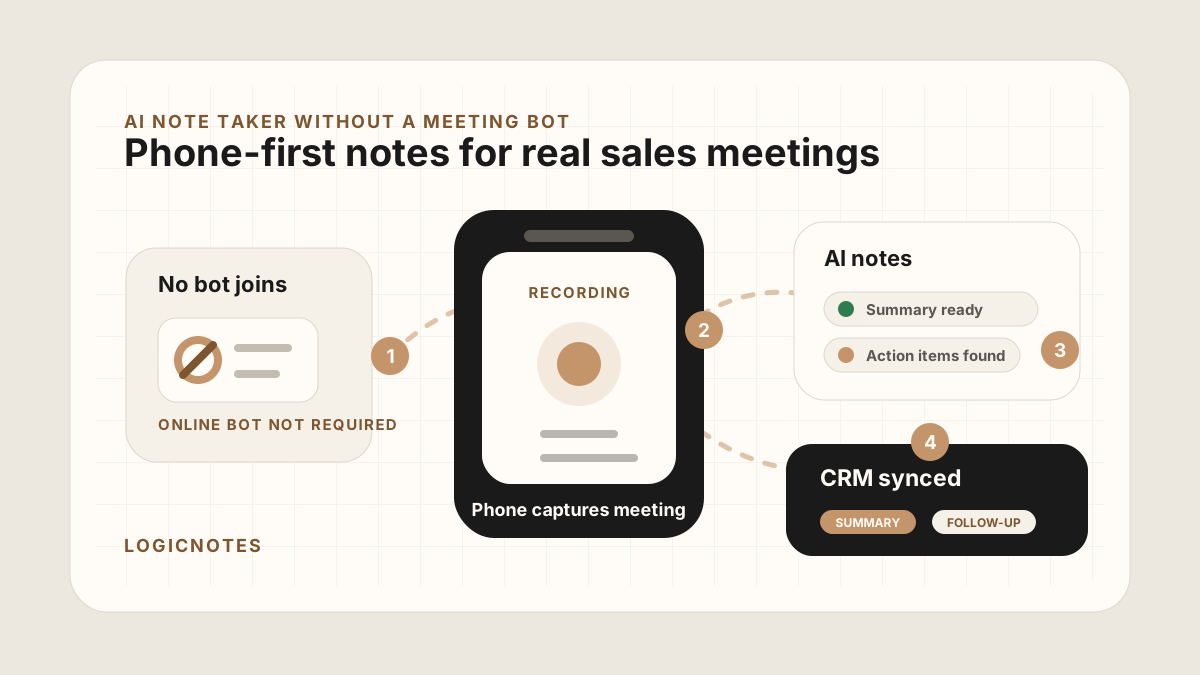
Many AI note takers are designed around the calendar invite. A bot joins the Zoom call, records the discussion, writes a summary, and sends notes after the meeting. That can work well for online calls.
But plenty of sales conversations do not happen in a video call. They happen across a conference table, in a customer office, at a trade show booth, during a field visit, or in the five-minute hallway conversation where the real objection finally comes out.
If there is no online meeting for a bot to join, the note-taking workflow has to move to the sales person's phone.
That is why no-bot capture belongs in the same stack as a field sales app CRM field map, a mobile CRM, a and a route plan. The rep needs a way to capture the conversation, review the output, and move the useful parts into CRM before the next customer stop.
Quick Answer: What AI Note Taker Works Without a Meeting Bot?
The best AI note taker without a meeting bot captures the conversation from the rep's phone or device with clear consent, then turns the recording or recap into a reviewed sales summary, buyer pain, objections, decisions, action items, owners, due dates, CRM field map, sync status, Salesforce or HubSpot tasks, Google Sheets rows, and sync status. Use a no-bot workflow for in-person meetings, site visits, trade shows, hallway conversations, and customer settings where there is no online meeting for a bot to join.
- If there is no video meeting: prioritize phone-first capture, immediate recap support, offline tolerance, and a fast after-sync hygiene.
- If customers dislike meeting bots: prioritize clear disclosure, consent-aware recording, visible rep control, and clean summaries over raw transcript dumps.
- If CRM follow-up is the goal: prioritize account match, contact match, action-item extraction, owner, due date, CRM task creation, and sync-error handling.
Why People Look for an AI Note Taker Without a Meeting Bot
The usual meeting bot workflow assumes a few things: the meeting is scheduled online, everyone is comfortable with a bot in the room, the conversation happens in one platform, and the output can wait until the call ends.
In-person sales meetings behave differently. The sales person may be moving between customers. The buyer may not want a visible assistant in the meeting. The conversation may happen without a calendar invite. And the most important output is usually not a transcript. It is a clean summary, action items, next steps, and CRM-ready context.
Current bot-free AI note takers usually solve this by recording from the user's device instead of appearing as a meeting participant. That can work for in-person meetings and ad hoc conversations, but it also means the workflow needs deliberate disclosure, team policy, and a clear destination for the notes.
- No bot can join a face-to-face meeting. A phone-first recorder fits the physical meeting better.
- The meeting may be sensitive. Some customers are more comfortable with a clear phone recording workflow than an unknown meeting assistant.
- The CRM still needs structure. Sales teams need summaries, follow-ups, owners, dates, and deal context, not just raw audio.
- The best notes happen quickly. The longer the gap after the meeting, the more details disappear.
When Meeting Bots Still Fit
No-bot capture is not automatically better. It is better when the meeting context makes a visible online assistant awkward, impossible, or unnecessary. For scheduled online calls, a bot-based or desktop meeting assistant can still be the right choice.
| Meeting type | Best capture mode | Reason |
|---|---|---|
| Scheduled Zoom or Teams demo | Meeting bot or desktop capture | Everyone is already in an online meeting, so capture can follow the meeting platform. |
| Customer office visit | Phone-first no-bot capture | There is no online room for a bot to join, and the rep needs mobile review before the next stop. |
| Conference booth conversation | Phone recap or no-bot recording | The conversation is fast, informal, and usually not scheduled on a calendar. |
| Internal team meeting | Meeting bot, desktop capture, or team notes tool | The output may be team memory rather than sales CRM handoff. |
| Route day with field visits | Phone-first no-bot capture | The rep needs summaries, action items, and CRM updates while still on the road. |
For the broader buying decision, see the best AI meeting notes apps for in-person sales comparison. This page focuses on the no-bot workflow itself.
When a No-Bot AI Note Taker Makes Sense
A no-bot workflow is not better for every meeting. If the meeting is a scheduled online demo, a meeting bot may be fine. The no-bot category matters most when the conversation is physical, mobile, or hard to capture from a laptop.
| Situation | Why a bot-first workflow breaks | What you need instead |
|---|---|---|
| Customer office visit | There is no online call for the bot to join. | Phone recording, summary, action items, and CRM sync. |
| Trade show conversation | The meeting is spontaneous and may not have a calendar event. | Fast capture, contact context, and follow-up reminders. |
| Field demo | The most important details may come while walking the site. | Mobile capture that turns field context into notes. |
| Route day with multiple visits | The rep may not open a laptop until hours after the customer conversation. | Phone-first capture, fast review, and CRM update before the next stop. |
| Coffee or lunch meeting | A meeting assistant would feel out of place. | Consent-aware recording and clean post-meeting notes. |
| Executive or procurement discussion | Participants may be cautious about extra software joining the meeting. | A simple capture flow with clear consent and useful outputs. |
No-Bot AI Note Taker Use Cases by Meeting Type
The no-bot workflow is most useful when the meeting format would make a visible online assistant impractical. For SEO and buying intent, this matters because teams are not just looking for transcription. They are looking for a way to preserve real sales conversations and turn them into CRM follow-up.
| Use case | What the note taker should capture | What it should create next |
|---|---|---|
| Customer office visit | Buyer problem, stakeholders, objections, exact language, and promised follow-up. | Account note, CRM task, owner, due date, and customer recap. |
| Field demo or site walk | Environment details, workflow constraints, product questions, implementation blockers, and proof requested. | Opportunity note, technical follow-up task, and manager-visible blocker. |
| Conference or booth conversation | Lead context, why the buyer stopped, buying role, urgency signal, and next reason to continue. | Lead/contact row, event follow-up task, and event context in CRM. |
| Renewal or account-risk meeting | Account health, champion strength, objections, renewal risk, product feedback, and escalation owner. | Account health note, renewal task, risk field, or customer-success handoff. |
| Coffee, lunch, or executive conversation | Strategic context, relationship details, decision process, and soft commitments. | Concise CRM note, next-step task, and review-ready summary. |
What to Look for in a No-Bot AI Note Taker
The point is not to remove the bot and keep everything else the same. A no-bot AI note taker needs to support the way sales people actually move through a day.
Use this checklist
A Simple No-Bot Note-Taking Workflow
The workflow should stay simple. If it takes more effort than typing notes manually, sales people will stop using it.
Before, during, and after the meeting
Before: Know what you need from the meeting: decision process, objections, next steps, stakeholder names, and follow-up promises.
During: Record with consent, keep the phone capture simple, and focus on the conversation instead of typing.
After: Review the AI summary, confirm action items, and let the notes and tasks sync automatically to the CRM or Google Sheets while the meeting is still fresh.
Later: Search past notes for promises, objections, customer details, and CRM updates before the next conversation.
If the meeting needs a fuller sales note before tasks are created, use a customer meeting notes template. If the key output is action, convert the follow-up into a task with one owner and due date.
Why the CRM Step Matters
Recording the meeting is only the first step. If the notes stay inside a note-taking app, the sales team still has to copy the important parts into the CRM later. That is where follow-ups get vague and details disappear.
For the task side of the workflow, see how to capture action items from sales meetings and how to turn sales meeting notes into CRM tasks.
No-bot CRM handoff checklist
No-Bot AI Notes CRM Field Map
A no-bot AI note taker should not dump a transcript into the CRM. It should map the useful parts of the meeting into fields that Salesforce, HubSpot, or Google Sheets can actually use.
| AI note field | CRM destination | How to review it |
|---|---|---|
| Account and contact | Salesforce account/contact, HubSpot company/contact, or Google Sheets account/contact columns. | Confirm the note landed on the right customer record after sync. |
| Meeting summary | Account note, opportunity note, HubSpot timeline note, or Sheet summary column. | Keep the summary short enough for a manager or teammate to scan. |
| Buyer signal and objection | Opportunity/deal note, risk field, account health note, or manager review field. | Separate what the buyer actually said from the rep's interpretation. |
| Action item, owner, and due date | Salesforce task, HubSpot task, CRM reminder, or Google Sheets follow-up columns. | Create one task per customer promise and make sure the owner is explicit. |
| Sync or sync status | CRM sync log, task status, manager after-sync hygiene, or spreadsheet status column. | Mark whether the note is pending review, synced, missing an account, or waiting on customer. |
After No-Bot AI Notes Sync: Keep the CRM Clean
Modern AI note tools, including LogicNotes, sync no-bot meeting notes to the CRM automatically. There is no approval screen between the meeting and the record, and that is the point: the rep stays out of data entry. The trust layer moves into the CRM itself, as a quick after-sync habit instead of a pre-sync gate.
After a synced note lands, a two-minute pass covers what matters: confirm the note attached to the right account or contact, make sure the next step exists as a real task with a date, and fix anything that looks off by editing the note or task directly in Salesforce, HubSpot, Zoho CRM, Dynamics 365, or Google Sheets. Edits made in the CRM are visible to managers and teammates right away, so the record stays trustworthy without slowing down the field day.
Common No-Bot Note-Taking Mistakes
The biggest mistake is assuming that no-bot means less structure. In reality, the no-bot workflow needs more structure because there is no online meeting platform organizing the capture for you.
- Recording without a clear consent habit. Always follow the consent rules that apply to your meeting and make the recording obvious to participants.
- Keeping only the transcript. A transcript is useful backup, but the sales workflow needs a summary and action items.
- Forgetting CRM sync. Notes that never reach the CRM create another manual admin step later.
- Waiting too long to review. Review the AI output while you still remember the room, the tone, and the promised next step.
- Using one workflow for every meeting. Online calls and in-person sales meetings need different capture systems.
Field Sales No-Bot Workflow
For field sales, the no-bot workflow has to fit between stops. The rep should not need a laptop, a video-call link, or a long admin block at the end of the day.
Use this between customer visits
This connects naturally to sales route planning, the broader field sales app guide, an outside sales app workflow, and a mobile CRM workflow. Pair it with visit tracking when managers need the route-day record to explain what happened after each stop. The capture tool is only useful if it makes the next follow-up easier to execute.
Where LogicNotes Fits
LogicNotes is built for sales people who need AI notes without inviting a meeting bot. Record an in-person meeting on your iPhone with consent, get clean AI summaries and action items, then let the notes and tasks sync automatically to your CRM or Google Sheets automatically.
That makes it a fit for customer visits, field demos, conference conversations, coffee meetings, and any sales conversation where the CRM still needs to reflect what actually happened.
No-Bot AI Note Taker FAQ
What is an AI note taker without a meeting bot?
An AI note taker without a meeting bot captures audio directly from a phone, laptop, desktop app, or device microphone instead of joining an online meeting as a visible participant.
When should field sales reps use a no-bot AI note taker?
Field sales reps should use a no-bot AI note taker for customer office visits, field demos, trade show conversations, coffee meetings, and other in-person conversations where there is no video call for a bot to join.
When is a meeting bot still a good fit?
A meeting bot is often a good fit for scheduled online calls, demos, internal meetings, and remote revenue teams where everyone expects a visible assistant in the call.
Is a no-bot AI note taker the same as recording secretly?
No. A no-bot workflow still needs clear disclosure, consent, and responsible recording habits. Always follow the recording consent rules that apply to the meeting location and participants.
What should no-bot AI notes produce for sales teams?
Sales teams should look for clean summaries, customer pain points, objections, decisions, action items, owners, due dates, meeting context, and CRM-ready fields.
How should no-bot notes become CRM tasks?
Each promised follow-up should become a CRM task or spreadsheet row with one owner, one due date, the related account or opportunity, and a short note explaining the customer request.
Can a no-bot AI note taker sync to Google Sheets?
Yes. A no-bot AI note taker can sync meeting summaries, action items, owners, due dates, CRM status, and next steps to a Google Sheets CRM workflow when the team is not ready for a full CRM.
Can a no-bot AI note taker sync to Salesforce or HubSpot?
Yes. A no-bot AI note taker can sync reviewed summaries, action items, owners, due dates, account context, and task fields to Salesforce or HubSpot when the workflow maps each note to the right CRM record.
What CRM fields should no-bot AI notes create?
No-bot AI notes should create or update fields for account, contact, meeting type, summary, buyer signal, objection, action item, owner, due date, task status, and sync or sync status.
Where should no-bot AI meeting notes go after the meeting?
The useful parts should sync to the CRM, account record, opportunity, task list, or Google Sheets tracker where the next sales action will happen.
How does a no-bot AI note taker reduce CRM admin?
It reduces CRM admin by capturing the meeting once, creating a structured summary and task list, and syncing the useful fields to the CRM or spreadsheet instead of asking reps to rewrite the conversation later.
Use AI notes without inviting a bot.
If your sales meetings happen in person but your CRM still needs clean summaries and follow-ups, LogicNotes was built for that.
Download LogicNotes for iOS