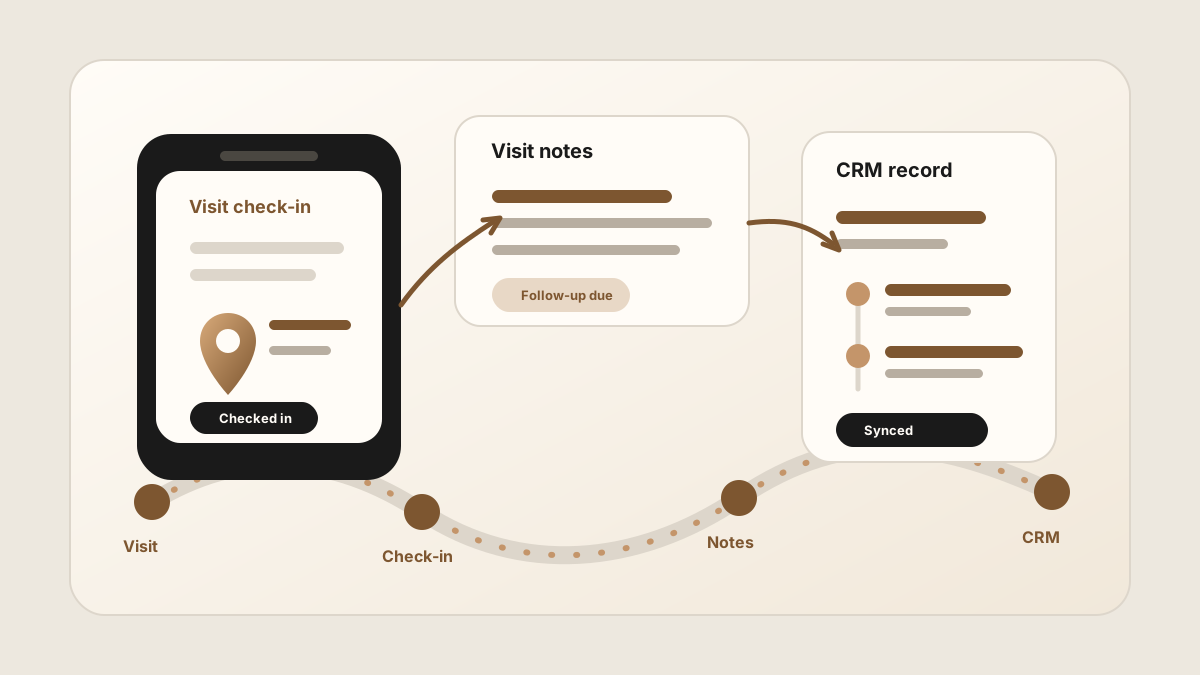
Sales rep visit tracking is useful only if it tells the team more than where someone went. A field sales check-in app can prove that a rep visited an account. The sales value comes from the notes, outcome, follow-up task, and account update that explain what happened during that visit.
That is why a visit tracking workflow needs to connect with field sales activity logging, the sales rep route planner app workflow, and the broader field sales app stack. The rep needs a fast mobile record. The manager needs visibility. The CRM needs useful context.
For teams comparing a broader sales rep app stack, visit tracking is the proof-of-work layer. It becomes more valuable when it connects to mobile CRM, route notes, the outside sales app workflow, activity tracking, CRM field maps, after-sync hygienes, follow-up tasks, Salesforce, HubSpot, Google Sheets, and CRM sync.
The strongest visit tracking habit is not "prove the stop." It is "preserve the stop": who was there, what changed, what was promised, and what happens next.
Quick Answer: What Sales Rep Visit Tracking Workflow Do Field Teams Need?
The best sales rep visit tracking workflow confirms the customer stop, preserves the notes and outcome behind the visit, creates follow-up tasks, and keeps the update easy to check in Salesforce, HubSpot, Sheets, or the CRM system of record after it syncs.
- If managers need visibility: prioritize account match, visit time, check-in status, territory coverage, and visit outcome without turning the workflow into surveillance.
- If reps lose context: prioritize fast visit notes, buyer language, objections, next steps, photos or attachments when useful, and mobile CRM history.
- If CRM follow-up is weak: prioritize action items, owners, due dates, originating visit, sync status, and CRM sync status.
Why Sales Rep Visit Tracking Breaks
Visit tracking breaks when it focuses on location but ignores the sales conversation. A map pin, timestamp, or check-in is useful for coverage and accountability, but it does not help the next rep understand the buyer's objection or the reason a follow-up task exists.
Current field-sales tools often include check-ins, geo-tagged visits, account notes, photos, visit history, route planning, task reminders, and CRM sync. Those features are strongest when they reduce reporting friction for reps and improve customer context for the team.
The failure mode is a busy activity report with thin account history. A manager can see the route was covered, but the next rep still cannot tell what the customer said, what was promised, or which follow-up task matters most.
Sales Rep Tracking App vs GPS Tracking vs CRM Activity Log
Search results for sales rep tracking apps often mix three different needs: manager visibility, rep-friendly visit capture, and CRM history. The best workflow separates those jobs instead of treating every field visit as a dot on a map.
| Tracking layer | What it proves | What it misses | Where LogicNotes helps |
|---|---|---|---|
| GPS or location tracking | Where a rep was, when they checked in, and whether territory coverage happened. | The customer conversation, objection, next step, and follow-up detail. | Adds the meeting summary and action items that explain why the visit mattered. |
| Visit tracking app | Which account was visited, what outcome was selected, and what activity was logged. | Nuanced buyer language if notes are too short or skipped between stops. | Captures the visit conversation while it is fresh and turns it into structured notes. |
| CRM activity log | The durable account history, tasks, and pipeline activity the team can inspect later. | Fresh field context if the rep waits until night to update it manually. | Syncs CRM-ready summaries and follow-up tasks from the visit workflow. |
| Field sales app stack | Route, check-in, visit notes, follow-up, CRM update, and manager visibility. | Clear ownership if every tool captures a different fragment of the visit. | Owns the conversation-to-CRM handoff inside the broader stack. |
If you are choosing the full phone toolkit, use the . If route coverage is the core problem, start with the sales rep route planner app guide. If the broader category is still unclear, use the field sales app guide. If you are piloting visit tracking across a team, use the field sales app rollout plan before turning every route into a manager report.
- The visit is verified but empty. The manager can see the stop happened, but the CRM has no useful customer detail.
- Notes stay separate from the visit. The rep logs a visit in one tool and writes notes somewhere else.
- Follow-up is not connected. A task is created later with no originating visit, account context, or buyer language.
- CRM history stays thin. The account record has activity count, but not the conversation that changed the deal.
What a Sales Rep Should Track After Each Visit
A good visit record should be short enough to complete in the field and specific enough to help the next action. Use the visit as the container, then attach the notes and tasks that make it useful.
| Visit detail | Why it matters | Where it belongs |
|---|---|---|
| Account and people met | Shows which customer, location, contact, and stakeholder were involved. | CRM contact, account, company, deal, or opportunity record. |
| Visit purpose and outcome | Explains why the rep stopped there and whether the visit created a next step. | Activity log, account note, or sales call report. |
| Customer notes | Preserves buyer language, objections, urgency, competitor context, and decision criteria. | CRM note, meeting summary, or account timeline. |
| Follow-up tasks | Turns customer promises into visible work with an owner and due date. | CRM tasks, reminders, or shared task queues. |
| Originating visit | Lets the team trace notes and tasks back to the field visit that created them. | Task description, activity detail, or CRM timeline. |
| Sync status | Shows whether the visit update is clean enough to sync or needs a rep check first. | Rep after-sync hygiene, sync-ready flag, manager exception view, or spreadsheet review column. |
Sales Rep Visit Tracking by Visit Outcome
A sales rep visit tracking app should explain what changed at the account, not just whether a rep arrived. Different visit outcomes need different fields, because a productive meeting, a service-risk visit, and a quick route touch should not create the same CRM update.
| Visit outcome | What to capture | Follow-up it should trigger |
|---|---|---|
| Productive customer meeting | Buyer signal, objection, stakeholder, promised resource, and next meeting need. | CRM note, task, recap, next meeting, or proposal step. |
| No-decision check-in | Reason no action is needed, account status, next check-in timing, and customer sentiment. | No-action status, future reminder, or light nurture task. |
| Service issue or risk visit | Issue summary, customer impact, urgency, internal owner, and expected resolution date. | Escalation, account risk note, customer update task, or manager review. |
| Route drop-in or territory touch | Stop reason, customer reaction, useful context, and whether another visit is worth scheduling. | Account note, future reminder, no-action status, or route-plan update. |
| Post-event lead follow-up | Event origin, priority, requested resource, buying timeline, and next conversation. | Lead task, contact note, next call, or CRM campaign activity. |
This is where a visit tracking tool connects to the broader field sales app category. Route and check-in data show coverage. Visit outcomes, notes, and tasks show whether coverage is becoming customer progress.
For a deeper CRM-notes workflow, use the field sales CRM notes app guide. For the outside-sales version, compare the outside sales visit notes app and outside sales CRM app workflows.
Check-In Tracking vs Visit Notes
A field check-in answers: did the rep visit the account? Visit notes answer: what happened while they were there? A field sales team usually needs both, but they solve different problems.
Check-ins help with route coverage, territory visibility, and manager confidence. Notes help with follow-up, pipeline context, customer handoff, and CRM quality. LogicNotes is built for the notes side of visit tracking: capturing the conversation and turning it into a structured summary, action items, and CRM-ready context.
A Phone-First Visit Tracking Workflow
The workflow has to work between customer stops. If a rep needs a laptop or a long form, the visit record will happen too late.
Use this after every customer stop
If your team needs more structure after the visit, use the field sales follow-up app workflow. If outside sales promises are getting lost between route stops, use the outside sales follow-up workflow. If reps need a repeatable note after each stop, use the sales route notes app workflow. If the broader activity log is too thin, use the field sales activity logging app workflow.
How Visit Tracking Should Sync to CRM
Visit tracking is most useful when the CRM becomes the durable memory of the customer relationship. The visit record should not become another silo.
- Attach notes to the right object. A contact note, account note, and opportunity activity serve different purposes.
- Separate outcome from next action. The outcome says what happened. The task says what needs to happen next.
- Keep the originating visit visible. Tasks should show which customer stop created them.
- Keep sensitive fields reviewable. Stage, close date, amount, and forecast changes should usually require human approval.
- Make the summary readable. The CRM needs concise context, not a raw transcript pasted into the activity feed.
For CRM-specific examples, compare the Salesforce meeting-notes sync workflow and the HubSpot meeting-notes sync workflow. For task structure, see how to turn meeting notes into CRM tasks.
Sales Rep Visit Tracking CRM Field Map
A sales rep visit tracking app needs a visit log and structured CRM fields. The visit log preserves what happened in the field. The CRM field map makes the update searchable, reportable, and useful for managers, account owners, and the next rep who touches the customer.
| Visit field | Why it matters | Where it should land |
|---|---|---|
| Account and contact | Ties the field visit to the customer, stakeholder, location, and active opportunity. | Salesforce account or opportunity, HubSpot company or deal, or Google Sheets account row. |
| Visit type and outcome | Separates check-ins, sales meetings, service issues, samples, drop-ins, and no-action visits. | CRM activity outcome, visit report, route report, or manager dashboard. |
| Visit note summary | Preserves buyer language, objections, urgency, competitive context, and promised next steps. | CRM note, contact timeline, opportunity note, or customer history field. |
| Action item | Turns the visit into visible work instead of leaving commitments buried in notes. | CRM task, reminder, follow-up queue, or shared team tracker. |
| Owner and due date | Makes accountability clear when a customer promise belongs to a rep, manager, service teammate, or partner. | Task owner, due date, calendar reminder, or follow-up report. |
| Sync status | Shows whether the visit update reached CRM, needs review, is queued, or should stay as no action. | Synced, queued, needs review, failed, or no-action status in the tracking workflow. |
| Sync status | Keeps uncertain matches, sensitive notes, customer promises, and manager-visible updates from syncing before a rep confirms them. | Rep after-sync hygiene, manager exception queue, sync-ready flag, or spreadsheet review column. |
For a lightweight spreadsheet version, use the Google Sheets CRM guide. If reps are rewriting visit notes into multiple systems after every route day, pair this with how to reduce CRM admin for sales reps.
After Visit Tracking CRM Sync: Keep Records Clean
Modern AI note tools, including LogicNotes, sync visit records to the CRM automatically. There is no approval screen between the meeting and the record, and that is the point: the rep stays out of data entry. The trust layer moves into the CRM itself, as a quick after-sync habit instead of a pre-sync gate.
After a synced note lands, a two-minute pass covers what matters: confirm the note attached to the right account or contact, make sure the next step exists as a real task with a date, and fix anything that looks off by editing the note or task directly in Salesforce, HubSpot, Zoho CRM, Dynamics 365, or Google Sheets. Edits made in the CRM are visible to managers and teammates right away, so the record stays trustworthy without slowing down the field day.
Common Visit Tracking Mistakes
The biggest mistake is measuring visits without improving follow-up. A visit tracking app should help reps sell better, not just help managers count stops.
- Tracking location without context. A verified stop with no notes does not help the customer relationship.
- Forcing long forms from the field. Reps will shorten, delay, or skip logs that feel like paperwork.
- Letting visit notes live outside CRM. Private notes do not help managers, handoffs, or future visits.
- Creating tasks without visit context. "Follow up" is not enough. The task needs the promise and visit source.
- Confusing accountability with micromanagement. The workflow should make reps more effective, not just more watched.
Where LogicNotes Fits
LogicNotes fits after the rep reaches the customer. It is not a GPS tracker, route planner, territory tool, or attendance system. It captures the in-person conversation on iPhone with consent, turns it into summaries and action items, and syncs CRM-ready visit context to Salesforce, HubSpot, Zoho CRM, Dynamics 365, or Google Sheets.
That makes it a useful companion to sales route planning and mobile CRM. The route gets the rep to the account. The CRM stores the account history. LogicNotes helps the visit record explain what actually happened.
Sales Rep Visit Tracking FAQ
What is a sales rep visit tracking app?
A sales rep visit tracking app helps field teams record customer visits, check-ins, notes, outcomes, follow-up tasks, and CRM updates from a mobile device.
What is the best sales rep tracking app?
The best sales rep tracking app depends on what the team needs to see. Manager-heavy teams may need GPS, check-ins, territory coverage, and visit status. Rep-friendly teams also need notes, outcomes, follow-up tasks, and CRM sync so the tracking record improves the customer relationship.
What should reps track after each customer visit?
Reps should track the account visited, people met, visit purpose, outcome, customer notes, action items, follow-up owner, due date, sync status, and the CRM record where the activity belongs.
Is visit tracking the same as GPS tracking?
No. GPS tracking can confirm location or check-in data. Visit tracking should also preserve what happened, what the customer said, and what next step was promised.
Does sales rep tracking require GPS?
Not always. GPS can help verify visits and territory coverage, but sales rep tracking can also rely on check-ins, CRM activity, visit notes, photos, route records, and follow-up tasks. The right level depends on the team's sales motion and privacy expectations.
Should visit tracking sync to CRM?
Yes. Visit notes, outcomes, and follow-up tasks should sync to the CRM when the CRM is the system of record for account history, pipeline activity, and team visibility.
Can a sales rep visit tracking app sync to Salesforce, HubSpot, or Google Sheets?
Yes. A sales rep visit tracking app can sync to Salesforce, HubSpot, or Google Sheets when visit outcome, account, contact, note summary, action item, owner, due date, sync status, and sync status fields are structured before the update is sent.
What should a sales rep visit tracking app sync to CRM?
A sales rep visit tracking app should sync the account, contact, visit type, visit outcome, note summary, buyer signal, action item, owner, due date, originating visit, CRM destination, and sync status.
Should reps check visit tracking updates after they sync?
Yes. After a sync lands, reps should give the CRM record a quick check when the account match looks unclear, the visit has no next step, a customer promise was captured, a high-value opportunity changed, or manager-visible activity needs context. Anything off is edited directly in the CRM.
How does sales rep visit tracking reduce CRM admin?
Sales rep visit tracking reduces CRM admin when reps capture the visit once, attach the outcome and note to the right customer, create follow-up tasks, and sync useful fields to CRM instead of rewriting the route day later.
How should managers use sales rep visit tracking data?
Managers should use sales rep visit tracking data to review territory coverage, visit quality, follow-up completion, account risk, and coaching patterns. The data is more useful when it combines check-ins with outcomes, notes, and tasks.
What is the difference between a field sales app and a sales rep visit tracking app?
A field sales app can cover routes, mobile CRM, lead capture, quotes, reporting, and follow-up. A sales rep visit tracking app focuses on customer stops: check-ins, visit records, outcomes, notes, tasks, and CRM sync.
Where does LogicNotes fit?
LogicNotes fits after or during the customer visit. It records in-person conversations on iPhone with consent, generates summaries and action items, and syncs CRM-ready visit context to Salesforce, HubSpot, Zoho CRM, Dynamics 365, or Google Sheets.
Track the visit and keep the context.
LogicNotes helps field reps turn customer visits into notes, action items, and CRM-ready follow-up before the next stop takes over.
Download LogicNotes for iOS