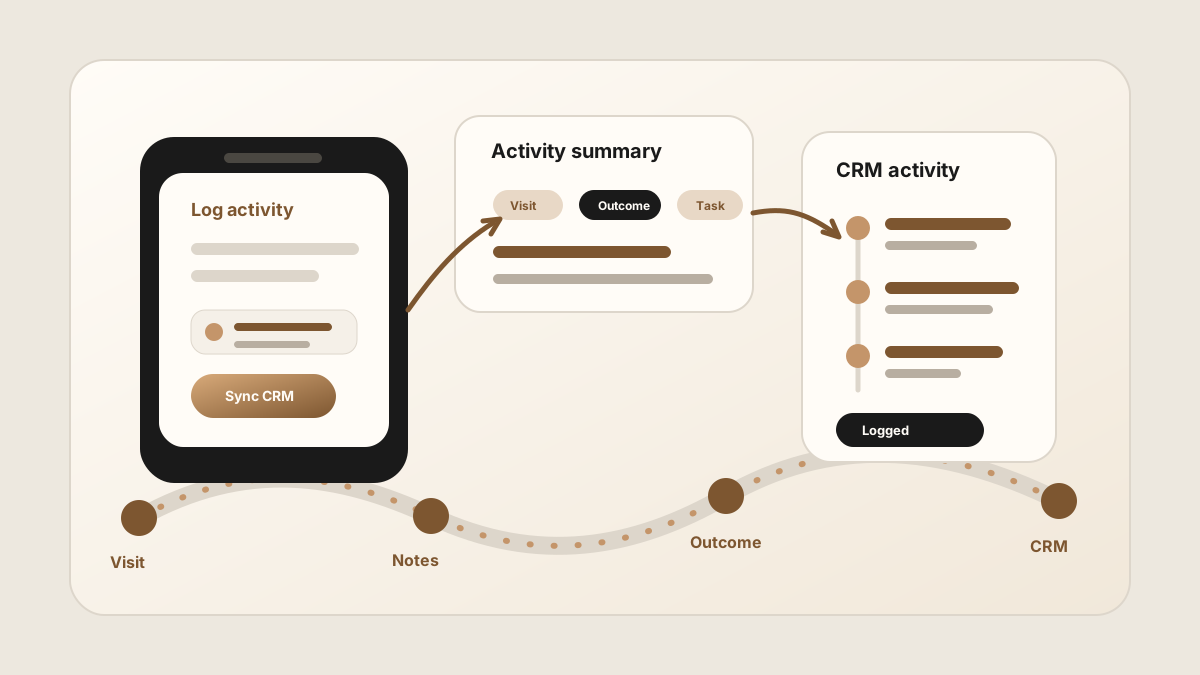
Field sales activity logging sounds simple until a real route day gets involved. A rep visits three accounts, hears two objections, promises one sample, learns a competitor is in the deal, and still has another stop across town. If the activity log waits until night, the CRM gets a blurry version of what actually happened.
A field sales activity logging app should help reps capture real field work from the phone: visits, customer notes, outcomes, follow-up tasks, and the CRM record where that context belongs. It is a support layer inside the broader field sales app stack, not a replacement for every field sales tool. If your team starts with check-ins, use the field sales check-in workflow and sales rep visit tracking workflow to keep the notes and next steps attached.
The point is not to watch reps. The point is to preserve what happened in the field so the next action, manager view, and CRM record are all working from the same truth.
Why Field Sales Activity Logging Breaks
Most activity logging fails because it asks field reps to do desktop admin from a phone. Long forms, vague activity types, and disconnected task lists turn the log into a chore. Reps delay it, shorten it, or skip the parts managers actually need.
Current field sales software is moving toward one-tap visit logging, account notes, task capture, offline mode, activity tracking, and CRM sync. The useful pattern is clear: logging has to happen close to the customer visit, with enough structure to make the activity useful later.
- The visit gets logged without context. The CRM shows that something happened, but not what changed.
- The note lives outside the activity. The customer detail sits in a private notebook while the CRM has only a timestamp.
- The task is not tied to the visit. Follow-up exists, but nobody can see which customer promise created it.
- The manager sees activity volume but not quality. More visits do not help if the team cannot tell which ones moved the deal.
What Field Sales Reps Should Log After a Visit
A useful activity log is specific enough to coach from and short enough for a rep to complete before the next stop. It should connect the customer visit to notes, tasks, outcomes, and account history.
| Activity detail | Why it matters | Where it should go |
|---|---|---|
| Visit outcome | Shows whether the meeting created a next step, objection, order, sample request, renewal risk, or no action. | CRM activity, account timeline, or sales report. |
| Customer note | Preserves buyer language, pain, stakeholders, urgency, and competitor context. | CRM note or account record. |
| Action items | Turns commitments into work with an owner and due date. | CRM task, reminder, or shared task queue. |
| Source meeting | Lets the team trace a task or note back to the customer visit that created it. | Activity detail or task description. |
| Account update | Keeps the CRM useful for the next rep, manager, or forecast review. | Contact, account, company, deal, or opportunity record. |
Activity Logging vs GPS Tracking
GPS tracking can verify that a rep was near an account. Activity logging explains what happened there. Those are different jobs, and they should not be confused.
For some teams, location verification, check-ins, routes, and territory coverage matter. For sales conversations, the higher-value data is usually the visit outcome, account note, action item, and CRM update. A location pin cannot explain the buyer's objection or the sample that was promised.
LogicNotes fits the activity side of the workflow. It does not try to be a GPS monitoring platform. It helps reps capture the conversation and convert it into structured CRM-ready activity.
A Field Rep Workflow for Activity Logging
The workflow has to be faster than the memory decay. Use this after each meaningful customer visit.
Use this after every field visit
If your team needs the capture layer first, start with the sales visit notes app workflow. If the work happens across outside sales routes, use the outside sales visit notes workflow or the sales route notes app workflow. If the issue is turning activities into accountable work, use the field sales follow-up app workflow or the outside sales follow-up workflow. If the field activity is captured but the CRM update still feels weak, compare the outside sales CRM app workflow.
How Activity Logs Should Sync to CRM
The CRM should be the durable activity history, not a place where reps rewrite the day. A good activity logging workflow sends concise, structured context into the system of record while keeping human review for judgment-heavy fields.
- Attach the activity to the right record. Account-level notes, contact-level notes, and deal-level tasks each answer different questions.
- Keep the summary scan-friendly. Managers need the point of the visit, the outcome, and the next action.
- Create tasks from real commitments. Samples, pricing, intros, technical answers, and next meetings should become visible work.
- Preserve buyer language. A short quote from the customer is often more useful than a generic status label.
- Review forecast changes. Let the app draft activity context, but avoid silently changing sensitive pipeline fields.
For CRM-specific handoff, compare the Salesforce meeting-notes sync workflow and the HubSpot meeting-notes sync workflow. For task design, see how to turn sales meeting notes into CRM tasks.
Common Field Sales Activity Logging Mistakes
Activity logging fails when it creates more friction than visibility. The best setup makes the useful parts automatic or near-automatic while still giving reps control over customer-facing and forecast-sensitive decisions.
- Logging only the check-in. A timestamp without outcome or context does not help the next sales step.
- Using too many activity categories. Reps should not need a taxonomy lesson before logging a visit.
- Making notes optional but reporting mandatory. Managers get numbers, but the account record stays thin.
- Separating activity from follow-up. The activity should create or connect to the next task.
- Tracking reps instead of helping reps sell. Tools that feel punitive usually get worse data.
Where LogicNotes Fits
LogicNotes is built for the part of field sales activity that starts with a customer conversation. Record an in-person meeting on iPhone with consent, review the AI-generated summary and action items, then sync useful activity context to Salesforce, HubSpot, Zoho, Dynamics, or Google Sheets.
It pairs well with sales route planning and mobile CRM. Route planning gets the rep to the right account. Mobile CRM shows the account history. LogicNotes captures what happened and helps the CRM reflect the real field activity.
Field Sales Activity Logging FAQ
What is a field sales activity logging app?
A field sales activity logging app helps reps record visits, meetings, notes, tasks, outcomes, and CRM updates from the phone while they are away from a desk.
What should reps log after a field visit?
Reps should log the account visited, people met, visit outcome, customer context, buyer concern, action items, follow-up tasks, owner, due date, and the CRM record that should hold the activity.
Is activity logging the same as GPS tracking?
No. GPS tracking shows where a rep was. Activity logging records what happened, what changed in the account, and what follow-up needs to happen next.
Should field sales activities sync to CRM?
Yes. Field sales activities should sync to the CRM when the CRM is the system of record for accounts, contacts, deals, notes, tasks, and pipeline visibility.
Where does LogicNotes fit?
LogicNotes fits in the meeting and visit capture layer. It records in-person conversations on iPhone with consent, generates summaries and action items, and syncs CRM-ready activity context to tools such as Salesforce, HubSpot, Zoho, Dynamics, or Google Sheets.
Log the visit without rewriting the day.
LogicNotes helps field reps capture customer conversations, action items, and CRM-ready activity before the next stop changes the story.
Download LogicNotes for iOS