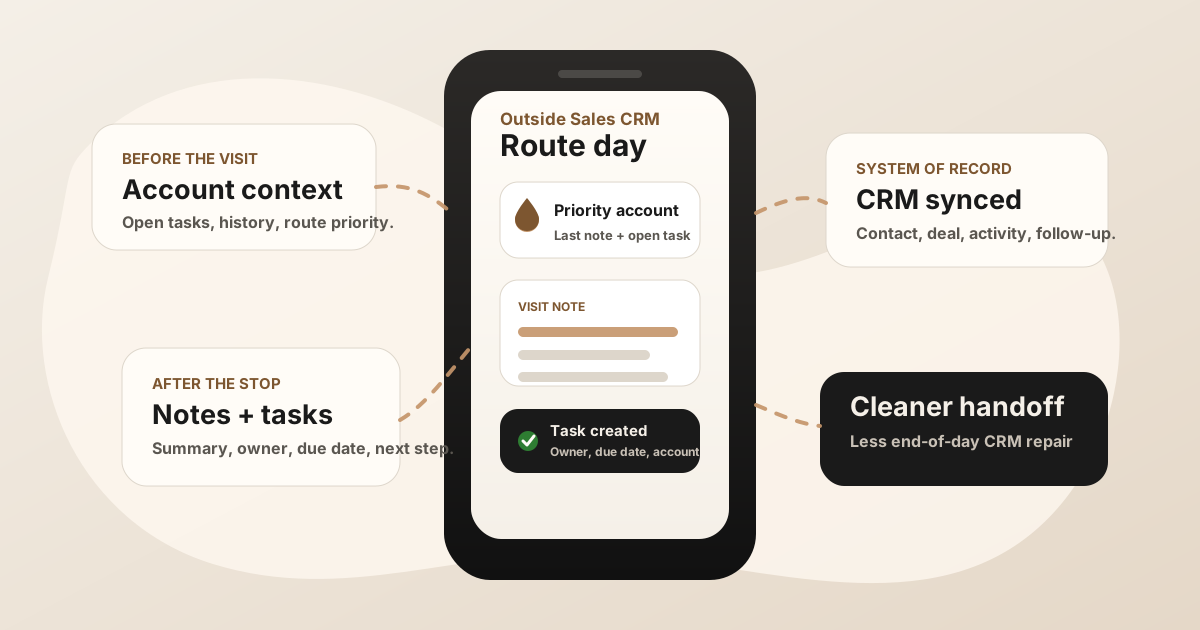
An outside sales CRM app should help reps keep the system of record current without turning the field day into a typing exercise. The rep needs customer context before the visit, a fast way to capture what happened after the visit, and a clean handoff into follow-up.
That sounds simple until the day starts moving. A rep leaves one account with a buyer objection, promised quote, new stakeholder name, and next visit date. Then the next appointment begins. If the CRM workflow is too slow, the update waits until later, and later is where good sales context gets thin.
The best outside sales CRM app is not just CRM on a smaller screen. It is a field workflow that turns each customer visit into account context, tasks, and next steps.
What Is an Outside Sales CRM App?
An outside sales CRM app is CRM access designed for reps who work away from a desk. It should make accounts, contacts, opportunities, recent activity, notes, follow-up tasks, and next steps usable from a phone.
The CRM is still the system of record. The app has to make that record useful during a route day. For the broader app stack around routes, notes, follow-up, files, and reporting, start with the outside sales app guide. For the field-sales category overall, see the field sales app guide.
If you already have Salesforce, HubSpot, Zoho, Dynamics, or another CRM, the question is not whether to replace it. The better question is whether reps can actually use it between customer visits without rebuilding the meeting from memory.
Why Outside Sales Reps Need More Than Desktop CRM on Mobile
Outside sales has a different rhythm than inside sales. Reps are not sitting with a laptop, a stable connection, and a clean call queue. They are moving through customer sites, showrooms, job sites, counters, conference floors, and parking lots.
That creates three CRM problems. First, account context has to be fast enough to review before walking in. Second, visit notes have to be captured before the next stop absorbs attention. Third, follow-up needs to become a dated task or customer message while the promise is still specific.
A mobile CRM that only lets reps look up account records is useful, but incomplete. Outside sales CRM should help reps update the record, not merely inspect it.
Outside Sales CRM vs Field Sales Software
The terms overlap in vendor pages, but they are not the same job. A CRM app manages the official account and pipeline record. Field sales software may add route planning, territory coverage, check-ins, visit tracking, and rep activity reporting around that CRM.
| Layer | Primary job | Risk if isolated |
|---|---|---|
| CRM app | Store accounts, contacts, deals, activity history, notes, and tasks. | Reps can see the record but still postpone useful updates until the end of the day. |
| Route planner | Sequence customer stops, reduce drive time, and group visits by location. | The route improves motion but not the CRM record after each conversation. |
| Visit notes workflow | Capture what happened, summarize the meeting, and identify follow-up. | The note becomes another silo if it does not sync to the right CRM record. |
| Follow-up workflow | Turn promises into tasks, reminders, owners, due dates, and customer messages. | Tasks become vague reminders with no buyer context. |
For the CRM-on-phone layer, use the mobile CRM for field sales reps guide. For the route layer, use sales route planning for field reps. For the notes attached to each route stop, use the sales route notes app workflow. For the field-sales version of the CRM note layer, use the field sales CRM notes app workflow. This page focuses on the outside-sales CRM workflow that keeps those layers connected.
What to Look For in an Outside Sales CRM App
- Fast account search: Reps should find the account, contact, opportunity, and latest activity in seconds.
- Route and calendar context: The CRM should fit the rep's actual day, not sit apart from appointments and territory movement.
- Offline-friendly capture: Notes or tasks should be saved when signal is poor and synced later.
- Visit note structure: The app should preserve buyer pain, objections, stakeholders, promised assets, and decision timing.
- Follow-up task creation: The rep should create a task with owner, due date, account, contact, opportunity, and source meeting context.
- Manager visibility: Leaders should see what happened in the field without asking reps to write a second report.
- Clean integrations: Notes and tasks should reach Salesforce, HubSpot, Zoho, Dynamics, Google Sheets, or the CRM your team already trusts.
A Practical Outside Sales CRM Workflow
The CRM app should support the full field day, not only the cleanup at the end.
Before the visit
Open the account, review the latest notes, check open tasks, confirm the opportunity stage, and understand why the customer is on the route. If the rep has to search three systems for that context, the CRM is already losing.
During the visit
Stay present with the customer. If recording is appropriate, get consent and capture the conversation. If not, record a quick recap immediately after the meeting. The important details are usually buyer language, objections, dates, names, pricing concerns, and promised follow-up.
Before the next stop
Turn the visit into a summary, task, due date, and CRM update. The goal is not perfect prose. The goal is a useful account record that the next person can understand without asking the rep what really happened.
At the end of the day
Review exceptions rather than rewrite every visit. The outside sales CRM app should already hold the route activity, visit notes, follow-up tasks, and account updates.
The Visit Notes to CRM Handoff
This is where many outside sales CRM rollouts stall. The CRM can store notes and tasks, but the rep still has to translate a real conversation into structured data.
A better handoff captures the meeting once and produces the pieces the CRM needs:
- Summary: What happened, what changed, and why it matters.
- Buyer context: Pain, objection, stakeholder, budget, urgency, or operational constraint.
- Action items: Owner, due date, promised asset, next meeting, and customer-facing message.
- CRM placement: The right account, contact, opportunity, deal, activity, task, or sheet row.
- Follow-up source: A link back to the visit note so the task carries context instead of becoming "follow up."
If the weak point is the note itself, use the outside sales visit notes app workflow. If the weak point is turning promises into accountable next steps, use the outside sales follow-up app workflow. If your team logs visits but loses the detail behind them, compare the field sales activity logging app guide.
Outside Sales CRM App Checklist
Use this before rolling out or cleaning up CRM for outside reps
- Can reps review the account before walking in?
- Can reps capture a note or recap with weak signal?
- Can the meeting note become a summary and action-item list?
- Can tasks land on the right account, contact, or opportunity?
- Can managers see visit context without asking for a separate report?
- Can the workflow be repeated after every meaningful customer visit?
- Can the stack reduce CRM admin instead of adding another place to type?
Where LogicNotes Fits
LogicNotes does not replace your outside sales CRM. It sits between the in-person customer meeting and the CRM update, where the conversation still needs to become a useful summary, action items, and follow-up context.
Record an in-person sales meeting on iPhone with consent, get structured notes and tasks, then sync the useful parts to Salesforce, HubSpot, Zoho, Dynamics, or Google Sheets. The CRM gets a cleaner update, and the rep spends less time rebuilding the meeting from memory.
Outside Sales CRM FAQ
What is an outside sales CRM app?
An outside sales CRM app is a mobile CRM workflow for reps who work away from a desk. It should make account context, visit notes, follow-up tasks, deal updates, and activity history easy to use from the field.
What should outside sales reps look for in a CRM app?
Outside sales reps should look for fast mobile account search, offline-friendly capture, route and calendar context, easy visit notes, follow-up task creation, and reliable sync to the CRM system of record.
Is an outside sales CRM app the same as field sales software?
Not exactly. The CRM app is the system of record on the phone. Field sales software may add route planning, territory coverage, check-ins, visit tracking, and reporting around that CRM.
How should outside sales CRM handle notes and follow-up?
Outside sales CRM should connect the visit note to the right account, contact, opportunity, task, owner, due date, and next customer-facing action so the CRM reflects what actually happened in the field.
Where does LogicNotes fit with outside sales CRM?
LogicNotes fits between the in-person customer meeting and the outside sales CRM update. It records the meeting on iPhone with consent, creates summaries and action items, and syncs CRM-ready context to Salesforce, HubSpot, Zoho, Dynamics, or Google Sheets.
Turn outside sales visits into cleaner CRM updates.
If your reps have strong customer conversations but the CRM only gets thin notes later, LogicNotes helps capture the visit and sync the follow-up while it is still fresh.
Download LogicNotes for iOS