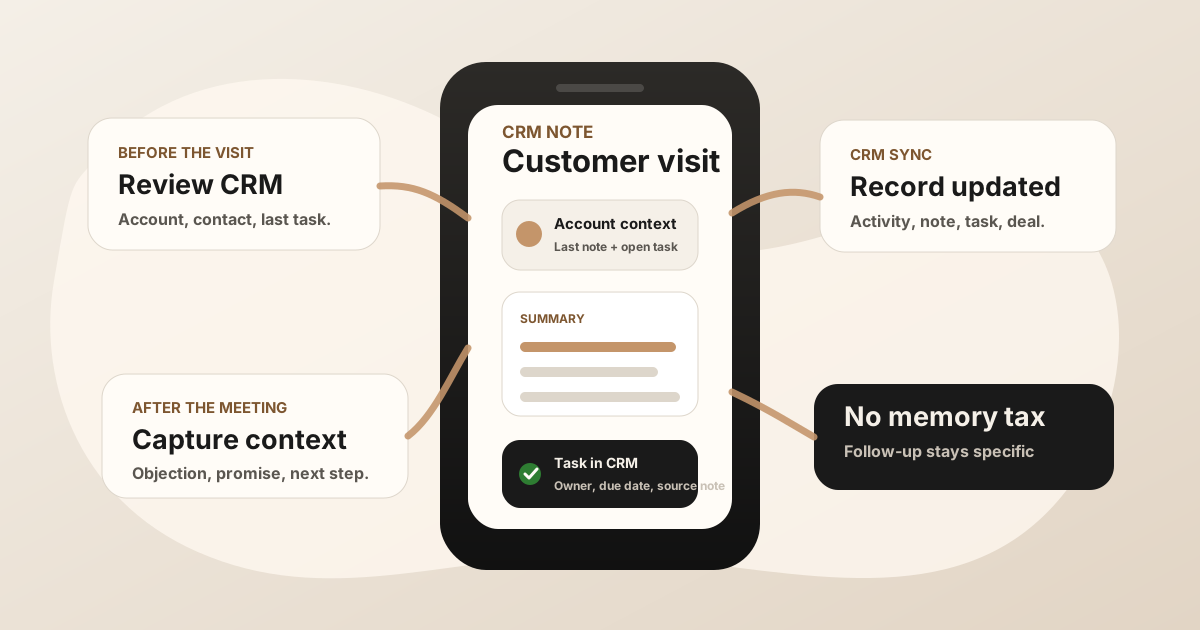
Field sales CRM notes are where the real customer conversation becomes usable later. The route gets a rep to the account. The CRM stores the official record. The note explains what changed, what was promised, and what should happen next.
The problem is timing. A rep can leave a customer site with a pricing objection, a new stakeholder, a sample request, and a promised follow-up. Ten minutes later, the next visit starts. If the CRM note waits until the evening, the update gets shorter, vaguer, and less useful.
A good field sales CRM notes app protects the few minutes between a customer conversation and the next stop.
What Is a Field Sales CRM Notes App?
A field sales CRM notes app helps reps capture customer visit notes, buyer context, action items, and follow-up tasks from the field, then sync the useful details to the CRM record. It belongs beside mobile CRM, sales route notes, and the broader field sales app stack.
This is narrower than a full field sales platform. The job is not route optimization, territory planning, proposal management, or replacing CRM. The job is to make sure the customer conversation does not become a one-line activity log.
If your team already uses Salesforce, HubSpot, Zoho, Dynamics, or Google Sheets, the best notes workflow should make that system better instead of becoming another place reps have to check.
Why Field Sales Reps Need CRM Notes Built for the Road
Desk-based sales notes often happen with a laptop, stable internet, and the CRM open beside the rep. Field sales notes happen in a car, hallway, lobby, showroom, job site, counter, or parking lot. That changes the product requirements.
Reps need fast capture, offline tolerance, account context, and a clean handoff into tasks. Managers need enough detail to coach and forecast without asking reps to rewrite their day. Operations teams need CRM data that is structured enough to report on without stripping out the buyer context.
That is why the best workflow captures notes while the meeting is fresh and then syncs to the system of record.
CRM Notes App vs Mobile CRM vs Route Planner
| Layer | Primary job | Where it can break |
|---|---|---|
| Route planner | Sequence stops, reduce drive time, and make the field day visible. | It shows where the rep went without preserving what happened in the meeting. |
| Mobile CRM | Give reps access to accounts, contacts, opportunities, tasks, and recent activity from the phone. | It can still be too slow or structured for rich post-visit capture. |
| CRM notes app | Turn the field conversation into a useful summary, action items, follow-up, and CRM update. | It becomes a silo if the note never reaches the right CRM record. |
For the route layer, use sales route planning for field reps. For the CRM-on-phone layer, use mobile CRM for field sales reps. This page focuses on the notes layer that keeps the CRM from going stale.
What Field Sales CRM Notes Should Capture
A useful CRM note should be short enough to create in the field and specific enough to make the next step obvious. "Good meeting" is not a CRM note. "Follow up" is not a task.
- Account and contact: Who was visited, who joined, and which CRM record should receive the note.
- Meeting objective: Why the rep was there and what outcome mattered.
- Buyer context: Pain, objection, stakeholder change, competitor mention, timing, budget, or operational constraint.
- Decision signal: What changed because the meeting happened.
- Promised follow-up: Quote, sample, intro, technical answer, deck, contract, next meeting, or customer-facing message.
- Owner and due date: Who owns the next action and when it should happen.
- CRM placement: Account, contact, opportunity, deal, activity, task, or Google Sheets row.
A Practical Field Sales CRM Notes Workflow
The workflow should follow the rep's day instead of asking the rep to do end-of-day reconstruction.
Before the visit
Open the account record, review the last note, check open tasks, confirm the opportunity stage, and decide what this visit is supposed to accomplish.
During the conversation
Stay present. If recording is appropriate, handle consent clearly and record the meeting. If not, capture a short recap immediately after the conversation with the details that will be hard to remember later.
Before the next stop
Turn the meeting into a summary and task while the context is still sharp. The note should answer: what happened, what changed, what was promised, who owns it, and where it belongs in CRM.
End of day
Review exceptions rather than rewriting every visit. The rep should be checking quality, not rebuilding five customer conversations from memory.
How CRM Notes Should Sync
CRM sync should preserve both the narrative and the structure. A transcript or long note can be useful, but the CRM also needs fields and tasks that the team can act on.
The strongest handoff usually creates or updates:
- Activity history: A clear record that the visit happened and what mattered.
- Contact or account note: Buyer language, objections, stakeholder detail, and context for the next visit.
- Opportunity or deal update: Stage movement, risk, timing, next step, or buying signal.
- Task: Owner, due date, promised follow-up, and source note.
- Manager visibility: Enough detail to coach without asking for a second report.
For CRM-specific handoff details, compare how to sync sales meeting notes to Salesforce and how to sync sales meeting notes to HubSpot. For the broader admin burden, use how to reduce CRM admin for sales reps.
Field Sales CRM Notes App Checklist
Use this before choosing or tightening a CRM notes workflow
- Can reps review the previous CRM note before walking in?
- Can reps capture a note immediately after the customer conversation?
- Can notes be saved when signal is weak?
- Can action items become CRM tasks with owner and due date?
- Can notes attach to the right account, contact, opportunity, or deal?
- Can managers see the real field context without a second report?
- Can the workflow be repeated after every meaningful visit?
Where LogicNotes Fits
LogicNotes fits between the in-person customer meeting and the CRM update. Record a field sales meeting on iPhone with consent, get structured summaries and action items, then sync the useful context to Salesforce, HubSpot, Zoho, Dynamics, or Google Sheets.
It does not replace your CRM, mobile CRM, or route planner. It protects the customer conversation so the CRM gets a note your team can actually use.
Field Sales CRM Notes FAQ
What is a field sales CRM notes app?
A field sales CRM notes app helps reps capture customer visit notes, buyer context, action items, and follow-up tasks from the field, then sync the useful details to the CRM record.
What should field sales CRM notes include?
Field sales CRM notes should include the account, contact, meeting objective, buyer pain, objection, stakeholder change, promised follow-up, owner, due date, and CRM destination.
How is a CRM notes app different from mobile CRM?
Mobile CRM is the system of record on a phone. A CRM notes app focuses on capturing the conversation and turning it into structured summaries, tasks, and field updates the CRM can use.
Should field sales CRM notes sync to Salesforce or HubSpot?
Yes. If Salesforce, HubSpot, Zoho, Dynamics, or Google Sheets is your team's source of truth, field sales notes should sync there so activity history and follow-up stay attached to the account.
Where does LogicNotes fit with field sales CRM notes?
LogicNotes fits between the in-person customer meeting and the CRM update. It records meetings on iPhone with consent, creates summaries and action items, and syncs CRM-ready context to the tools your team already uses.
Turn field conversations into CRM-ready notes.
If your reps have strong customer visits but the CRM gets thin updates later, LogicNotes helps capture the meeting and sync the useful follow-up while it is still fresh.
Download LogicNotes for iOS