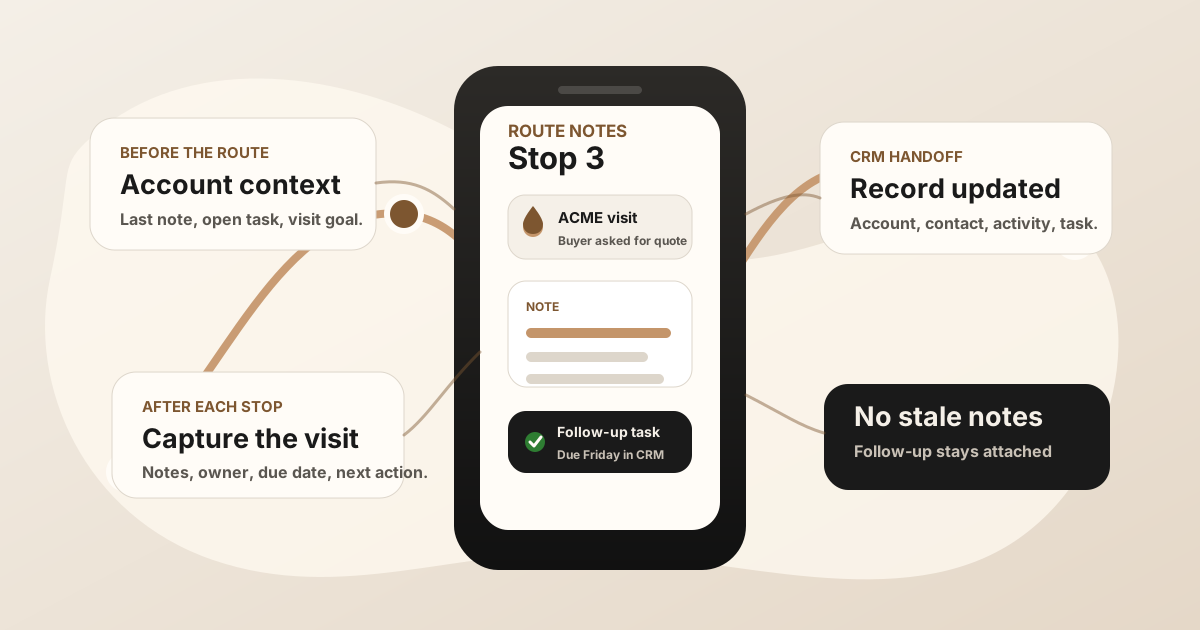
A good sales route gets a field rep to the right accounts. A good sales route notes app makes sure the day still means something after the driving is done.
The hidden risk in route-heavy selling is that movement feels like progress. A rep may visit six accounts, handle objections, promise follow-up, hear a new buying signal, and learn that a stakeholder changed. If those details stay in memory until the end of the day, the CRM gets a blurry version of the route.
The route gets the rep to the account. The route note explains what happened there and what should happen next.
What Is a Sales Route Notes App?
A sales route notes app helps field reps capture what happened at each customer stop, turn the visit into action items, and sync useful context to the CRM. It sits beside sales route planning, mobile CRM, and the broader field sales app stack.
Some route platforms include notes, check-ins, and CRM sync. Some teams use a separate route planner and a separate notes workflow. Either setup can work as long as the rep does not have to reconstruct the customer conversation later.
If your team runs outside sales routes, this workflow overlaps with the outside sales visit notes app guide. This page focuses on the route-day version: one rep, multiple stops, fast capture, and no loose promises.
Why Route Planning Needs a Notes Workflow
Route planning software is getting better at grouping accounts, reducing drive time, prioritizing stops, and surfacing nearby opportunities. That helps reps see more customers. It does not automatically preserve the reason each visit mattered.
Field reps need account context before the stop and a capture habit after the stop. Without that second piece, the CRM may show activity but not insight. A manager can see that the rep visited the account, but not the objection, buying signal, decision date, or promised follow-up.
That is why the notes workflow should be built into the route, not left as a separate end-of-day cleanup chore.
Route Planner vs Route Notes App vs CRM
| Layer | Primary job | Where it can break |
|---|---|---|
| Route planner | Sequence stops, reduce drive time, show nearby accounts, and keep the day visible. | It can prove where the rep went without explaining what changed at the account. |
| Route notes app | Capture visit context, action items, buyer details, and follow-up after each stop. | It becomes another silo if notes do not land in the CRM record. |
| CRM | Store the official account, contact, opportunity, activity, task, and pipeline record. | Desktop-first workflows make reps wait until later, when route context is already fading. |
If the CRM update itself is the bottleneck, use the field sales CRM notes app workflow or the outside sales CRM app workflow. If the issue is promises drifting after the note is captured, use the outside sales follow-up app guide.
What Sales Route Notes Should Capture
A route note should be short enough to capture in the field and specific enough to help the next action. Avoid generic notes like "good meeting" or "follow up." They do not help the rep, manager, or next teammate who opens the account.
- Account and contact: Who was visited, who was present, and which CRM record should receive the note.
- Visit objective: Why this account was on the route today.
- Buyer context: Pain, objection, buying signal, stakeholder change, timing, budget, or competitor mention.
- Outcome: What changed because the visit happened.
- Promised follow-up: The asset, quote, sample, intro, date, or next meeting promised to the customer.
- Owner and due date: Who owns the next action and when it should happen.
- CRM destination: The account, contact, opportunity, deal, activity, task, or Google Sheets row that should be updated.
A Practical Sales Route Notes Workflow
The notes workflow should match the rhythm of the route day.
Before the first stop
Review the route, account priority, open tasks, previous notes, and objective for each important visit. The rep should know why each stop is worth the drive.
At the customer site
Stay present. If recording is appropriate, handle consent clearly. If not, capture only the details that will be hard to remember later: names, objections, dates, commitments, and the customer's exact phrasing.
Before driving away
Capture a route note while the visit is still fresh. The note should produce at least one of three things: a CRM update, a follow-up task, or a reason no follow-up is needed.
After the route
Review exceptions rather than rewrite the whole day. If notes and tasks were captured after each stop, end-of-day review becomes quality control, not manual reconstruction.
How Route Notes Should Sync to CRM
A route note is only useful if it follows the account. That means the note should land where the sales team already works: Salesforce, HubSpot, Zoho, Dynamics, Google Sheets, or the CRM your team treats as the source of truth.
The best handoff connects the note to:
- The account: So future visits start with context instead of memory.
- The contact: So the buyer language and stakeholder details are not lost.
- The opportunity or deal: So pipeline stage and next action reflect the real visit.
- The task: So the follow-up has an owner, date, and source note.
- The activity log: So managers can see field work without chasing manual reports.
For the broader post-visit admin problem, see how to reduce CRM admin for sales reps. For a phone-first capture path, see how to record a meeting on iPhone for sales notes.
Sales Route Notes App Checklist
Use this before choosing or tightening a route notes workflow
- Can reps see the last note before they walk in?
- Can reps capture notes immediately after each stop?
- Can notes be saved when signal is weak?
- Can action items become CRM tasks with owner and due date?
- Can each note attach to the right account, contact, or opportunity?
- Can managers see route outcomes without asking for a second report?
- Can the workflow survive a busy day with five or more customer visits?
Where LogicNotes Fits
LogicNotes fits after the route stop, where the real customer conversation needs to become useful CRM context. Record an in-person meeting on iPhone with consent, get a clean summary and action items, then sync the useful parts to Salesforce, HubSpot, Zoho, Dynamics, or Google Sheets.
It does not replace your route planner or CRM. It protects the conversation between them, so each stop on the route creates a better note, a clearer task, and a CRM record your team can trust.
Sales Route Notes FAQ
What is a sales route notes app?
A sales route notes app helps field reps capture what happened at each customer stop, turn the visit into action items, and sync useful context to the CRM before the next stop makes the details fade.
What should sales route notes include?
Sales route notes should include the account, contact, visit objective, buyer pain, objection, promised follow-up, owner, due date, next action, and the CRM record that needs to be updated.
How is a route notes app different from a route planner?
A route planner helps reps decide where to go and in what order. A route notes app preserves what happened at each stop and turns the visit into CRM notes, tasks, and follow-up.
Should sales route notes sync to CRM?
Yes. Sales route notes should sync to CRM when the CRM is the system of record for accounts, contacts, opportunities, activity history, and follow-up ownership.
Where does LogicNotes fit with sales route notes?
LogicNotes fits after the customer conversation. It records in-person meetings on iPhone with consent, creates summaries and action items, and syncs route-stop context to Salesforce, HubSpot, Zoho, Dynamics, or Google Sheets.
Turn route stops into CRM-ready notes.
If your route days create good conversations but thin CRM updates, LogicNotes helps capture each customer visit and sync the follow-up while it is still fresh.
Download LogicNotes for iOS