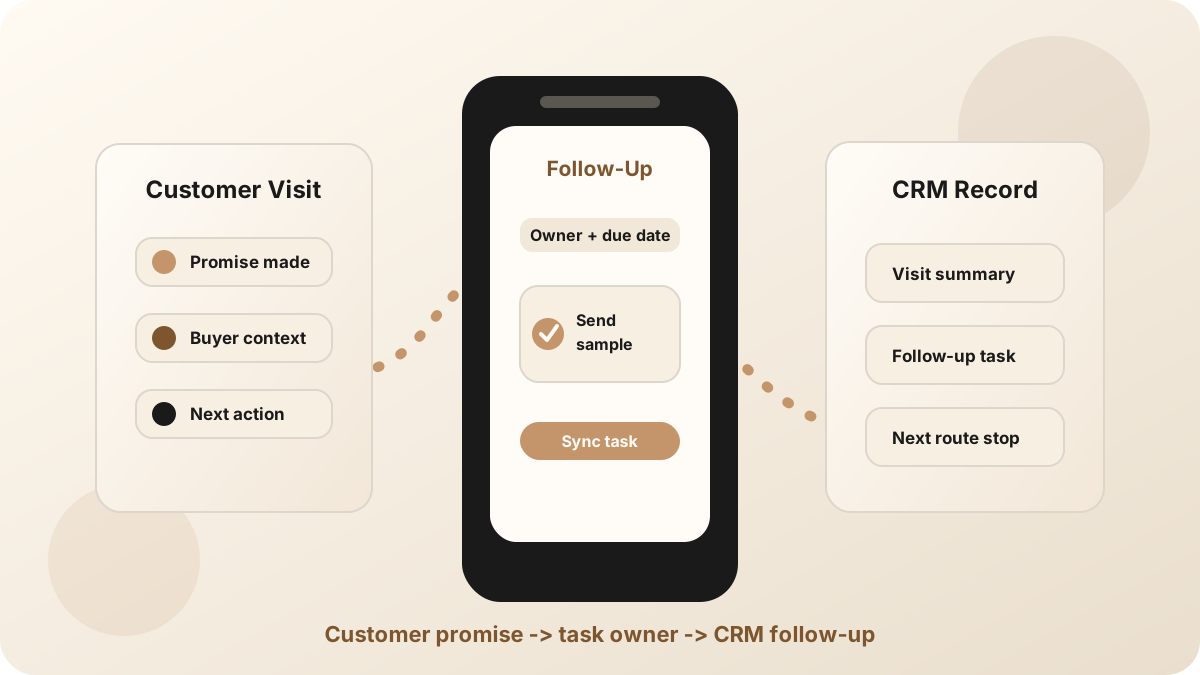
An outside sales rep can leave a customer visit with the exact next step in mind. Send the sample. Introduce the engineer. Confirm pricing. Check inventory. Then the route continues, another customer conversation starts, and the first promise becomes a vague reminder.
An outside sales follow-up app should protect that moment. It should turn the customer conversation into a specific task, message, owner, due date, and CRM update while the rep is still close to the visit. It belongs beside the outside sales visit notes app, sales route notes app, sales route planning, mobile CRM, the outside sales CRM workflow, and broader outside sales app stack.
The best follow-up workflow is not a generic reminder. It is a promise, owner, due date, customer context, and CRM location tied back to the visit that created it.
Why Outside Sales Follow-Up Breaks
Outside sales follow-up breaks because the day keeps moving. A desk-based seller can often clean up notes after a call. A road-based rep may have another stop, a weak connection, a customer phone call, or a long drive before they can update the CRM.
Current outside-sales and field-sales software increasingly bundles routes, account notes, reminders, task management, visit logs, and CRM sync. That is useful, but the workflow still has to preserve the customer promise before it gets flattened into "follow up."
- The task is too vague. "Follow up with buyer" does not say what was promised or why it matters.
- The task separates from the note. A reminder exists, but the account record does not explain the visit.
- The owner is unclear. The rep, manager, sales engineer, or support person all assume someone else has it.
- The CRM update waits until night. After a full route, specific customer language becomes generic admin text.
What an Outside Sales Follow-Up App Should Do
The app does not need to replace your CRM or route planner. It needs to make the next action usable from the phone, then move the right context into the system of record.
| Follow-up job | What good looks like | Where it should land |
|---|---|---|
| Capture the promise | Preserve what the rep said they would do, what the customer asked for, and why it matters. | Visit note, account note, or opportunity activity. |
| Create the task | Assign an owner, due date, customer context, and source visit. | CRM task, reminder, or shared task queue. |
| Draft the message | Use the visit context to make the next email, call, or text specific. | Email draft, task description, or follow-up sequence. |
| Update the record | Attach the summary and action items to the right account, contact, company, deal, or opportunity. | CRM timeline or activity history. |
A Route-Day Workflow for Outside Sales Follow-Up
The workflow has to survive the road. It should work from the phone after a visit, between appointments, or from a parking lot before the next drive.
Use this before moving to the next stop
For deeper task structure, use the guide on capturing sales meeting action items. If your team already has notes but loses accountability, see how to turn sales meeting notes into CRM tasks.
Visit Notes vs Follow-Up Tasks
Outside sales teams often blur notes and follow-up together. That is how a useful customer conversation turns into a messy CRM entry. The note should explain what happened. The follow-up task should define what happens next.
A good outside sales visit notes workflow captures account context, buyer pain, objections, and promised next steps. A good follow-up workflow extracts the promises into action: owner, date, message, and CRM record. Both matter, but they should not be the same object.
How Outside Sales Follow-Up Should Sync to CRM
A follow-up app creates value only when the task reaches the place where the team manages customer work. For many sales teams, that is the CRM.
- Attach the task to the right object. A contact task, account task, and opportunity task answer different questions.
- Keep the source visit visible. The task should show which customer stop created it.
- Preserve the customer reason. Include the buyer's pain, requested asset, objection, or date that triggered the task.
- Keep sensitive fields reviewable. Let the app draft notes and tasks, but keep forecast and stage changes human-approved.
- Support offline capture. Outside reps should be able to save the follow-up even when the connection is poor.
For CRM-specific handoff, compare the Salesforce meeting-notes sync workflow and the HubSpot meeting-notes sync workflow. For reducing the cleanup after each field day, use the CRM admin reduction workflow.
Common Outside Sales Follow-Up Mistakes
The most common mistake is treating follow-up as a memory problem. Memory matters, but the real issue is handoff: the customer promise has to move from the conversation into visible work.
- Writing "follow up" with no context. The rep still has to reconstruct the visit before acting.
- Keeping reminders private. Private tasks do not help managers, handoffs, or future account work.
- Waiting until the route is done. Several customer visits can blur together by the end of the day.
- Using a task app with no CRM sync. The rep may remember, but the system of record stays thin.
- Automating judgment-heavy decisions. Drafting is useful. Sensitive commitments and pipeline changes still need review.
Where LogicNotes Fits
LogicNotes is built for the handoff from in-person customer conversation to CRM-ready follow-up. Record the visit on iPhone with consent, review the AI-generated summary and action items, then sync useful notes and tasks to Salesforce, HubSpot, Zoho, Dynamics, or Google Sheets.
It does not replace your route planner, CRM, territory tool, or full outside sales platform. It handles the fragile moment after the visit: turning what was said into a clear next action before the route day takes over.
Outside Sales Follow-Up App FAQ
What is an outside sales follow-up app?
An outside sales follow-up app helps reps turn field visits into specific next steps, reminders, CRM tasks, customer emails, and account updates from a mobile device.
What should outside sales follow-up include?
Outside sales follow-up should include the customer promise, owner, due date, visit note, buyer context, account or opportunity record, and the next customer-facing action.
How fast should outside sales reps follow up after a visit?
Outside sales reps should capture the follow-up immediately after the visit and send, schedule, or assign the next step before the route day makes the details less specific.
Should outside sales follow-up sync to CRM?
Yes. Outside sales follow-up should sync to CRM when the CRM is the system of record for account history, customer tasks, pipeline activity, and team accountability.
Where does LogicNotes fit?
LogicNotes fits between the in-person customer visit and the CRM. It records the visit on iPhone with consent, creates summaries and action items, and syncs CRM-ready follow-up to tools such as Salesforce, HubSpot, Zoho, Dynamics, or Google Sheets.
Turn outside sales visits into clear follow-up.
LogicNotes helps reps capture in-person conversations, review action items, and sync CRM-ready follow-up before the next customer stop takes over.
Download LogicNotes for iOS