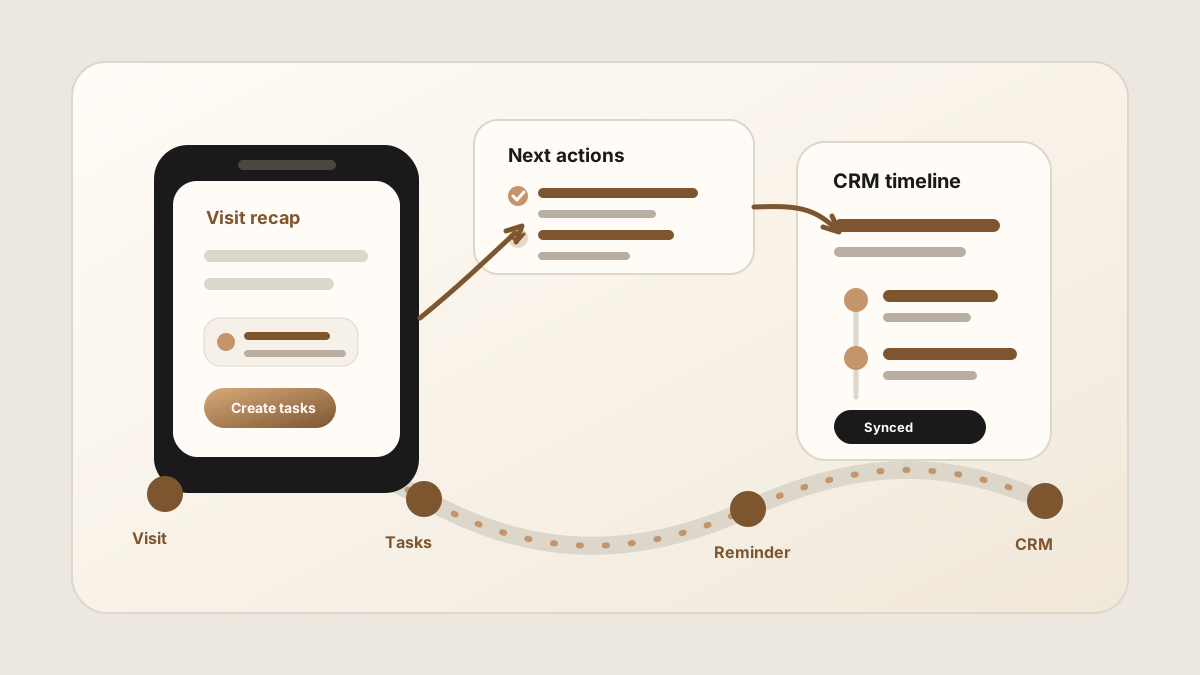
A field sales rep can leave a customer visit with three good next steps and still miss the follow-up. The problem is rarely effort. The problem is timing. By the time the rep gets to the next meeting, the promise has already become fuzzy.
A field sales follow-up app should turn the customer conversation into a clear next action while the context is still fresh. It belongs beside your sales rep tracking app, sales rep route planner app, outside sales follow-up app, mobile CRM, and broader field sales app stack.
For teams comparing a sales rep app or outside sales app, the follow-up layer should connect visit tracking, CRM field maps, after-sync hygienes, follow-up tasks, and CRM sync so Salesforce, HubSpot, or Google Sheets receives clean customer commitments instead of scattered reminders.
The best follow-up workflow is simple: capture the promise, assign the owner, set the due date, attach the context, and sync it to the place where the team already works.
Quick Answer: What Field Sales Follow-Up Workflow Do Reps Need?
The best field sales follow-up workflow turns each customer promise from an in-person visit into an owned next step with the right account context, due date, message or task type, sync status, and CRM sync status before the rep moves too far from the conversation.
- If reminders are vague: prioritize the promised action, owner, due date, customer reason, source visit, and preferred follow-up channel.
- If notes and tasks split apart: prioritize linking each task to the visit note, buyer language, account, contact, opportunity, and CRM field map.
- If CRM tasks pile up: prioritize sync status, priority, blocked follow-up, manager visibility, and sync status for Salesforce, HubSpot, Sheets, or the CRM system of record.
Why Field Sales Follow-Up Breaks
Follow-up breaks because field sales is interrupt-driven. Reps move between routes, account visits, walk-ins, conference booths, showrooms, and customer calls. A task that would be obvious at the table can become vague by the end of the day.
Modern field sales tools increasingly include route planning, activity logging, note capture, follow-up reminders, and CRM sync. That is the right direction, but the workflow still needs to protect the handoff from conversation to task.
- The task is too vague. "Follow up" does not say what was promised, who owns it, or why it matters.
- The note and task split apart. The rep remembers the conversation, but the CRM only shows a generic reminder.
- The follow-up lives in the wrong tool. A private reminder helps one rep, but it does not help managers, handoffs, or pipeline reviews.
- The update happens too late. End-of-day CRM cleanup often turns specific customer language into bland summary text.
Field Sales Follow-Up App vs Reminder App vs CRM Task
Searches for sales follow-up apps often blend personal reminders, CRM tasks, outreach automation, and field sales software. Those tools overlap, but they do different jobs. The best workflow keeps the customer promise, next action, and CRM record connected.
| Layer | Best for | Risk | How field teams should use it |
|---|---|---|---|
| Personal reminder app | Giving one rep a private nudge to call, email, or check back later. | The reminder can drift away from the customer note, account history, and manager view. | Use it only for personal nudges, not as the system of record for customer promises. |
| Field sales follow-up app | Turning visit notes into action items, owners, due dates, message drafts, and CRM-ready tasks. | It fails if the rep has to rewrite the visit or copy the same task into another system. | Use it immediately after the visit, while the buyer language and promised next step are fresh. |
| CRM task | Creating durable accountability on the account, contact, company, opportunity, or deal. | A generic CRM task can say "follow up" without explaining what the customer actually asked for. | Let tasks sync from the phone into CRM with the source visit and customer context attached. |
| Outreach or sequence tool | Automating repeatable email, call, and text cadences across a pipeline. | Generic automation can ignore the nuance of an in-person customer promise. | Use it after the visit-specific task and message are clear, not as a substitute for capture. |
Field Sales Follow-Up by Visit Outcome
Not every customer visit creates the same follow-up. A good follow-up app should help reps choose the right next action instead of turning every visit into the same generic "check in next week" reminder.
| Visit outcome | Best follow-up | CRM task details |
|---|---|---|
| Quote or pricing requested | Send pricing, attach relevant product or package context, and confirm the buyer's decision timeline. | Owner, quote due date, opportunity or deal, buyer deadline, and customer-specific requirement. |
| Technical question raised | Route the question to the right internal owner, then send a concise answer back to the customer. | Question, internal owner, customer contact, response due date, and source visit note. |
| Objection or risk surfaced | Log the objection, clarify the impact, and schedule a specific next conversation. | Objection type, buyer quote, risk level, next meeting owner, and follow-up date. |
| Next meeting agreed | Send a recap and calendar invite while the meeting reason is still clear. | Meeting purpose, attendees, agenda, date, and prep items. |
| No immediate action | Record the visit outcome and set a context-aware reminder only if there is a real reason to revisit. | No-action reason, revisit date, account status, and any customer signal worth preserving. |
What a Field Sales Follow-Up App Should Do
The app does not need to replace your CRM. It needs to make the follow-up usable from the phone and then move the right information into the CRM record.
| Follow-up job | What good looks like | Where it should land |
|---|---|---|
| Capture the promise | Preserve the exact next step, buyer concern, and customer language from the visit. | Meeting note, account note, or opportunity activity. |
| Create the task | Assign an owner, due date, originating meeting, and reason the task exists. | CRM task, reminder, or shared task queue. |
| Draft the message | Use the visit context to make the next email or call specific, not generic. | Email draft, task description, or follow-up sequence. |
| Update the record | Attach the summary to the right contact, account, company, deal, or opportunity. | CRM timeline or activity history. |
| Check after sync | Fix unclear owners, vague due dates, and sensitive deal changes directly in the CRM record after the note lands. | CRM record, task list, or manager view. |
A Field Rep Workflow for Follow-Up
The workflow has to survive a real route day. It should work after a customer visit, between appointments, or from the car before the next stop.
Use this before leaving the account
For deeper task structure, use the guide on capturing sales meeting action items. If your team already has notes but loses accountability, see how to turn sales meeting notes into CRM tasks.
CRM Task Rules for Field Sales Follow-Up
Good CRM tasks are short, but they are not empty. They should carry enough context that the rep can act without digging through a transcript or memory.
- Start with a verb. Send pricing, schedule demo, introduce engineer, check inventory, confirm date, or review contract.
- Attach the source visit. Link the task to the meeting note or account visit that created it.
- Keep customer language. If the buyer said "we need this before the July rollout," keep that phrase in the note.
- Separate admin from judgment. Let the app draft tasks and notes, but keep forecast and deal-stage changes reviewable.
- Sync to the right CRM object. A task on the wrong contact can be as hard to find as no task at all.
For CRM-specific handoff, compare the Salesforce meeting-notes sync workflow and HubSpot meeting-notes sync workflow.
Field Sales Follow-Up CRM Field Map
A field sales follow-up app should not create a loose reminder and hope the CRM catches up later. Its CRM field map should connect the customer promise to the fields that make the next action visible: related record, owner, due date, status, priority, context, after-sync hygiene, and sync status.
| Follow-up detail | Why reps need it | CRM destination |
|---|---|---|
| Account, contact, company, or deal | Keeps the task attached to the customer record where the team will look later. | Salesforce account/opportunity, HubSpot contact/company/deal, or spreadsheet row. |
| Customer promise | Preserves what the buyer actually asked for or agreed to. | Task description, note body, or follow-up reason field. |
| Owner and due date | Turns a good intention into accountable work. | Task owner, due date, status, and reminder fields. |
| Priority and blocker | Separates urgent customer commitments from routine check-ins. | Priority field, risk note, deal next step, or manager after-sync hygiene. |
| Customer-facing message | Lets the rep send a specific recap without rewriting the visit from memory. | Email draft, task detail, or note attached to the related record. |
| Sync status and sync status | Shows whether the task is ready, synced, waiting, or still in the after-sync hygiene. | Needs review, synced, waiting on customer, no action needed, or manager review. |
Field Sales Follow-Up to CRM Sync Handoff
The follow-up app should not become another place where tasks hide. The final handoff should put the task, owner, due date, and customer context where the team already manages account history.
Before the follow-up is complete
If your team uses a spreadsheet instead of a full CRM, the same structure can feed the Google Sheets CRM template. If reps are creating the same follow-up in multiple places, pair this with the guide to reducing CRM admin for sales reps.
After Follow-Up CRM Sync: Keep Records Clean
Modern AI note tools, including LogicNotes, sync follow-up notes and tasks to the CRM automatically. There is no approval screen between the meeting and the record, and that is the point: the rep stays out of data entry. The trust layer moves into the CRM itself, as a quick after-sync habit instead of a pre-sync gate.
After a synced note lands, a two-minute pass covers what matters: confirm the note attached to the right account or contact, make sure the next step exists as a real task with a date, and fix anything that looks off by editing the note or task directly in Salesforce, HubSpot, Zoho CRM, Dynamics 365, or Google Sheets. Edits made in the CRM are visible to managers and teammates right away, so the record stays trustworthy without slowing down the field day.
Where a Follow-Up App Fits in the Field Sales Stack
Field sales follow-up sits between visit capture and CRM execution. Sales route planning helps the rep get to the right accounts and check-ins show where the promise came from, and visit notes preserve what happened. The follow-up app turns that context into the next customer-facing move.
Some teams use a full field sales platform for all of this. Others use a lighter stack: calendar, maps, mobile CRM, notes, and task sync. Either approach can work as long as the follow-up does not become a private to-do list outside the CRM.
Common Follow-Up App Mistakes
The most common mistake is treating follow-up as a reminder problem. Reminders matter, but they are only useful when they carry the customer context from the meeting.
- Choosing a task app with no CRM sync. The rep may remember, but the account record stays incomplete.
- Automating every next step. Drafting is useful. Final judgment on sensitive customer commitments still belongs to the rep.
- Writing tasks without dates. A task with no due date is a parking lot, not follow-up.
- Saving transcripts instead of summaries. The CRM needs a concise note and action list, not a wall of text.
- Waiting for the hotel or home office. The best follow-up is captured before the next customer conversation rewrites the rep's memory.
Where LogicNotes Fits
LogicNotes is built for the handoff from in-person meeting to CRM-ready follow-up. Record the visit on iPhone with consent, review the AI-generated summary and action items, then let the notes and tasks sync automatically to Salesforce, HubSpot, Zoho CRM, Dynamics 365, or Google Sheets.
It pairs naturally with a route planner and mobile CRM because it handles the moment most field sales tools still struggle with: turning the live customer conversation into clear follow-up before the details fade. For teams trying to reduce admin, use this alongside the CRM admin reduction workflow and the customer meeting notes template.
Field Sales Follow-Up App FAQ
What is a field sales follow-up app?
A field sales follow-up app helps reps turn customer visits into clear next steps, tasks, reminders, emails, and CRM updates from the phone.
What is the best field sales follow-up app?
The best field sales follow-up app is the one reps can use immediately after a visit. Look for fast customer-promise capture, follow-up tasks, owner and due date fields, reminders, CRM field maps, after-sync hygienes, sync status, and enough context to sync a specific next step.
What is the difference between a reminder app and a sales follow-up app?
A reminder app gives a rep a personal nudge. A sales follow-up app connects the reminder to the customer visit, account context, CRM record, owner, due date, and next message or task.
What should field sales follow-up include?
Field sales follow-up should include the customer promise, owner, due date, buyer context, originating meeting note, CRM record, sync status, and the next message or task.
What should a field sales follow-up task include?
A field sales follow-up task should include the customer promise, owner, due date, customer context, source visit, CRM record, and the specific message, asset, call, or meeting that needs to happen next.
How fast should field reps follow up after a visit?
Field reps should capture the follow-up immediately after the visit and send or schedule the next step before the context fades, ideally before the next stop.
Can field sales follow-up sync to Salesforce, HubSpot, or Google Sheets?
Yes. A field sales follow-up workflow can sync meeting summaries, promised next steps, CRM tasks, owners, due dates, sync status, follow-up status, and customer context to Salesforce, HubSpot, or a Google Sheets sales tracker.
What fields should a field sales follow-up app sync to CRM?
A field sales follow-up app should sync the account or contact, meeting summary, customer promise, action item, owner, due date, priority, related record, task status, and sync status. Deal-stage, amount, forecast, and close-date changes should usually require rep or manager review.
How should reps prioritize follow-up after a route day?
Reps should prioritize follow-up by urgency, customer promise, deal impact, renewal risk, buyer deadline, and whether the task blocks the next meeting or proposal.
How should field reps review follow-up before CRM sync?
Right after sync, field reps should give the customer recap, task title, owner, due date, and related record a quick check in Salesforce or HubSpot. Routine tasks need no extra attention, but customer-facing messages and deal updates deserve a careful read before they go out or change the pipeline.
Should a field sales follow-up app replace CRM?
Usually no. A field sales follow-up app should make it easier to capture and review the next action from the phone, then let the task and note details sync automatically to the CRM as the system of record.
Should follow-up tasks live in the CRM?
Yes. Follow-up tasks should sync to the CRM when the customer, deal, or account record is where the team manages pipeline activity and accountability.
Where does LogicNotes fit?
LogicNotes fits between the in-person customer conversation and the CRM. It records the visit on iPhone with consent, creates summaries and action items, and syncs CRM-ready follow-up to tools such as Salesforce, HubSpot, Zoho CRM, Dynamics 365, or Google Sheets.
Turn customer visits into clean follow-up.
LogicNotes helps field reps capture in-person meetings, get AI action items, and sync CRM-ready follow-up automatically before the next stop.
Download LogicNotes for iOS