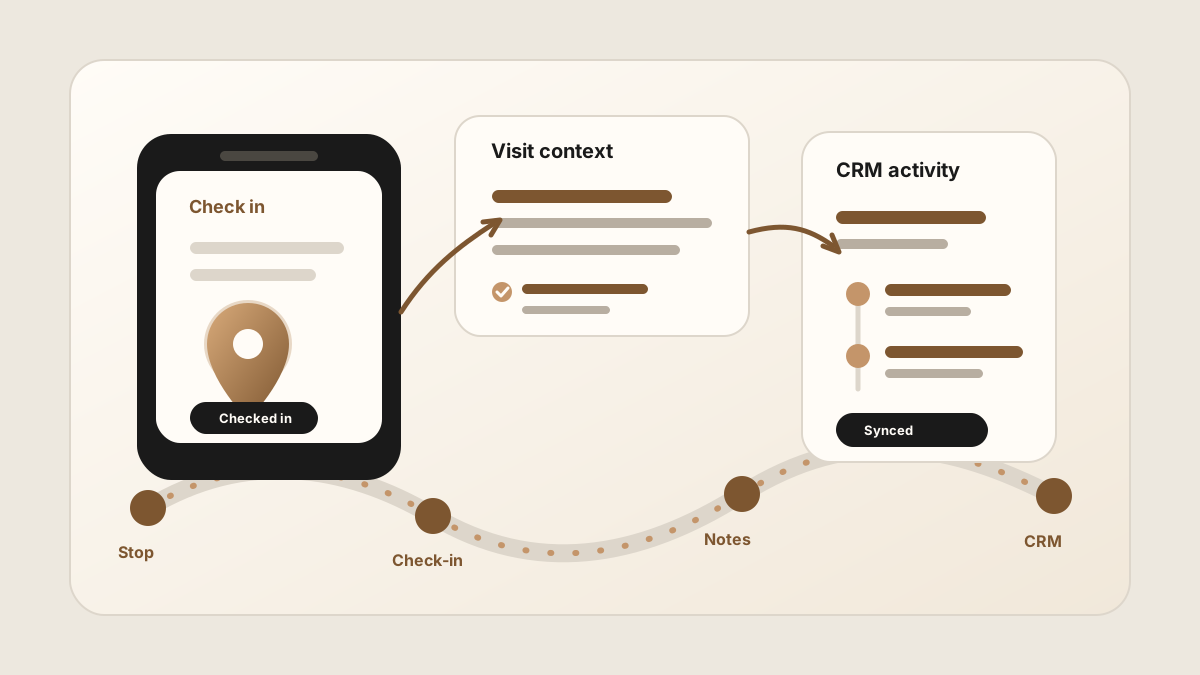
A field sales check-in is a useful signal, but it is not the whole sales story. It can show that a rep arrived at a customer account. It cannot explain the buyer's objection, the promised follow-up, or the next task that should land in the CRM.
That is why a good check-in workflow should connect to sales rep visit tracking, activity logging, and sales visit notes. The check-in marks the stop. The notes and tasks make the stop useful.
The best field sales check-in app helps reps prove the visit without losing the conversation that made the visit matter.
Why Field Sales Check-Ins Break
Check-ins break when they become a manager-only data point. A timestamp and location can help with coverage, but they do not help the rep follow up or help the next person understand the account.
Current field sales software often includes geo-tagged check-ins, visit history, account notes, photos, route planning, activity feeds, and CRM sync. The practical lesson is simple: if the check-in does not lead to notes, outcomes, and follow-up, it creates visibility without much sales value.
- The check-in is empty. The CRM shows the rep visited, but not what changed.
- The note is delayed. The rep waits until later and loses the specific buyer language.
- The follow-up is disconnected. A task exists somewhere, but it does not point back to the customer stop.
- The rep feels monitored instead of helped. Adoption drops when check-ins only serve management.
What a Field Sales Check-In Should Capture
The check-in should be the start of the visit record, not the whole record. A useful check-in captures enough structure to make the next action obvious.
| Check-in detail | Why it matters | Where it should land |
|---|---|---|
| Account and contact | Connects the stop to the right customer, stakeholder, and CRM record. | CRM account, company, contact, deal, or opportunity. |
| Visit purpose | Explains whether the stop was discovery, renewal, service recovery, proposal, sample, or follow-up. | Activity type or meeting note. |
| Visit notes | Preserves what the customer said, not just that the rep arrived. | CRM note or account timeline. |
| Outcome | Shows whether the visit created a next meeting, objection, quote request, no action, or risk. | Activity log or sales call report. |
| Follow-up tasks | Turns promises into visible work with an owner and due date. | CRM task or reminder. |
Check-In App vs Visit Notes App
A check-in app answers: did the rep visit the customer? A visit notes app answers: what happened during the conversation? A field sales team may need both, but they should not be treated as the same tool.
LogicNotes is built for the notes and follow-up side. It does not replace a GPS check-in, route planner, or territory tool. It helps reps capture the in-person conversation and turn it into a summary, action items, and CRM-ready context.
A Phone-First Check-In Workflow
The workflow should be simple enough to use before the rep drives to the next customer. Use this pattern after each meaningful stop.
Use this after each check-in
For the broader visit record, use the sales rep visit tracking workflow. For the follow-up handoff, use the field sales follow-up app workflow.
How Check-Ins Should Sync to CRM
A check-in that never reaches the CRM is hard to reuse. A check-in that reaches the CRM without notes is hard to trust. The useful version combines the stop, the conversation, and the next action.
- Attach the check-in to the right record. Account, contact, and opportunity records answer different sales questions.
- Keep the note concise. The CRM needs a scan-friendly summary, not a raw transcript.
- Create tasks from promises. Samples, pricing, introductions, technical answers, and next meetings should become visible work.
- Keep sensitive fields reviewable. Stage, forecast, amount, and close date changes should usually require rep confirmation.
- Preserve the source visit. A task should show which customer stop created it.
For CRM-specific examples, compare the Salesforce meeting-notes sync workflow and the HubSpot meeting-notes sync workflow.
Common Field Sales Check-In Mistakes
Check-ins are useful when they reduce reporting friction and improve follow-up. They backfire when they feel like surveillance without helping the rep sell.
- Counting stops without outcomes. Visit volume alone does not explain pipeline movement.
- Making reps type long forms. The longer the form, the later and thinner the update becomes.
- Separating notes from the check-in. The customer context should stay attached to the stop.
- Using check-ins as a substitute for coaching. Managers need context, not just dots on a map.
- Leaving follow-up outside CRM. A private reminder does not help the account record or the rest of the team.
Where LogicNotes Fits
LogicNotes fits after the check-in, when the rep needs to preserve what happened in the customer conversation. Record the in-person meeting on iPhone with consent, review the AI-generated summary and action items, then sync CRM-ready context to Salesforce, HubSpot, Zoho, Dynamics, or Google Sheets.
It pairs naturally with sales route planning, mobile CRM, and the broader field sales app stack. The check-in confirms the stop. LogicNotes helps the CRM remember the conversation.
Field Sales Check-In App FAQ
What is a field sales check-in app?
A field sales check-in app lets reps record that they visited a customer account, often with time, location, account, notes, outcome, and follow-up details.
What should happen after a field sales check-in?
After a check-in, the rep should capture visit notes, mark the outcome, create follow-up tasks, and sync useful context to the correct CRM record.
Is a check-in app the same as a visit notes app?
No. A check-in app confirms that a visit happened. A visit notes app preserves what happened during the conversation and what should happen next.
Should field sales check-ins sync to CRM?
Yes. Check-ins, visit notes, outcomes, and follow-up tasks should sync to CRM when the CRM is the system of record for account history and pipeline activity.
Where does LogicNotes fit?
LogicNotes fits after the check-in or during the customer conversation. It records in-person meetings on iPhone with consent, creates summaries and action items, and syncs CRM-ready visit context to Salesforce, HubSpot, Zoho, Dynamics, or Google Sheets.
Turn the check-in into CRM-ready context.
LogicNotes helps field reps capture customer conversations, action items, and CRM-ready notes after each visit.
Download LogicNotes for iOS