Field sales notes that leave the meeting as action.
LogicNotes captures the customer detail reps usually lose between stops, then turns it into AI summaries, action items, next steps, and CRM-ready notes.
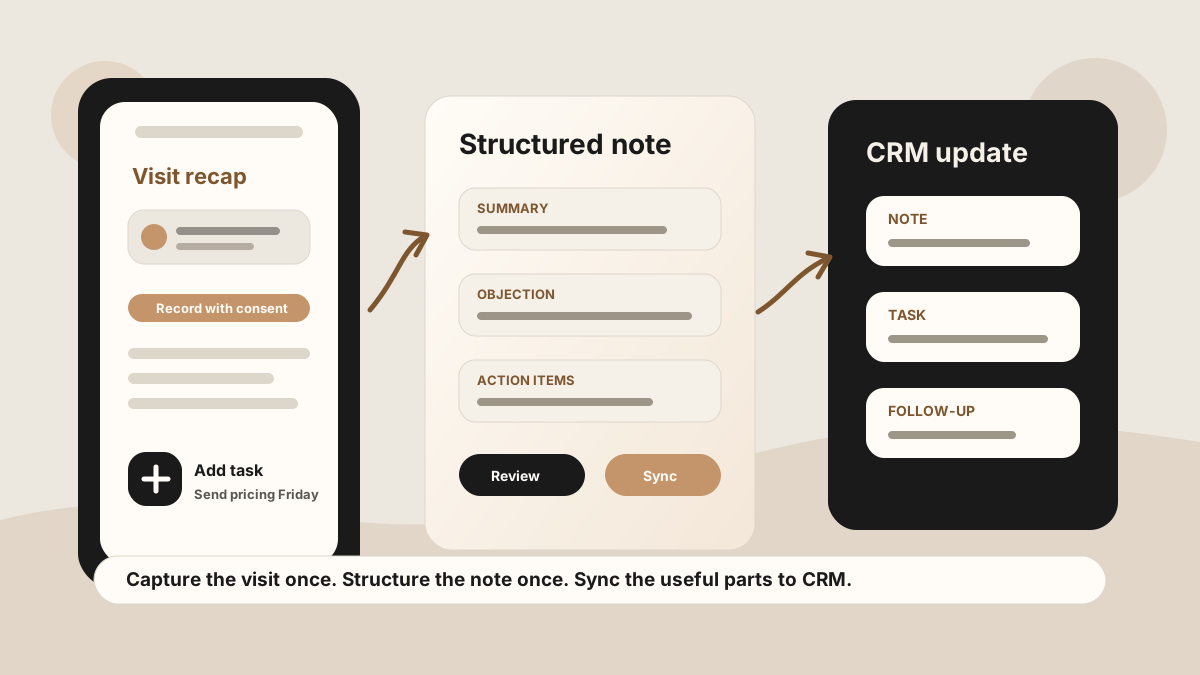
Capture the customer detail while it is fresh, before the next stop, parking lot, or end-of-day admin pile buries it.
LogicNotes in one paragraph.
LogicNotes is an iOS app for in-person meeting notes. It helps teams record customer conversations on iPhone, generate AI summaries and action items, and sync meeting notes to Salesforce, HubSpot, Zoho CRM, Dynamics 365, or Google Sheets.
No meeting bot joins the conversation. LogicNotes is built for face-to-face meetings where the useful output is follow-up, CRM context, and searchable meeting history.
More than a recap. A sales note your team can use.
LogicNotes structures the meeting around the details that decide what happens next.
Pain points, role changes, objections, buying signals, and decision criteria stay attached to the visit.
Follow-up is captured with enough customer context that the next action is obvious.
Tasks include enough context so promises do not turn into vague reminders.
Notes and tasks can move to CRM or Sheets when those destinations are connected.
The note flow is built for the minutes after a visit.
Field reps rarely have a perfect desk moment. LogicNotes keeps capture short, summaries useful, and handoff structured.
Capture while the meeting is fresh
Record with clear consent, or add a concise recap when the room calls for it.
Create the sales-ready note
LogicNotes organizes the visit into summary, buyer signal, decisions, action items, and follow-up context.
Send the useful parts onward
Move meeting notes and action items to Salesforce, HubSpot, Zoho CRM, Dynamics 365, or Google Sheets.
Basic notes store information. LogicNotes turns notes into workflow.
Useful for raw thoughts.
Works when reps have time to type, but follow-up and CRM handoff stay manual.
Useful for raw audio.
Captures the conversation, but someone still has to replay, extract tasks, and share context.
Useful for sales execution.
Creates AI summaries, tasks, next steps, and CRM-ready notes from the meeting.
Field sales notes app questions.
What is a field sales notes app?
A field sales notes app helps reps capture customer visit notes, decisions, objections, and promised follow-up while they are still close to the meeting details.
How is LogicNotes different from a basic notes app?
LogicNotes turns in-person meeting capture into structured summaries, action items, next steps, and CRM-ready updates instead of leaving reps with unstructured notes.
Can reps use LogicNotes after outside sales visits?
Yes. Reps can capture outside sales visit notes on iPhone, get AI summaries and action items, and have the notes sync to CRM or Google Sheets automatically.
Does LogicNotes require a meeting bot?
No. LogicNotes is built for phone-first, consent-aware recording and recap capture when the meeting happens in person.