Sales meeting notes to CRM, without the copy-paste drag.
LogicNotes turns in-person sales conversations into CRM handoff: summaries, action items, customer signal, and notes your team can use.
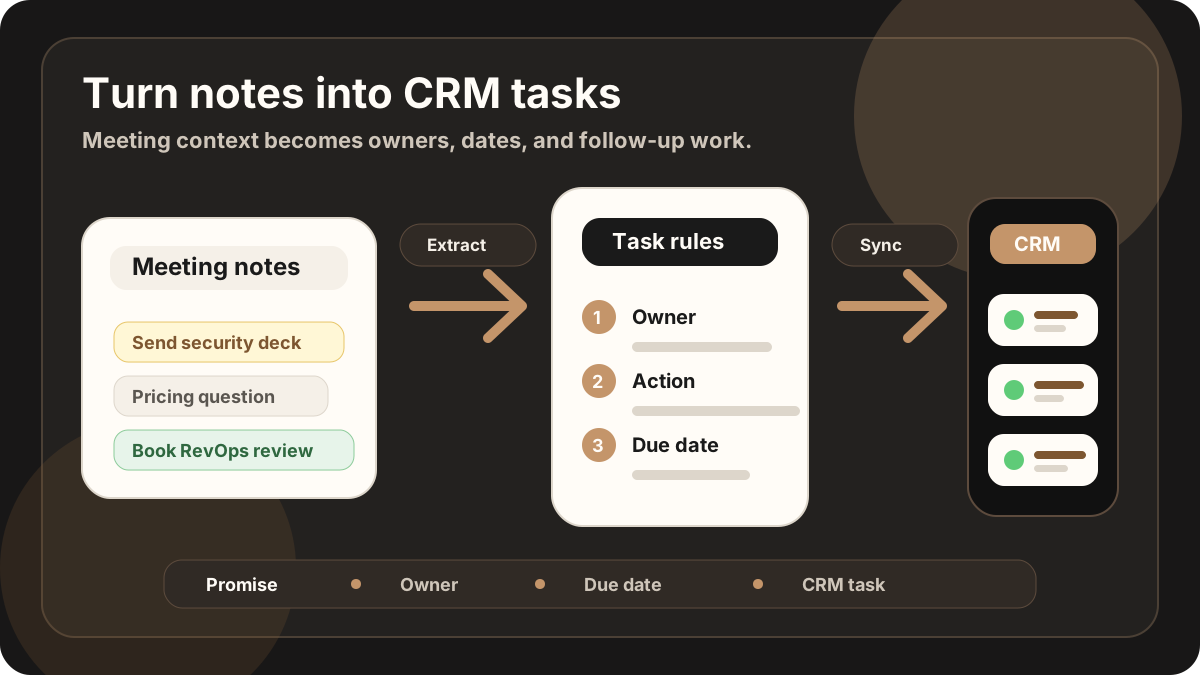
Use the meeting once. Sync useful sales context where follow-up actually happens.
LogicNotes in one paragraph.
LogicNotes is an iOS app for in-person meeting notes. It helps teams record customer conversations on iPhone, generate AI summaries and action items, and sync meeting notes to Salesforce, HubSpot, Zoho CRM, Dynamics 365, or Google Sheets.
No meeting bot joins the conversation. LogicNotes is built for face-to-face meetings where the useful output is follow-up, CRM context, and searchable meeting history.
Sync the pieces that improve the record, not every word spoken.
The CRM handoff should be short enough to trust and complete enough to act on.
What changed in the customer conversation, captured in a format managers and teammates can scan.
Promised next steps become tasks with useful customer context.
Objections, decision criteria, urgency, and deal risk can be kept close to the opportunity.
Meeting notes and action items can move to the connected systems your team already uses.
The handoff is structured and destination-aware.
LogicNotes is not trying to flood your CRM. It turns the meeting into a concise update and sends the right details to the right workflow.
Capture the customer conversation
Use iPhone capture with consent or a quick recap after the meeting.
Create the CRM handoff
LogicNotes organizes the summary, customer signal, action items, and meeting context.
Sync the meeting output
Send notes and tasks to Salesforce, HubSpot, Zoho CRM, Dynamics 365, or Google Sheets.
Keep your CRM as the system of record.
LogicNotes handles the messy meeting-to-update step, then sends meeting context into the destination your team already runs on.
Sales notes to CRM questions.
How do sales meeting notes sync to CRM?
LogicNotes turns the meeting into an AI summary and action items, then syncs meeting notes and tasks to supported CRM or Google Sheets workflows.
Can LogicNotes create Salesforce or HubSpot tasks?
Yes. LogicNotes can create follow-up tasks and CRM notes in supported Salesforce and HubSpot workflows when those destinations are connected.
Should full transcripts go into CRM?
Usually no. CRM records are easier to use when they contain a concise summary, buyer signal, objection, next step, and sync status instead of a raw transcript dump.
Can teams use Google Sheets instead of a CRM?
Yes. Teams that use a lightweight CRM workflow can send structured meeting rows, summaries, and action items to Google Sheets.